Skip to content

activitypub

Rendering ActivityPub groups (Part 2)

In Part 1 we described what a group is and how its contents are displayed in the so-called "Forum Mode" in Raccoon. As a quick reminder, the main page contains the list of first-level posts re-shared by the group, which roughly correspond to classic forum "threads".

Each thread can be opened to access its detail screen containing the discussion. The thread detail screen has the following layout: the initial post by the OP is displayed at the top and replies appear below.

In this article we will explain how the raccoon proceeds to "dig though the trash" and go deeper and deeper in the discussion thread.

The Family Tree

In a discussion each element has exactly one parent, except for the initial post which has none and is the common ancestor of all others.

In Computer Science, this data structure is called a tree, where the initial post is the root node. This means that conversations are intrinsically hierarchical, where the context of each post is made up of:

  • its parent and ancestors up to the root node;
  • its children and descendants below it.
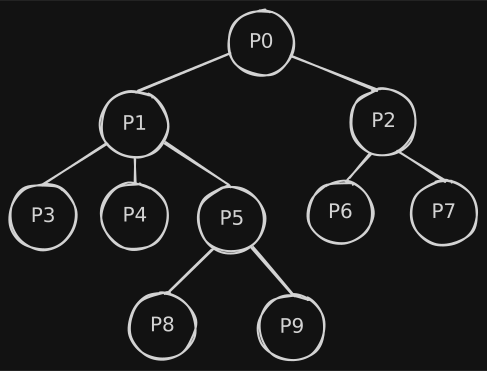
sample reply tree
Underlying representation of replies as a tree.

Making Threads Look Good

In order to follow a discussion as a reader and writer, it is important to quickly identify two types of relationships:

  • who is answering to whom, i.e. parents and children;
  • posts on the same level because they have the same parent, i.e. siblings.

In order to guide the user in identifying these, two visual elements are introduced:

  • visual offset: posts are progressively indented according to their depth level;
  • comment bar: a colorful bar is displayed laterally with the full height of the post body, so that posts of the same level can be easily identified.1
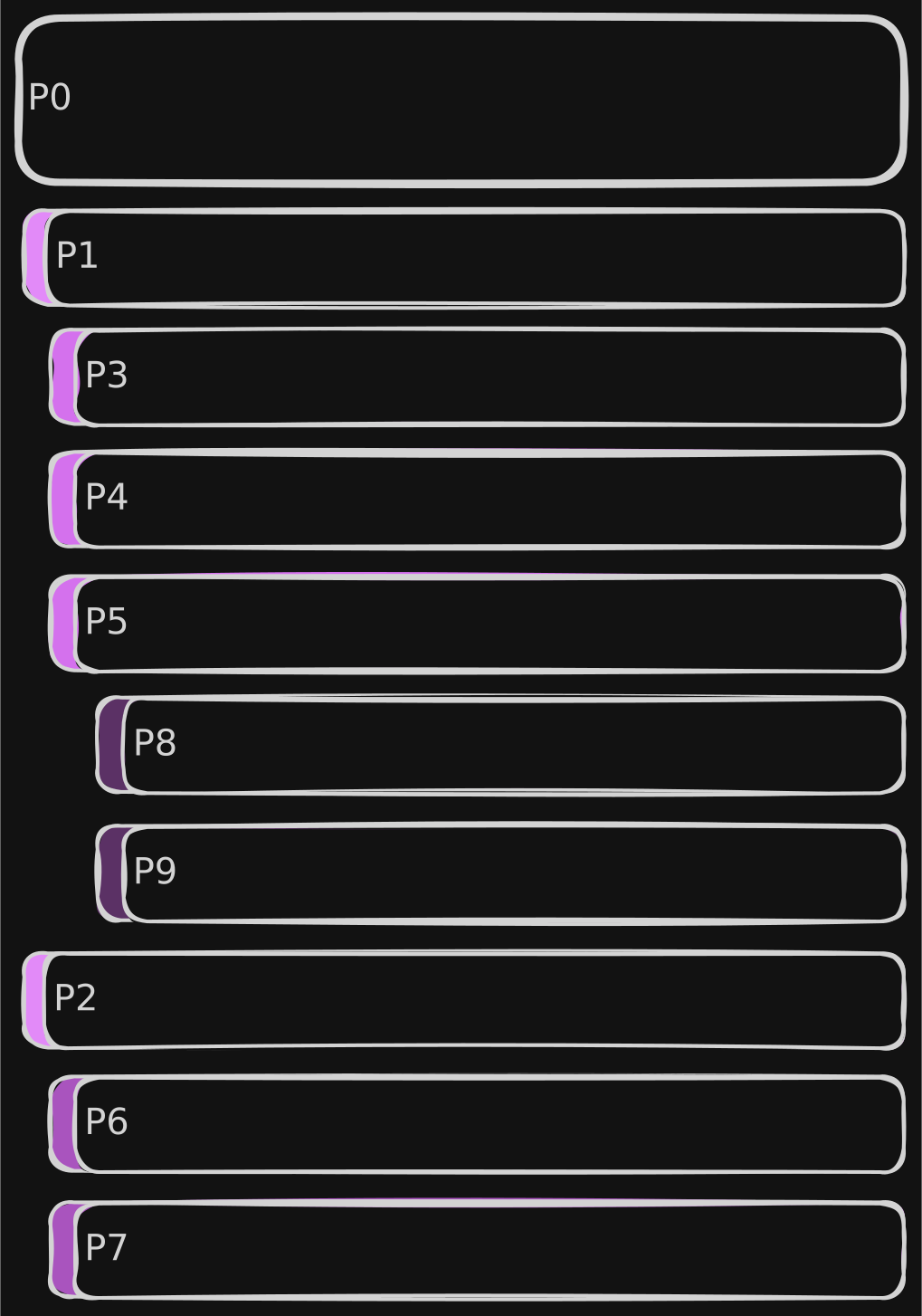
sample reply list
Visual representation of replies as a list.

Completeness is Key

Reply trees can grow indefinitely (both in breadth and depth) and, it is very important to make sure that:

  • no unneeded extra data is downloaded: more data means more time to load as well as more bandwidth, memory and power consumption;
  • at the same time, if each data fetch is partial, not too many requests are done to the instance, to avoid overloading servers.

As anticipated in part 1, Mastodon APIs offer an endpoint to fetch the context of a post: GET v1/statuses/:id/context. On Mastodon instances, the resulting context is capped to 40 ancestors and 60 descendants with a max depth of 20 for unauthenticated requests, 4096 ancestors and 4096 descendants with unlimited depth for authenticated requests.

API Considerations

Unfortunately, on Friendica this API has historically always been problematic. Friendica is built to aggregate different networks and protocols (ActivityPub, Diaspora, RSS feeds, etc.). Probably due to the more complex DB structure, results of the context API are kwnown to be truncated, with some reply branches entirely missing.

In order to overcome this issue, the only solution was to populate the tree manually. As an example, let's imagine "P0", "P1", etc. to be the post IDs. Let's also assume that response for a GET v1/statuses/P0/context would be the following JSON, where descendants are truncated at the first level:

{
  "ancestors": [],
  "descendants": [
    {
      "id": "P1",
      "replies_count": 3,
      // ...
    },
    {
      "id": "P2",
      "replies_count": 2,
      // ...
    }
  ]
}

We know that the post has no ancestors and has two descendants, one of which with three replies. In order to reconstruct the rest of the tree, we need to: iterate over all descendants having a reply count greater than zero (non-leaves), collect their first-level descendants, then proceed downwards in all subtrees recursively until leaves are reached in every path.

In the process, it is important that we keep track the depth of each post, in order to properly indent them in the layout and for another reason we'll discuss later.

Considering that conversations can grow indefinitely, another condition should be imposed: stop fetching data when a threshold depth is reached, to avoid overloading the server with too many requests and fetching data that the reader may not even be interested to see. The depth property we have been calculating earlier may be useful with this respect.

Since the tree we manipulate is incomplete, we also need to be able to identify those "pruning points" and be able to load the remaining subtree (on-demand) at a later point. Again, the depth property we have been calculating can be used, in conjunction with the reply_count we get from the server.

Step 1: Grow the Tree

private data class Node(
    val entry: TimelineEntryModel,
    var children: List<Node> = listOf(),
)

private suspend fun populateTree(node: Node, depth: Int, max: Int) {
    if (node.entry.replyCount == 0 || depth >= max) {
        return
    }
    val descendants = repository.getContext(node.entry.id)?.descendants.orEmpty()
    val children = descendants.mapNotNull { child ->
        Node(entry = child.copy(depth = node.entry.depth + 1))
    }
    for (child in children) {
        populateTree(node = child, depth = depth + 1, max = max)
    }
    node.children = children
}

Let's break down the code:

  • lines 1-4 define a data structure to represent tree nodes;
  • line 6 contains the function signature, where in the params:
    • depth is the current level in the tree;
    • max is the threshold depth;
  • lines 7-9 contains the base cases, either the current node is a leaf or the max depth is reached;
  • line 10 fetches the post's context from the server and extract the descendants;
  • lines 11-13 retain each node's absolute depth and create the list of children;
  • lines 14-16 recursively calls the function for each child node;
  • line 17 populates the children of the current node.

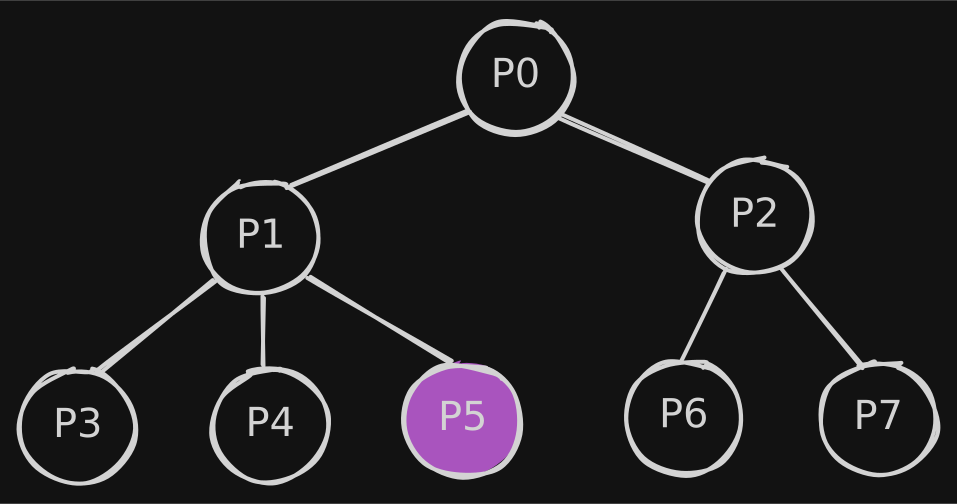
Imagine we call this function on P0 with max = 2, the result would be:
sample reply list

where in "P5" we know (by its replyCount) that are 2 descendants, but we did not fetch any of them.

Step 2: Linearize the Tree

Building the tree is only half of the puzzle, though. As we've seen earlier posts must be laid out in a list and in a very specific order.

In order to do so, we have another recursive helper:

1
2
3
4
5
6
private fun MutableList<TimelineEntryModel>.linearize(node: Node) {
    add(node.entry)
    for (child in node.children) {
        linearize(child)
    }
}

which traverses the tree depth-first adding each visited node, so that if we consider the post IDs we get ["P0", "P1", "P3", "P4", "P5", "P2", "P6", "P7"] as we wanted.

How do we know, though, that between "P5" and "P2" there is a "pruning point"?

Step 3: Knowing When to Stop

The answer is in the last helper function:

1
2
3
4
5
6
private fun List<TimelineEntryModel>.populateLoadMore() = mapIndexed { idx, entry ->
    val hasMoreReplies = entry.replyCount > 0
    val isNextCommentNotChild =
        idx == lastIndex || this[idx + 1].depth <= entry.depth
    entry.copy(loadMore = hasMoreReplies && isNextCommentNotChild)
}

where we set a loadMore flag in the entries, which is true only if these two conditions hold true at the same time:

  • the entry has at least one reply (replyCount strictly greater than zero);
  • it is the last item of the list or the next item has a depth less than or equal to the current one (i.e. it is a sibling, an uncle or great-uncle).

In those points, in the UI, a "Load more replies" button will be shown which ends up triggering the populateTree function for the subtree rooted in that node.


  1. Depending on the theme, colors also convey the depth: the deeper the level, the darker the color. ↩
Rendering ActivityPub groups (Part 1)

This is Part 1 of a two-article sequence on ActivityPub groups. This post covers ActivityStreams definitions, Mastodon API integration, and the Raccoon rendering logic.

Part 2 will follow with a deep dive into the code behind populating the reply tree in the thread detail screen.

What are Actors?

The AP protocol describes several kinds of Actors, i.e. the entities publishing content, interconnected by relationships and interacting with each other and with content.

Under the hood, for any object to be considered an Actor, it must have the following properties:

  • an inbox, where it receives messages published by others;
  • an outbox, where it publishes its own activities.

In the AS 2.0 lingo, the most common type of actor is a Person, which represents an individual human user. This is what we typically think of as a "user account": the entity that publishes posts, follows others, and interacts with content by liking or reblogging it.

Another very interesting type of actor is a Group. According to the specification, groups represent a formal or informal collective of individuals. In practice, they often act as communities or relays: activities sent to the group are distributed to all its members.

The perfect use case for groups are discussion topics: pages where all first level posts are related to a common topic and each of them can be replied to. This is basically the same structure of online forums, of Reddit's subreddits, Lemmy's communities, and so on…

How this maps to Mastodon

In terms of Mastodon APIs, Groups map to instances of the Account, where the group property is true.1 According to the official docs, this property:

Note

Description:
Indicates that the account represents a Group actor
Type:
Boolean
Version history:
3.1.0 – added

Raccoon Rendering

Forum list

In Raccoon, when opening a user profile and the corresponding account has "group": true the preferred view mode for the user detail screen is the so-called "Forum Mode".

This is very similar to a classic timeline, but with some differences:

  • in the top app bar, the title shows «Topic: [group name]» instead of just the username;
  • posts are retrieved with a GET v1/accounts/:id/statuses request, where the exclude_replies parameter set to true: by doing so, only first-level posts created or boosted by the account are shown;
  • there is a "Plus" button to create a new thread in the forum (first-level post).
forum list screenshot
A screenshot of the user detail screen in "Forum Mode".

Post creation

In the composer, when creating a new thread:

  • an indicator «Post to [group name]» is shown;
  • an @-mention is automatically added at the beginning of the message.2

Instead, when creating nested level replies, the usual reply pattern is applied:

  • an indicator «In reply to [user name]» is shown;
  • a series of @-mentions are automatically added at the beginning.

Thread detail

Conceptually, this screen is very similar to a regular post detail but with some differences:

  • the main post (first-level) is displayed always at the top, in its full layout;
  • replies appear below it and are retrieved with a GET v1/statuses/:id/context request, with a progressive indentation depending on their depth level with a color indicating the level and making it easier to identify same-level answers;
  • Swipe Navigation: you can scroll between threads in the forum with horizontal swipes;
  • there is a "Reply" button to create new second-level replies to the main post.
thread detail screenshot
A screenshot of the thread detail screen with the list of replies.

Stay tuned!

Now that we've covered the "what", it's time to talk about the "how". In the second part of this series, I'll be sharing the code that makes this all possible.

To be honest, this was one of the most complex parts of the project: fetching and organizing the reply tree.

I'll walk you through the hurdles I encountered with the current state of Mastodon APIs and the specific workarounds Raccoon uses to make the conversation flow feel natural without overloading the server instance at the same time.


  1. Support for this kind of entity has been introduced in February 2020 in #12071. ↩

  2. It was a !-mention initially, but it was changed later to increase compatibility (!-mentions are only supported by Friendica) and visibility (with !-mentions, only accounts following the group can see the message). ↩

Breaking Language Barriers: Client-Side Translation in the Fediverse

The Multilingual Reality of ActivityPub

The Fediverse is built on the promise of decentralized, equal communication. However, when users from different instances federate, they often encounter a barrier that code alone can not fix: language. While global connectivity is built into the protocol, making sense of foreign content often requires external tools that many servers do not provide.

Why Server-Side Translation is Rare

Services like Mastodon are designed to integrate with translation providers, so that users can toggle on-demand translation for posts appearing in their timelines.

This integration is not automatic, though, it has to be explicitly configured by instance administrators:

  • if requests are routed to an external provider (such as DeepL or a LibreTranslate instance), admins have to configure an API key and pay the costs for translations;
  • alternatively, since LibreTranslate is a self-hostable FOSS appliance, it can be installed on a server they already own (even the same hosting the instance), but they still need to pay for used resources.

As a result, not many instances (especially smaller ones) offer server-side translation, as they are run by volunteers who already run instances at their own expenses, often on a not-so-generous budget.

A growing user base already means more storage and computational resources are needed just for content management, so it is no surprise that translation is an expense worth sacrificing.

Empowering Clients

A possible solution to this is managing translation on the client-side. This doesn't necessarily mean running a local AI model on-device; while privacy-preserving, the large download size and high memory demands can be a dealbreaker for many mobile users.

A more flexible approach is allowing users to connect to their preferred translation service directly. By sending requests to a user-configured LibreTranslate instance and using their own API key, the cost and quota management are decentralized.

This removes the financial burden from instance admins while giving users control over their data. They can choose their trusted service and have their saying in whom data is sent to.

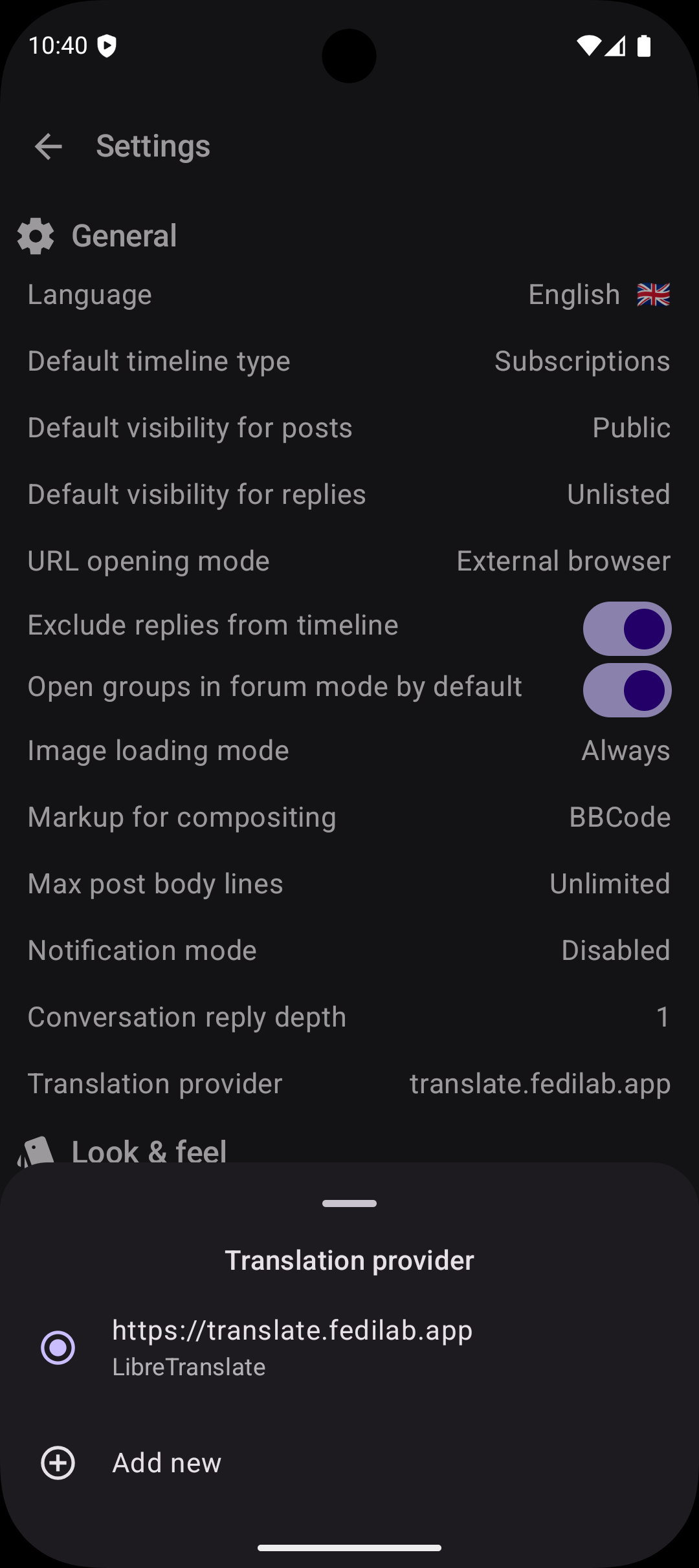
This is the path may apps have taken, including Raccoon. In the settings screen it is possible to configure one or more translation providers and choose the default one.

screenshot of the Settings page
Translation provider configuration bottom sheet.

For now the only supported provider is LibreTranslate: its configuration require the user to enter the instance URL and their API key (most instances require one).

Once a translation provider has been selected, the options menu in each post whose language is not the current one,1 contains an option to toggle translation. When selected, the original content is swapped with the translation and the drop-down menu option allows to switch back to the source version.

A Bit of History

Getting this right was not an overnight process. Before integrating with LibreTranslate I experimented with another third-party service (see #746) but the output was very low quality. Users complained, I listened to their feedback and decided to remove it.

The new architecture implemented in #1176 is built on two core principles: user choice and extensibility.

It is flexible enough to let users configure more than one service and extensible enough so developers can add other implementations for different providers (local or remote).

Question

How do you currently handle posts in languages you don't speak? Do you rely on your instance’s built-in tools, or do you find yourself copy-pasting into external browser? Let's talk about how we can make the Fediverse feel more like a global neighborhood.


  1. The current language corresponds to the app's on (from Settings), the post's one corresponds to its language property. ↩

Friendica: the Swiss Army knife of the Fediverse

While most fediverse platforms force you to choose between microblogging, photo sharing, or link aggregation, one platform refuses to make you pick just one.

Friendica is a social environment integrated in the Fediverse, just like Mastodon or Pixelfed ‒ but it is also compatible with Bluesky, Tumblr, WordPress, GNU Social, Diaspora, RSS and several more tools and platforms.

Universal federation hub

Unlike other platform, which primarily focus on single types of contents (e.g statuses or photo sharing), Friendica serves as a universal translator across multiple protocols, acting like a hub which brings "together all of the Fediverse into one experience" (according to hankg).

The Facebook the Fediverse

Friendica uses a post/replies idiom with a Facebook-like UX, rather than the Twitter-like status streams found in Mastodon. This creates a more traditional social networking experience with threaded conversations and a focus on community interaction.

Just like Facebook, Friendica features the concept of groups (which are treated as ActivityPub actors), i.e. a special kind of profiles which act as an aggregator for posts related to the same topic, similar to Lemmy's communities.

Other features which Friendica shares with Facebook are:

  • the possibility to organize uploaded media into a gallery with different albums (and images inside each album);
  • an integrated event calendar (with birthdays and custom events);
  • direct messages between users;
  • the ability to quote (cross-post) other people's posts, not just boosting them but embedding them into a new one;
  • the possibility to organize contacts in circles (which can not only be used like user-defined timelines to read posts but also as a target scope to publish posts to).

Enhanced content

Friendica offers robust content capabilities including unlimited post length (within server limits), extensive media support for photos (even embedded), audios, videos, and file attachments, plus geotagging options.

Moreover, posts can have, besides the main content, also a title and a spoiler, and their body supports rich formatting with different text styles (italic, bold, strikethrough, monospaced, quoted, itemized, etc.)

With this respect, Friendica positions itself as a Swiss Army knife ‒ less specialized than Mastodon (microblogging) or Pixelfed (photo sharing), but more versatile in connecting different communities and content types under one roof.

External integrations

Friendica can import arbitrary websites and blogs into your social stream via RSS/Atom feeds, making it act as both a social network and content aggregator. This feature is unique among major fediverse platforms.

It also features an email connector which allows to you add conventional email contacts to your social networking stream, making it possible to bidirectionally interact via email with the configured contacts just as if they were participating in the social stream.

The mobile challenge

This feature richness creates both Friendica's greatest strength and its biggest challenge when implementing clients. As a matter of fact, the web interface is great to access all of these features on desktop but on a mobile device there are different constraints for usability and readability, so having an app to use the most important functions of the platform would be a great plus.

Ideally, an app for Friendica should have at least the following features:

  • timeline view with ability to switch feed type (public, local, subscriptions, user-made lists);
  • post detail, i.e. opening a conversation in its context and see the replies, number of re-shares and people who added it to favorites;
  • user detail with ability to see posts, post and replies, pinned posts and media, subscribe for notifications from a user, follow/send a request or unfollow them, see following/followers;
  • support for ActivityPub groups, with the ability to open threads in "forum mode";
  • see trending posts, hashtags, links and following recommendations;
  • follow/unfollow an hashtag and view all the posts containing a given hashtag;
  • post actions (re-share, favorite, bookmark) and – for own ones – edit, delete or pin to profile;
  • global search hashtags, post and users containing some specific terms;
  • customize the application appearance with color themes, font face and size, etc;
  • login via OAuth2;
  • view and edit one's own profile data;
  • view incoming notifications and filter the list;
  • manage one's own follow requests and accept/reject each one of them;
  • view the list of one's own favorites, bookmarks and followed hashtags;
  • create a post/reply with formatted text, image attachments (and alt text), spoiler and title;
  • schedule a post (and change its schedule date) or save it to drafts;
  • report posts/users to administrators for content moderation;
  • mute/unmute, block/unblock users and manage the list of muted/blocked users;
  • manage one's own circles (i.e. user-defined lists);
  • multi-account with easy ability to switch between accounts;
  • send direct messages to other users and see conversations;
  • manage one's own photo gallery;
  • view one's own event calendar.

Tip

This is the point where Raccoon for Friendica comes in, trying to provide a mobile solution functional and aesthetically convenient at the same time.