Skip to content

2025

Why I decided to migrate away from the Ktorfit library

Why maintaining an open source app is hard…

Maintaining open source projects is not for the faint of heart. Beyond technical competence it requires commitment and dedication, being able to organize and plan time carefully not only to deal with actual implementations but also for triaging user requests/reports, managing public relationships, reviewing external contributions, organizing internal workforce, etc.

It can be daunting, especially for projects maintained by few people (or just one person) in their spare time, considering we all have our regular jobs, families, hobbies, etc. Working on an application other people use in their day by day can be a great responsibility because final users depend on what you do or won't do.

… and a KMP lib is harder

Maintaining an open source library is even harder, because you are providing the building blocks on which third party apps rely, so the exposure to end-users scales up exponentially, responsibilities are much greater and so is the amount of stress maintainers are subjected to.

Kotlin Multiplatform is highly dynamic and ever-evolving ecosystem, where maintaining a library is almost a nightmare: not only the underlying platforms behind each target evolve continuously and independently ‒ JVM, native (macOS / iOS / WatchOS / TvOS / Linux / Android / MinGW) Wasm, JavaScript ‒ but also each new release of the Kotlin compiler can break things, considering JetBrains hasn't stabilized yet the APIs for compiler plugins, so each new version is potentially breaking compatibility.

Beyond the K2 compiler, the same is valid for KSP (Kotlin symbol processor) which has a release cycle close (but not 100% aligned) with the one of the compiler, with every new version potentially requiring adjustments.

Development previews and Release Candidates for both the compiler and the symbol processors are made available for the community before a new stable release becomes public, in order to give both app developers and library maintainers the time to test and adapt; nonetheless it should not be taken for granted that an open source project (especially if maintained by a small group of volunteers) do so, considering there may be other internal priorities when the new version of an external build tool is released.

Our experience

Initial dilemma and a promised solution

With this in mind, let us consider what happened during the last weeks in our apps. Both the Raccoon apps are using Ktor for networking, due to its excellent flexibility and multiplatform support.

But I was used to Retrofit to write endpoint contracts and abstract away how network calls are performed. Using annotations to define service specifications and rely on code generation to create an implementation which internally calls an HTTP client is convenient and can save writing a considerable amount of boilerplate.

Unfortunately, Retrofit is not available on KMP, so there are two alternatives:

  1. use just the Ktor client, which has a nice DSL to configure the base HTTP client as well as each individual request, plus it offers support for authentication, content negotiation (with several serialization options), logging, etc.
  2. use a library like Ktorfit, which is very similar to Retrofit and offers a familiar set of annotations plus all the advantages of code generation.

I wanted to experiment, so in 2023 chose solution 2, and for the Lemmy app there were no issues using Ktorfit in the beginning.

End of the honeymoon

When in 2024 I started working on the Friendica/Mastodon app, some headaches arrived because in some Mastodon APIs for pagination you need to access both the body and the headers of responses. Doing so requires method signatures to change in service definition (and you have to add an additional converter). Having to deal with Response<T> instead of T as a return type started to feel like the boilerplate I wanted to avoid, but I could use it just where it was needed, so overall it was fine.

When KSP 2 reached the stable stage and became the default in April 2025, both apps broke because implicit inference of dependencies between Gradle tasks (and both the Android and iOS compile tasks depended on kspCommonMainKotlinMetadata) changed. But, again, I adapted my setup after spending some time figuring out how to deal with this issue (not documented), and I still thought the benefits from using Ktorfit outnumbered the disadvantages.

Final breakup

The breakup arrived at the end of June 2025, when Kotlin 2.2.0 and KSP 2.2.0-2.0.2 were released. The library broke again, it was not possible to update the Kotlin Multiplatform plugin, which made it risky to upgrade the Gradle distribution and the Android Gradle Plugin (see here for more compatibility details). As if it wasn't enough, I had recently adopted ViewModels from AndroidX lifecycle library, and an incompatibility between the version of the library available for KMP and the AGP version I was stuck on made the Android lint crash ( see here), so my CI pipelines were broken and I had to skip a beta release.

Someone had already filed an issue to Ktorfit maintainers, but the days passed and the fix, even if a contributor had submitted a solution already, was not being merged. People started asking for updates (which is understandable considering the amount of issues I found myself in too) and I took part in the discussion wondering whether this KSP release was the gravestone for the library and switching to plain Ktor (i.e. solution 1) would allow me to escape the impasse. If there were no plans to release a new version in the short term, which is understandable too because the team could have other priorities, it could be a viable option.

And here the hell started. A well known personality in the Compose and Kotlin world, who was not even a direct contributor of the project, replied to me

Quote

Quit complaining, and constantly asking for updates. If you want to write all of the service definitions yourself, then go ahead!

and then, when someone intervened to try and make the tones settle down a little bit, replied angrily

Quote

Are you paying for support? Are you paying for maintenance? I very much doubt it, therefore you have zero right to expect anything.

And yes, at that point enough was enough. I started working on this and this to completely remove Ktorfit from all Procyon projects. The result was quite neat:

  • with dependency injection, you still decouple the service clients and the service implementations;
  • Ktor has a nice DSL to configure request (both centrally and individually).

Considering the unwelcoming community around it, I don't think I'll revert the decision, use Ktorfit again in other projects, submit new report or collaborate with them in any way in the future.

Lessons learned

What lessons did I learn from all this? First of all, as already discussed multiple times here, that choosing wisely your libraries can really make the difference. And by "wisely" I do not only mean that they implement the features they are made for, but also that they are well-maintained, updated regularly and with a positive and supportive community around them. Codes of conduct for open source projects are there for a reason, we can do better than proprietary alternatives, we believe that community in itself is a value and our words / actions reflect this principle.

Secondly, I had to review my opinion on "very important people" in software development. One can have a high degree, a great career, be an active and renowned member of the open source movement and still behave rudely to others, scare away contributors, dismiss arrogantly bug reports, etc.

I still think highly of the person who argued with me: from a technical point of view he is on a level I will probably never reach. But we are humans, we have feelings, we already live in a harsh world and we should try to be kind to each other, especially with those who are not our enemies.

I think replying in that way to someone, without knowing anything of what they are going through IRL and without trying to understand the reasons of their behaviour, shows you have little empathy and — quoting what I've been told when I said I would switch away — «puts you in a bad light».
Hold my state: why shared ViewModels are a life-changer

This week's technical post is going to deal with state holders and the major overhaul which Raccoon apps have undergone here and here concerning how state is retained and managed.

Before deep-diving in the technical questions and project history, let's start by making it clear what domain we are in with some basic terminology, what is the issue we are trying to solve and why this matters for app development in general and specifically for KMP.

What is this all about?

We are dealing with the relationships between the UI — i.e. that part of the software which has the responsibility of rendering graphical elements on the screen to convey some information to users and collect user input — (generally called «View»), the business logic objects which represent the entities being handled (called «Model») and the presentational component which stands in between the View and the Model and coordinates the interaction between them.

This intermediate component is called in different way depending on the architectural pattern followed by developers, it can be called «Controller» in the Model View Controller (MVC) architecture, «Presenter» in the Model View Presenter (MVP) one, «ViewModel» in Model View ViewModel (MVVM), and so on. What is common to all of them is that this "middleman" is responsible for:

  • interacting with the View to present information;
  • collecting user input from the View in order to perform changes in the Model.

How much and how each of these tasks is achieved and the relationships with the other two elements of the triangle are different in MVC, MVP or MVVM, but this is outside the scope of this article.

Concerning mobile development, on iOS the MVC pattern has been the standard for many years, it was recommended one by Apple and it was an integral part of UIKit (the framework used to create UI on iOS apps before the advent of SwiftUI). On Android, on the other side, the most widely accepted pattern in modern apps is MVVM (coming built-in with AndroidX libraries and recommended by Google).

What about Kotlin Multiplatform?

KMP apps can have either of these "share strategies":

  1. The business logic (all or parts of it) are shared across platforms, which corresponds to having a shared Model but native Views;
  2. All is shared (like we do in Raccoon apps) so Model, View and ViewModel are all shared (and the only native parts are the components dealing at the lowest level with hardware features such as the camera, Bluetooth, gallery, sharing data with other processes, playing videos, etc.).

While the first option leaves developers with the choice to share or not the ViewModel and, if they decide to do so, handle the interaction on iOS with the native SwitfUI View (see, about this, the KMP-ObservableViewModel project which has a brilliant solution for this issue), the second one requires to have a way to create components to hold the screen state, observe it in the Compose UI and properly manage their lifecycle (e.g. cancelling pending asynchronous operations when the portion of UI they are tied to goes off screen, e.g. due to back navigation).

Early stages: 3rd party solutions

Initially, when working with Compose Multiplatform, there was no official solution for ViewModels and the only available solution were third-party libraries like Voyager. The latter, besides offering a comprehensive navigation library, allows you to define not only your Screens but also the ScreenModels, bind them so that their lifecycle is tied together, automatically managing their creation and disposal.

Going this way has a lot of positive aspects, such as:

  • easy setup, especially if compared to other popular libraries in the KMP environment such as Decompose;
  • pragmatic approach and thorough documentation (synthetic but extensive);
  • it is well integrated with popular frameworks for dependency injection both native (Hilt) and multiplatform (Koin, Kodein) and reactive programming;
  • the library works well and it does what it promises and many more things (animated transitions, etc.).

But, on the other hand, it has also several downsides:

  • obtrusiveness: it forces you to follow their design choices (some of which are not Compose-idiomatic, for example screens are class instances and not functions);
  • state restoration does not work with non-primitive constructor parameters (and even if screens are classes, you should resist at any cost the temptation of adding any instance variables, otherwise expect runtime crashes whenever the lifecycle leaves the STARTED state);
  • no support for predictive back gesture on Android and weird way to intercept back navigation (using the onBackPressed callback of the root Navigator which acts globally and not on a per-screen basis, unlike the regular BackHandler Composable);
  • deep link support: if sort of works even though with some workaround (which is crucial in Raccoon apps to support integration with Mastodon Redirect) but it feels fragile;
  • the transition artifact works but does not play well in all scenarios (I've had multiple problems, e.g. with the Kodein + Compose combo);
  • once you start using the library, you find yourself more and more tied to it because everything must be done in "their way", even at the cost of reduplicating existing components (such as using BottomSheetNavigator where Compose has ModalBottomSheet, etc.) which is needless and makes your project diverge more and more from mainstream.

AndroidX ViewModels to the rescue

This situation changed drastically once for all in May 2024 when JetBrains's port of the popular org.jetbrains.androidx.lifecycle:lifecycle-viewmodel-compose library hit the stable distribution. When you add this dependency, suddenly you have AndroidX's ViewModels available with all the same constructs every native Android developer is familiar with. For example, you can configure their instantiation them with a ViewModelProvider.Factory and, if you add the org.jetbrains.androidx.lifecycle:lifecycle-viewmodel-savedstate library, you can also rely on SavedStateHandle to be able to retain values even across death and recreation.

Here is a simple example of how you can setup a ViewModelProvider.Factory to retrieve instances with Koin's DI and pass custom parameters with assisted injection

val VM_ARG_KEY = object : CreationExtras.Key<ViewModelCreationArgs> {}

class CustomViewModelFactory(private val injector: DI) : ViewModelProvider.Factory {
    override fun <T : ViewModel> create(modelClass: KClass<T>, extras: CreationExtras): T {
        val argument = extras[VM_ARG_KEY]
        if (argument != null) {
            val model by injector.instance<ViewModelCreationArgs, ViewModel>(
                tag = modelClass.simpleName,
                arg = argument,
            )
            return modelClass.cast(model)
        }

        val model by injector.instance<ViewModel>(tag = modelClass.simpleName)
        return modelClass.cast(model)
    }
}

@Composable
inline fun <reified T : ViewModel> getViewModel(arg: ViewModelCreationArgs? = null): T {
    val factory by localDI().instance<ViewModelProvider.Factory>()
    return viewModel(
        factory = factory,
        extras = MutableCreationExtras().apply {
            if (arg != null) {
                set(VM_ARG_KEY, arg)
            }
        },
    )
}

Our experience

Raccoon for Lemmy was born in 2023 with Voyager, because back then it was the best solution in terms of tradeoff between functionality, flexibility and ease of use. I had tried other alternatives in the past such as Precompose or Decompose but in all other solutions the disadvantages outnumbered the pros.

When I started working on Raccoon for Friendica in 2024, even if AndroidX ViewModels were already stable, I chose to continue with Voyager because I was already familiar with it and my idea was to create a proof-of-concept of a Friendica client as soon as possible so there wasn't much room for experimentation during project setup.

The situation changed in 2025, when I had grown more and more dissatisfied with Voyager and wanted to give a try to a more standard solution, considering common ViewModel is the recommended solution by JetBrains for KMP apps.

I was stunningly surprised as how easy it was to migrate away from Voyager's ScreenModels and even get rid of the DI integration (which give me more flexibility if I decide to change in the future my DI framework).

But there is more, actually: this was the first step to completely remove the Voyager library (see here and here) and migrate towards more standard solutions such as AndroidX navigation which again matches more closely JetBrain's recommendations.

One more time, being able to embrace change and being open minded towards technology evolution has made me a better software architect and resulted in a more solid app for end users (since making these changes was a great opportunity for refactoring and cleanup).

Question

What do you think of navigation libraries on Compose or Compose Multiplatform? Have you ever tried Voyager, Decompose or Precompose and want to share your experience? Let us know!

Playful themes: what's in a name?

Localization and customization are first-class citizens at Procyon, as already discussed. An feature in which they come together is the choice of the color theme to apply to the app.

In Compose Multiplatform, we have an amazing library to generate color palettes with different styles (more or less playful, vibrant, etc.) base on a seed color, called MaterialKolor.

In order to select the base color to generate the palette, I wanted to be able to let user insert a custom value, but also to make it possible to choose from a preset.

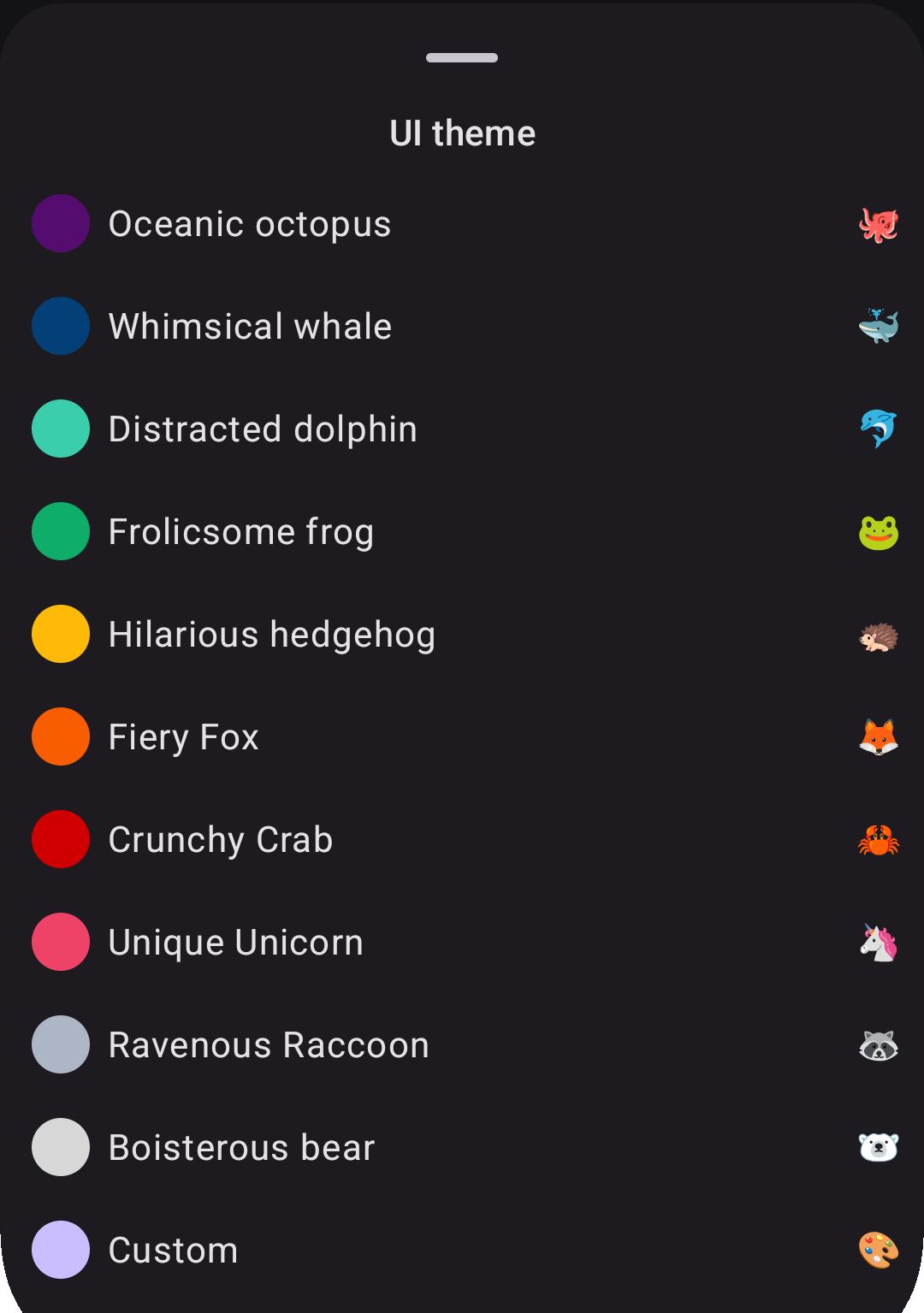
Instead of just displaying the colors and maybe the hex code in the preview, I decided to name themes based on an animal and to create noun-adjective alliterating pair, where both words started with the same syllable onset (or at least written with the same letter).

screenshot of theme selector
A screenshot of the theme selector bottom sheet in the app.

When translating this into languages other than English, I tried to retain the play on words and specified instructions for it on Weblate for collaborators.

When these instructions were respected, the result was indeed quite funny:

Italian

<string name="theme_color_blue">Balena ballerina</string>
<string name="theme_color_gray">Procione pasticcione</string>
<string name="theme_color_green">Rana rilassata</string>
<string name="theme_color_light_blue">Delfino distratto</string>
<string name="theme_color_orange">Volpe virtuosa</string>
<string name="theme_color_pink">Unicorno unico</string>
<string name="theme_color_purple">Piovra portentosa</string>
<string name="theme_color_red">Granchio galante</string>
<string name="theme_color_white">Orso originale</string>
<string name="theme_color_yellow">Riccio rampante</string>

Spanish

<string name="theme_color_blue">Ballena bailarina</string>
<string name="theme_color_gray">Mapache maloliente</string>
<string name="theme_color_green">Rana relajada</string>
<string name="theme_color_light_blue">Delfín distraído</string>
<string name="theme_color_orange">Zorro zancudo</string>
<string name="theme_color_pink">Unicornio único</string>
<string name="theme_color_purple">Pulpo portentoso</string>
<string name="theme_color_red">Cangrejo crujiente</string>
<string name="theme_color_white">Panda peludo</string>
<string name="theme_color_yellow">Erizo errante</string>

German

<string name="settings_theme_color_blue">Witziger Wal</string>
<string name="theme_color_gray">Wildgewordener Waschbär</string>
<string name="theme_color_green">Fröhlicher Frosch</string>
<string name="theme_color_light_blue">Desorientierter Delfin</string>
<string name="theme_color_orange">Feuriger Fuchs</string>
<string name="theme_color_pink">Einzigartiges Einhorn</string>
<string name="theme_color_purple">Ozeanischer Oktopus</string>
<string name="theme_color_red">Knusprige Krabbe</string>
<string name="theme_color_white">Brabbelnder Bär</string>
<string name="theme_color_yellow">Irrsinniger Igel</string>

French

<string name="theme_color_blue">Baleine balourde</string>
<string name="theme_color_gray">Raton-laveur rapide</string>
<string name="theme_color_green">Grenouille gaffeuse</string>
<string name="theme_color_light_blue">Dauphin distrait</string>
<string name="theme_color_orange">Renard raisonnable</string>
<string name="theme_color_pink">Licorne lunatique</string>
<string name="theme_color_purple">Pieuvre pantouflarde</string>
<string name="theme_color_red">Crabe croquant</string>
<string name="theme_color_white">Ours ouaté</string>
<string name="theme_color_yellow">Hérisson hilarant</string>

In some other languages, though, the same effect was not retained and only occasionally the alliteration is preserved, e.g. in Finnish the red theme 🦀 is "Rapea rapu" or in Russian the purple theme 🐙 is rendered as "Океанический осьминог".

Question

Do you want to help improving the existing translations or add a new one? Join our Weblate projects (here and here)!

Koin VS Kodein: a developer's journey through multiplatform DI hell

Dependency injection (or DI) has been the backbone of Android development for years, bringing flexibility, easier refactoring, and proper lifecycle management through decoupling and abstraction. But when you venture into Kotlin Multiplatform (KMP) territory, the comfortable world of Dagger and Hilt suddenly becomes unavailable.

This is the story of my two-year journey building Raccoon for Lemmy and Raccoon for Friendica, and how I learned the hard way that not all DI solutions are created equal.

The multiplatform DI dilemma

Why Dagger & Hilt don't work

The gold standards of Android DI face fundamental barriers in KMP:

  • Java dependency: both rely heavily on generated Java code, making them incompatible with native platforms like iOS;
  • KAPT legacy: until late 2023 (versions < 2.49), Dagger was tightly coupled with KAPT (Kotlin Annotation Processing Tool), while KMP uses KSP (Kotlin Symbol Processor).

Enter the alternatives

With traditional solutions off the table, the KMP community turned to alternatives. Koin emerged as a popular choice, with its lead developer Arnaud Giuliani making bold claims about multiplatform compatibility since 2021.

But here's the thing: Koin isn't actually a proper DI framework — it's a service locator. This distinction matters more than you might think. As a matter of fact, a lot of experienced Android developers do not consider Koin worth to be used large-scaled industry-level projects (as a rule of thumb, the greater the seniority the more "toy tools" are frowned upon). But why trusting blindly other people's prejudices, when you can try things directly?

Round 1: Koin (no annotations)

The setup

When I started Raccoon for Lemmy in 2023, Koin seemed like the logical choice:

  • Strong multiplatform support claims;
  • Integration with Voyager navigation library;
  • Simplified ViewModel injection and lifecycle management.

I went with the manual module definition approach, fully aware of the risks that NoBeanDefFoundException was just around the corner if I misconfigured the DI or forgot to define a binding.

A reality check

The good:

  • Project completed successfully;
  • Apps published on Google Play and F-Droid;
  • Complex interface-to-implementation binding in platform-specific source sets worked.

Concerning the last point, I was also able to handle complex scenarios where you have an interface in the commonMain source set and you want to bind it to different implementations in platform-specific source sets.

The idea was to simply have the native module as an expect val and several actual modules with native bindings (see example below).

The bad:

  • No compile-time validation: NoBeanDefFoundException lurking around every corner;
  • A lot of boilerplate code to define modules manually.

The lack of compile-time safety became increasingly problematic as the project grew. Unlike Dagger, where DI errors prevent compilation, Koin happily lets you ship broken apps if you forget a binding or including some module (it happened, for example here).

Round 2: Koin-Annotations

The promise

When starting Raccoon for Friendica, I decided to challenge myself with Koin-Annotations, lured by promises of:

  • Compile-time validation;
  • Reduced boilerplate;
  • Industry-ready reliability.

An implementation nightmare

KSP configuration hell

Setting up KSP in a multi-module KMP project was not so easy:

  • Documentation was sparse (mid-2024)
  • Trial and error for days
  • Multiple modules made everything trickier, but I eventually created a Gradle convention plugin to properly configure all subprojects.
Platform-specific bindings

The elegant solution for platform-specific implementations became a little more convoluted:

Before (manual):

// in commonMain source set
interface SomeInterface {
    fun someFunction()
}

expect val nativeModule: Module

// in platform-specific source sets
class SomeImplementation : SomeInterface {
    override fun someFunction() = Unit
}

actual val nativeModule = module {
    single<SomeInterface> {
        SomeImplementation()
    }
}

After (with annotations):

// in commonMain source set
interface SomeInterface {
    fun someFunction()
}

@Single
expect class SomeImplementation : SomeInterface {
    override fun someFunction()
}

@Module
expect class SomeModule

// in platform-specific source sets
@Single
actual class SomeImplementation : SomeInterface {
    override fun someFunction() = Unit
}

@Module
@ComponentScan
actual class SomeModule

This required the experimental -Xexpected-actual-classes compiler argument and significantly more boilerplate (notice the repeated @Single scopes, the empty method body in the expect class, etc.).

Nonetheless, I rolled up my sleeves and embarked in the journey:

  • ~200 DI bindings per app
  • Multiple Gradle subprojects
  • Several weeks of intensive work (in my spare time)

The F-Droid catastrophe

Just when I thought the migration was successful, disaster struck. The Lemmy app, which had been successfully building on F-Droid, suddenly failed their reproducible build requirements.

The root cause

Koin-Annotations generates metadata classes with time-based hashes that change on every compilation. This breaks reproducible builds — a critical requirement for F-Droid's security policies.

The maintainer response

I opened an issue explaining the problem. The response was disappointing:

  • No acknowledgment of the issue;
  • Similar issues remain unaddressed after 6+ months;
  • Arrogant dismissal (to the other developer reporting the same issue I encountered): lead maintainer doesn't understand why this is an issue (see here).

For an open-source project where F-Droid represented my main user base, this was unacceptable.

Round 3: Kodein to the rescue

Why Kodein?

Frustrated with Koin's maintainership and technical issues, I looked for alternatives. Kodein caught my attention:

  • "Painless dependency injection" tagline (painkillers were exactly what I needed);
  • Integration with Voyager navigation;
  • No pretentious marketing claims: it was honest about what it is and isn't.

The migration experience

What I expected

Another painful multi-week migration process.

What I got
  • Clear, comprehensive documentation
  • Practical examples
  • Straightforward integration
  • Excellent Compose multiplatform support
Technical considerations

The only "tricky" part was Android Context binding (Koin had dedicated constructs for this):

// in commonMain source set
fun initDi(additionalBuilder: DI.Builder.() -> Unit = {}) {
    RootDI.di =
        DI {
            additionalBuilder()
            // rest of module imports and/or definitions
        }
}

// in androidMain source set
class MainApplication : Application() {
    override fun onCreate() {
        super.onCreate()
        initDi {
            bind<Context> { provider { applicationContext } }
        }
    }
}

whereas in the iOSApp.swift:

@main
struct iOSApp: App {
    init() {
        DiHelperKt.doInitDi { _ in }
    }
}

The results

  • Seamless cross-platform portability
  • No build reproducibility issues
  • Cleaner architecture (thanks to accumulated experience)
  • Reliable, predictable behavior

Key lessons learned

Tool selection matters

For cross-functional infrastructure (DI, navigation, logging), choose tools based on:

  • Maintenance quality: how are issues handled?
  • Community engagement: are contributions properly managed?
  • Documentation: is it clear and comprehensive?
  • Stability vs. innovation balance: new features shouldn't compromise reliability

Design for flexibility

  • Keep DI structure modular and replaceable
  • Abstract away framework-specific details
  • Design interfaces that don't leak implementation concerns
  • Changes are inevitable — embrace them as improvement opportunities

Stay open to innovation

The KMP DI landscape continues evolving. Keep an eye on emerging solutions like:

  • Metro: a promising new KMP DI tool
  • Future Dagger/Hilt KMP support
  • Other community-driven alternatives

The final veredict: a comparison

Aspect Koin (Manual) Koin-Annotations Kodein
Compile-time Safety ❌ ✅ ❌
Setup Complexity ⭐⭐ ⭐⭐⭐⭐⭐ ⭐⭐
Documentation ⭐⭐⭐ ⭐⭐ ⭐⭐⭐⭐⭐
Maintenance ⭐⭐ ⭐ ⭐⭐⭐⭐
F-Droid Compatible ✅ ❌ ✅
Learning Curve ⭐⭐ ⭐⭐⭐⭐ ⭐⭐

Final thoughts

Sometimes the best solution isn't the most popular or heavily marketed one. Kodein's honest, straightforward approach to dependency injection proved more valuable than Koin's flashy promises and problematic execution.

The journey taught me that in software development, as in life, reliability trumps hype every time. When building production applications that need to work across multiple platforms and distribution channels, choose tools that do what they say they will do — nothing more, nothing less.

For your next KMP project, consider giving Kodein a try. Your future self (and your F-Droid users) will thank you.

Question

Have you had similar experiences with DI libraries in KMP? Reach out to your thoughts and war stories!

Swipe Navigation: turn your Fediverse feed into a page-turner

Question

Tired of the endless tap-back-tap dance? There's a better way to browse!

Picture this: You're deep-diving into your Mastodon timeline when you spot an intriguing post. You tap to read the full discussion, scan through replies, then… tap back. Find your place again. Tap the next post. Repeat. Does it sound familiar?

What if scrolling through social content felt as natural as flipping through a magazine? Enter swipe navigation – the game-changing UX pattern that's transforming how we consume Fediverse content.

Problem: lost in navigation hell

Every Fediverse platform has its building blocks – Lemmy's posts, Mastodon/GNU social's statuses, Friendica's items – but they all share the same fundamental challenge. These content units live in lists: timelines, author feeds, community threads, search results. And traditionally, exploring them means constant context switching.

The typical mobile experience goes like this:

  1. Scroll through feed
  2. Tap interesting content
  3. Read, engage, absorb
  4. Hit back (losing your flow)
  5. Hunt for where you left off
  6. Repeat until frustrated

This master-detail navigation works on large screens, but on mobile? It's a focus-killer and engagement-destroyer.

Solution: think of a book, not a db

Swipe navigation flips the script – literally. Instead of treating content as isolated database entries, it transforms your feed into a flowing narrative where each post is simply the next page in your story.

Swipe right: Previous content
Swipe left: Next content
Stay engaged: Never lose your place

It's that simple. No more navigation gymnastics, no more losing your scroll position, no more breaking your reading flow.

The technical behind the scenes

Making this feel effortless requires some clever engineering. Here's how we solved it in the Raccoon apps:

Smart pagination memory

We maintain a "snapshot" of your current browsing context:

  • current pagination specification i.e. all the data which are needed, if you have page n, to get page n+1;
  • partial list of all the contents which have been downloaded so far;
  • current pagination status (e.g. the current page index or the next "pagination token", the information about whether there are more pages or not).

Intelligent prefetching

As you swipe toward the end of loaded content, the app quietly fetches the next batch in the background. You get the illusion of infinite content without wait times, data waste or battery draining, because only as many contents are downloaded as they are likely to be seen.

Context navigation stack

Here's where things get interesting. What happens when you're browsing your home timeline, then dive into someone's profile, then start swiping through their posts?

We solved this with a navigation stack – think of it as breadcrumbs for your browsing session. Each time you enter a new feed context, we push a new state onto the stack. When you navigate back, we pop it off and restore exactly where you were in the previous feed.

Example flow:

  1. Browsing home timeline (State A)
  2. Open user profile → New context (State B pushed)
  3. Swipe through their posts using State B pagination
  4. Hit back → Pop State B, restore State A
  5. Continue exactly where you left off in home timeline

Why this matters for the Fediverse

This isn't just about smoother UX – it's about engagement and adoption. The Fediverse is competing with highly polished corporate platforms that have spent billions optimizing user experience.

Swipe navigation levels the playing field by:

  • Reducing friction: fewer taps, less cognitive load
  • Maintaining flow state: users stay immersed in content
  • Feeling native: matches expected mobile interaction patterns
  • Encouraging exploration: easier to discover new content and creators

The Relay legacy

Fun fact: This navigation pattern gained popularity in the Reddit ecosystem through the Relay app, which is why some developers still call it "Relay-style navigation." It proved so effective that it became a sought-after feature across Threadiverse clients, and now it's making its way into broader Fediverse apps.

Building a better social web

Every interaction pattern we choose shapes how people experience the open social web. Swipe navigation might seem like a small UX detail, but it represents something bigger: the commitment to making decentralized platforms not just functional, but delightful.

When users can lose themselves in their feeds – really get into that flow state where time disappears and content discovery feels effortless – that's when the Fediverse truly competes with the walled gardens.

The future of social media is open, decentralized, and user-controlled. But it also needs to feel amazing to use. Swipe navigation is one piece of that puzzle, turning mechanical browsing into intuitive exploration.

Ready to transform your Fediverse experience? Look for apps that support swipe navigation, or if you're a developer, consider implementing this pattern in your next project. Your users' engagement levels will thank you.

Question

What navigation patterns do you think could improve the Fediverse experience? Share your thoughts and help us build better social tools for everyone.

Global localization: Building a truly international open source app

How a humanities background shaped the technical decisions behind Raccoon's multilingual journey

Let me start with an adaptation from the Raccoon for Lemmy manifesto:

Quote

our goal is to offer an experience where everyone can "feel at home"

This simple phrase encapsulates a fundamental principle — enabling users to interact with software in their native language isn't just a nice-to-have feature, it's essential for true accessibility and inclusion.

As someone who studied both computer science and humanities, with extensive coursework in foreign languages (English and Spanish), translation, and interpreting, I've always understood that localization goes far beyond simply translating text. My master's thesis focused on internationalization and open source localization tools, so when I began developing the Raccoon apps, multilingual support wasn't an afterthought — it was baked into the foundation from day one.

Our philosophy

A crucial aspect of making users truly own their application is allowing it to adapt to them, not the other way around. This means providing the most direct interaction possible, starting with language preference. When someone opens an app and sees their native language, there's an immediate sense of belonging — the software feels like it was made for them.

This philosophy guided every technical decision I made about localization infrastructure.

Mapping our global expansion

1. Build the foundation

I started by implementing support for the languages I could personally manage: English, Spanish, and Italian. This gave me direct control over quality and helped establish our localization workflow before opening it up to community contributions.

2. Community-driven growth

The Raccoon apps were adopted almost immediately across Europe, North and South America. Following true open source principles, I welcomed contributions from native speakers who wanted to help. The first community-contributed languages were: Portuguese (both European pt and Brazilian pt_BR variants, German and Spanish (community review and improvements).

3. Expand across continents

With a solid foundation in place, I proactively created base resources for additional European languages, hoping to attract new users and contributors. This strategy worked beautifully, bringing in contributions for: Finnish, French, Irish, Norwegian, Romanian, Polish, Ukrainian.

Our reach eventually extended beyond Europe's borders with the addition of Chinese (Traditional Taiwan zh_TW, Hong Kong zh_HK, and Simplified zh_CN) and Tamil.

Each new language didn't just expand our user base — it brought new perspectives and cultural insights that improved the app for everyone. For this reason, I decided to create a dedicated «Acknowledgements» section in both apps and include all translators in the list of contributors, in order to give them visibility and recognize the importance of their work. The apps wouldn't be the same without it!

Our technical journey

Early days: third-party solutions (mid-2023)

When I launched the first Raccoon app in mid-2023, Compose Multiplatform lacked native localization support. I initially used Moko Resources, which worked well for simple cases but became unwieldy as our project grew in complexity. Having every module depend on resources created maintenance nightmares, especially with complex KSP (Kotlin Symbol Processing) configurations.

Lyricist (flexibility & tradeoffs)

As Compose Multiplatform evolved and added built-in support for resources like drawables and fonts, I migrated away from third-party dependencies, however, localization support was still missing in early versions (e.g. 1.6.0, released in February 2024).

Enter Lyricist, developed by the same team behind the Voyager navigation library I was already using. Lyricist offered excellent flexibility but came with significant challenges:

Option 1: XML processors

  • Advantage uses standard Android-style XMLs (converted to resource files);
  • Problem: Using format specifiers (%1$s, %1$d, etc.) may lead to invalid generated code;
  • Major issue: It completely broke reproducible builds, making F-Droid submissions painful.

Option 2: Plain Kotlin files

  • Advantage: Full control over string resources;
  • Problem: Not compatible with standard translation platforms like Weblate.

Collaboration challenges

Since these are community-driven projects, using professional translation platforms was essential. I still remember receiving Spanish translation reviews via email — there had to be a better way!

When I set up our Weblate projects, I was still using Lyricist, which meant I had to write Python scripts to convert between XML and Kotlin for every translation update. This manual process was error-prone and time-consuming, especially when using the Weblate-GitHub integration to open PRs with new translations, because I had to manually regenerate resources after every merge.

Native Compose Multiplatform

Finally, with version 1.6.10 (released in May 2024), Compose Multiplatform added native support for reading string values from the composeResources directory. This was the turning point — I could now use Android-style XML resources that seamlessly integrated with Weblate, eliminating conversion scripts entirely.

Lessons learned

Community is everything: native speakers don't just translate — they bring cultural context that makes your app truly feel local. It is important to acknowledge their work and give them visibility!

Tool selection matters: the right technical choices can make the difference between a maintainable internationalization system and a maintenance nightmare.

Start with strong foundations and design for extension: investing time in proper localization infrastructure early pays dividends as your project scales. I is important to write future-proof code and keep flexibility in mind because the ecosystem keeps evolving, and new solution may be worth embracing.

Platform integration is key: using tools that integrate well with translation platforms like Weblate dramatically reduces friction for contributors and allows them to focus on what really matters.

What's next

The localization journey continues. The foundation I've built makes adding new languages straightforward, and our community-driven approach ensures quality while fostering a sense of shared ownership.

If you're building a multilingual app, remember: localization isn't just about translating strings — it's about creating an experience where every user feels the software was made specifically for them. That's when you know you've truly succeeded in making your app feel like home.

Example

Want to contribute to Raccoon's localization efforts? Check out:

What happened to Raccoon for Lemmy?

Many people have wondered what happened during August 2024 to the Raccoon for Lemmy app. The original repository was completely shut down overnight, and development continued in what was then the main fork — fortunately updated to the latest commit before the shutdown.

The fork was initially owned by a contributor called N7-X (who had already submitted multiple PRs upstream during the previous months), then transferred to new ownership and hosted within an organization, with N7-X and Akesi Seli as main contributors.

What happened, and more importantly, why? This article recaps the situation before and after the change to clarify things for the community.

Just a side project…

The app was initially hosted here (latest available snapshot from the Internet Archive) and had been primarily developed since mid-2023 by a developer from Italy as a side project to experiment with Kotlin Multiplatform technology.

External contributions were always welcome. During spring 2024, N7-X began contributing, starting with smaller tasks and gradually taking on more significant features — including Markdown support — eventually becoming a de facto co-maintainer.

The Markdown benchmark incident

On August 1st, 2024, this post was created in the Lemmy Apps community on lemmy.world. The moderator conducted a benchmark evaluating Markdown rendering across different Lemmy clients, scoring each app based on predefined test cases.

The benchmark's goal was constructive: raise awareness about Markdown rendering issues so the community could work together to improve the Lemmy ecosystem during a critical period when the user base was fragmented across various competing platforms.

However, Raccoon had issues rendering tables correctly, and some format checks incorrectly evaluated text within poorly-rendered tables. This caused the app to be «marked down twice when it shouldn't have» (see here), resulting in an initially very low score (not even 5 out of 10), before the post was updated.

Unintended consequences

What followed was unexpected and unfortunate. People began complaining about Raccoon's poor performance, others suggested migrating away from the app, and the main developer started receiving notifications and negative reviews (during his summer vacation).

He suddenly realized his real identity was publicly visible and that the negative feedback could damage his professional reputation. Concerned about potential impact on his current job and future career prospects, he made the difficult decision to shut down the original repository.

Community-driven revival

The original developer was planning to create a new anonymous account and republish the app with a different package name, but before he could do so, the community had already adopted N7-X's fork as the new "official" version of Raccoon.

Recognizing the community's decision, the original developer worked with the co-maintainer to perform a comprehensive migration: changing the package name, updating URLs for remote assets, and moving the project to a neutral organization account.

Better than before

The transition proved beneficial for the project. The new team gradually restored and improved all aspects of the app, including:

  • enhanced Continuous Integration workflows;
  • improved test coverage calculation;
  • shared build logic among modules with Gradle convention plugins;
  • better quality assurance with static analysis tools.

Today, Raccoon for Lemmy is in better condition than before, with active community support and ongoing development. While the circumstances that led to the transition were unfortunate, they ultimately resulted in a stronger, more sustainable project structure.

The incident serves as a reminder of both the challenges facing open source maintainers and the resilience of community-driven development when people come together to support valuable projects.

Friendica: the Swiss Army knife of the Fediverse

While most fediverse platforms force you to choose between microblogging, photo sharing, or link aggregation, one platform refuses to make you pick just one.

Friendica is a social environment integrated in the Fediverse, just like Mastodon or Pixelfed ‒ but it is also compatible with Bluesky, Tumblr, WordPress, GNU Social, Diaspora, RSS and several more tools and platforms.

Universal federation hub

Unlike other platform, which primarily focus on single types of contents (e.g statuses or photo sharing), Friendica serves as a universal translator across multiple protocols, acting like a hub which brings "together all of the Fediverse into one experience" (according to hankg).

The Facebook the Fediverse

Friendica uses a post/replies idiom with a Facebook-like UX, rather than the Twitter-like status streams found in Mastodon. This creates a more traditional social networking experience with threaded conversations and a focus on community interaction.

Just like Facebook, Friendica features the concept of groups (which are treated as ActivityPub actors), i.e. a special kind of profiles which act as an aggregator for posts related to the same topic, similar to Lemmy's communities.

Other features which Friendica shares with Facebook are:

  • the possibility to organize uploaded media into a gallery with different albums (and images inside each album);
  • an integrated event calendar (with birthdays and custom events);
  • direct messages between users;
  • the ability to quote (cross-post) other people's posts, not just boosting them but embedding them into a new one;
  • the possibility to organize contacts in circles (which can not only be used like user-defined timelines to read posts but also as a target scope to publish posts to).

Enhanced content

Friendica offers robust content capabilities including unlimited post length (within server limits), extensive media support for photos (even embedded), audios, videos, and file attachments, plus geotagging options.

Moreover, posts can have, besides the main content, also a title and a spoiler, and their body supports rich formatting with different text styles (italic, bold, strikethrough, monospaced, quoted, itemized, etc.)

With this respect, Friendica positions itself as a Swiss Army knife ‒ less specialized than Mastodon (microblogging) or Pixelfed (photo sharing), but more versatile in connecting different communities and content types under one roof.

External integrations

Friendica can import arbitrary websites and blogs into your social stream via RSS/Atom feeds, making it act as both a social network and content aggregator. This feature is unique among major fediverse platforms.

It also features an email connector which allows to you add conventional email contacts to your social networking stream, making it possible to bidirectionally interact via email with the configured contacts just as if they were participating in the social stream.

The mobile challenge

This feature richness creates both Friendica's greatest strength and its biggest challenge when implementing clients. As a matter of fact, the web interface is great to access all of these features on desktop but on a mobile device there are different constraints for usability and readability, so having an app to use the most important functions of the platform would be a great plus.

Ideally, an app for Friendica should have at least the following features:

  • timeline view with ability to switch feed type (public, local, subscriptions, user-made lists);
  • post detail, i.e. opening a conversation in its context and see the replies, number of re-shares and people who added it to favorites;
  • user detail with ability to see posts, post and replies, pinned posts and media, subscribe for notifications from a user, follow/send a request or unfollow them, see following/followers;
  • support for ActivityPub groups, with the ability to open threads in "forum mode";
  • see trending posts, hashtags, links and following recommendations;
  • follow/unfollow an hashtag and view all the posts containing a given hashtag;
  • post actions (re-share, favorite, bookmark) and – for own ones – edit, delete or pin to profile;
  • global search hashtags, post and users containing some specific terms;
  • customize the application appearance with color themes, font face and size, etc;
  • login via OAuth2;
  • view and edit one's own profile data;
  • view incoming notifications and filter the list;
  • manage one's own follow requests and accept/reject each one of them;
  • view the list of one's own favorites, bookmarks and followed hashtags;
  • create a post/reply with formatted text, image attachments (and alt text), spoiler and title;
  • schedule a post (and change its schedule date) or save it to drafts;
  • report posts/users to administrators for content moderation;
  • mute/unmute, block/unblock users and manage the list of muted/blocked users;
  • manage one's own circles (i.e. user-defined lists);
  • multi-account with easy ability to switch between accounts;
  • send direct messages to other users and see conversations;
  • manage one's own photo gallery;
  • view one's own event calendar.

Tip

This is the point where Raccoon for Friendica comes in, trying to provide a mobile solution functional and aesthetically convenient at the same time.

Building modern Fediverse apps in KMP & Compose: the perfect match

The Fediverse represents the future of social media — decentralized, open, and user-controlled. As platforms like Mastodon, Friendica, and Lemmy gain momentum, developers face a crucial question: how do you build modern, cross-platform applications that can keep pace with this rapidly evolving ecosystem?

The answer lies in Kotlin Multiplatform (KMP) combined with Compose Multiplatform (CMP) — a technology stack that is uniquely suited to solve what I refer to as «Fediverse development challenge».

The Fediverse development challenge

Platform fragmentation

Modern users expect native experiences across mobile, desktop, and web platforms. Traditional approaches usually force developers to choose between:

  • building separate native apps (which is expensive and slow to iterate)
  • creating web-only solutions (with the disadvantage of limited platform integration )
  • using older cross-platform frameworks for app development (which may imply performance tradeoffs or increase the side of the app package).

Protocol complexity

Fediverse protocols like ActivityPub are intricate, requiring sophisticated networking, JSON parsing, proper state management and a well-designed and future-proof implementation.

Duplicating this logic across multiple platforms introduces maintenance overhead for sure, plus it may potentially lead to bugs.

Rapid evolution

The Fediverse moves fast: new features, protocol extensions, and federation behaviors emerge regularly. The development stack needs to support quick iterations and seamless updates across all platforms, in order to adapt to changes rapidly, release quickly and reach the widest possible audience.

Why Kotlin Multiplatform?

Share what you want, when you want

KMP is flexible and allows you to choose what to share: for example, you can share the complex business logic — ActivityPub implementation, federation handling, data models, and networking — while keeping platform-specific UI native. Otherwise, you can also share some UI parts or, if you are brave enough, all of it with Compose Multiplatform (CMP) as we do in Procyon.

The key concept is, it is not an "all or nothing" choice where you either opt in or opt out completely at once, you can gradually choose what to share and when to do it, which gives you as a developer great power (even to roll back some of your decisions if you want to).

The expect/actual mechanism, moreover, makes it possible to access underlying operating system features (such as filesystem, gallery, camera, video playback, push notifications, inter-process communication e.g. sharing data to other apps or receive data from other apps through deep links) when you need them, defining your own abstractions to call from common code.

Type-safety

Kotlin's strong type system and sealed classes make it excellent for modeling ActivityPub entities and activities. You can create robust, compile-time-safe representations of posts, actors, and interactions that work identically across all platforms.

There are even libraries, like LemmyBackwardsCompatibleAPI which offer abstractions for Lemmy data types and a unified adapter to endpoints which make it transparent for client-apps developers which version of the backend is used by the current instance.

Networking & serialization

Libraries like Ktor, Ktorfit and kotlinx.serialization provide first-class support for HTTP clients, API modeling and JSON parsing — essential for Fediverse applications that constantly communicate with various servers and handle complex data.

Using these three libraries in conjunction (with KSP, the Kotlin Symbol Processor) makes it extremely simple to define endpoint calls, handling asynchronous result and errors in an idiomatic way. Dealing with KSP in a multi-module and multi-platform project may pose some difficulties, nonetheless, stay tuned for updates on this in future posts.

Structured concurrency

Kotlin coroutines excel at handling the asynchronous, real-time nature of social media apps. Parent-child relationships between tasks, when background operations are tied with the lifecycle of a screen, allow to gracefully cancel tasks when their result is not needed, saving battery power and limiting data transmission over the network.

Compose Multiplatform

Declarative UI

Social media interfaces are inherently complex — timelines, media galleries, thread visualizations for discussions, and real-time updates. The declarative approach of Compose Multiplatform makes these interfaces easier to build and maintain than traditional imperative UI frameworks.

Consistent design systems

Fediverse apps benefit from consistent branding and behavior across platforms. Compose Multiplatform lets you implement your design once and deploy it everywhere, ensuring users get the same experience (no matter whether they're on Android, iOS, desktop, or web).

Material Design 3 is a modern and robust design system which ensures consistency, accessibility and customization options.

Performance where it counts

Unlike web-base cross-platform solutions, Compose Multiplatform compiles to native code, providing the smooth scrolling and responsive interactions that social media users expect, which are especially important to make the Fediverse as engaging as possible for users and promote its adoption.

Real-world advantages

Faster federation support

When new ActivityPub extensions or features emerge, you can implement them once in shared KMP code and immediately have support everywhere. This is crucial to keep up with the fast-moving Fediverse ecosystem.

For example, Raccoon is going to provide Lemmy 1.x support to all its target platform (Android, iOS) at once, see this issue to monitor the state of integration.

Simplified testing

Not only the implementation code is shared, with KMP you can also share tests. For business logic this is pretty straightforward (more on this in future posts, especially for mocking libraries) — whereas UI tests need a device to run (iOS simulator, Android emulator, etc.) but it is nonetheless possible to write tests once and run them on multiple devices (more on this here).

Community contributions

A single, well-structured Kotlin codebase is more approachable for open-source contributors than maintaining separate applications. This matters for Fediverse projects that often rely on community development, when the workforce is often limited to few volunteers.

Leverage a rich ecosystem

The Kotlin and Compose Multiplatform ecosystem has matured significantly over the past few years and at Procyon I've seen it grow from 2023 on.

Key libraries for Fediverse development include:

Conclusion

Building a modern Fediverse app requires balancing rapid development, protocol complexity, and user experience across multiple platforms.

Kotlin Multiplatform and Compose Multiplatform provide the perfect foundation — letting you focus on what makes your Fediverse app unique while sharing the complex domain code that makes your app work.

The Fediverse represents a return to user agency and open protocols. Your development stack should embody those same principles: open, flexible, and designed for the long term. Kotlin Multiplatform and Compose Multiplatform deliver exactly that.

Tip

Ready to build the next great Fediverse app? The tools are here, the protocols are maturing, and the community is waiting.

Contributing to Raccoon apps

Community-driven approach

The Raccoon apps are Kotlin Multiplatform clients for Friendica and Lemmy that embody the spirit of open-source collaboration. At Procyon, every contribution is welcome and everyone's opinion is valued, emphasizing that this is a community project, open source, ad-free and free of charge, so it belongs to us all.

Our philosophy

Procyon encourages contributors to embrace the raccoon motto: #livefasteattrash — a playful reminder that this is a community-driven effort where experimentation and contribution are encouraged.

Our Code of Conduct

What makes us special isn't just its code — it's the principles that guide its community. The project follows the RACCOON code of conduct, where each letter represents a core value:

🦝 R – respect: We respect each other as people, remembering we are part of a group that goes beyond individual opinions, beliefs, preferences and habits.

🦝 A – availability: We support each other with the skills and available time that we have, considering that we are volunteers and we operate on a best-effort basis. 🦝 Commitment: We are responsible for our choices and we agree that our choices are taken wisely, always considering the impact on other members of the group.

🦝 C – cohesion: We remember that we are part of a community which is bigger than the individual members, so we do unto others as we would have them do unto us.

🦝 O – objectivity: We are committed to telling the truth in the most objective way and, if we express subjective opinions, to do it in a clear and constructive way.

🦝 O – originality: We bring our own personal experience and ideas which are acceptable even if " different": everyone's voice matters and deserves to be listened.

🦝 N – never give up: We are tenacious and are not afraid by technical challenges, we embrace every difficult task as an opportunity to learn and acquire new skills.

Community impact

Procyon has been shaped by the huge amount of patience and dedication of early adopters who sent continuous feedback and ideas for improvement after every release, reported bugs, offered to help, and submitted translations through Weblate.

Join us

Whether you're a seasoned developer or a newcomer to open source, Procyon welcomes your contributions. The project's inclusive approach ensures that every voice matters in building a better Friendica or Lemmy client for the community.

Tip

Ready to contribute? Head over to the RaccoonForLemmy repository and check out the CONTRIBUTING.md file for detailed guidelines.