Skip to content

l10n

Breaking Language Barriers: Client-Side Translation in the Fediverse

The Multilingual Reality of ActivityPub

The Fediverse is built on the promise of decentralized, equal communication. However, when users from different instances federate, they often encounter a barrier that code alone can not fix: language. While global connectivity is built into the protocol, making sense of foreign content often requires external tools that many servers do not provide.

Why Server-Side Translation is Rare

Services like Mastodon are designed to integrate with translation providers, so that users can toggle on-demand translation for posts appearing in their timelines.

This integration is not automatic, though, it has to be explicitly configured by instance administrators:

  • if requests are routed to an external provider (such as DeepL or a LibreTranslate instance), admins have to configure an API key and pay the costs for translations;
  • alternatively, since LibreTranslate is a self-hostable FOSS appliance, it can be installed on a server they already own (even the same hosting the instance), but they still need to pay for used resources.

As a result, not many instances (especially smaller ones) offer server-side translation, as they are run by volunteers who already run instances at their own expenses, often on a not-so-generous budget.

A growing user base already means more storage and computational resources are needed just for content management, so it is no surprise that translation is an expense worth sacrificing.

Empowering Clients

A possible solution to this is managing translation on the client-side. This doesn't necessarily mean running a local AI model on-device; while privacy-preserving, the large download size and high memory demands can be a dealbreaker for many mobile users.

A more flexible approach is allowing users to connect to their preferred translation service directly. By sending requests to a user-configured LibreTranslate instance and using their own API key, the cost and quota management are decentralized.

This removes the financial burden from instance admins while giving users control over their data. They can choose their trusted service and have their saying in whom data is sent to.

This is the path may apps have taken, including Raccoon. In the settings screen it is possible to configure one or more translation providers and choose the default one.
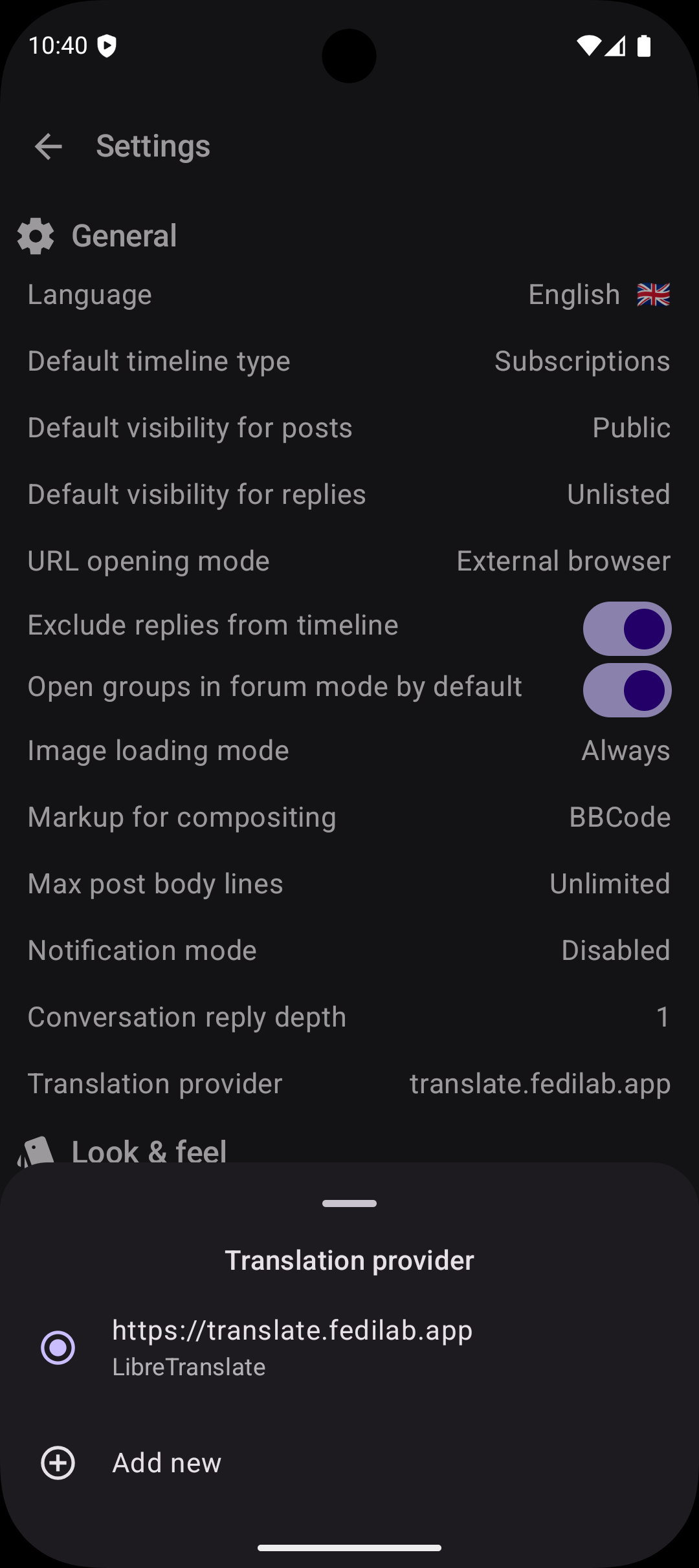
screenshot of the Settings page
Translation provider configuration bottom sheet.

For now the only supported provider is LibreTranslate: its configuration require the user to enter the instance URL and their API key (most instances require one).

Once a translation provider has been selected, the options menu in each post whose language is not the current one,1 contains an option to toggle translation. When selected, the original content is swapped with the translation and the drop-down menu option allows to switch back to the source version.

A Bit of History

Getting this right was not an overnight process. Before integrating with LibreTranslate I experimented with another third-party service (see #746) but the output was very low quality. Users complained, I listened to their feedback and decided to remove it.

The new architecture implemented in #1176 is built on two core principles: user choice and extensibility.

It is flexible enough to let users configure more than one service and extensible enough so developers can add other implementations for different providers (local or remote).

Question

How do you currently handle posts in languages you don't speak? Do you rely on your instance’s built-in tools, or do you find yourself copy-pasting into external browser? Let's talk about how we can make the Fediverse feel more like a global neighborhood.


  1. The current language corresponds to the app's on (from Settings), the post's one corresponds to its language property. ↩

Playful themes: what's in a name?

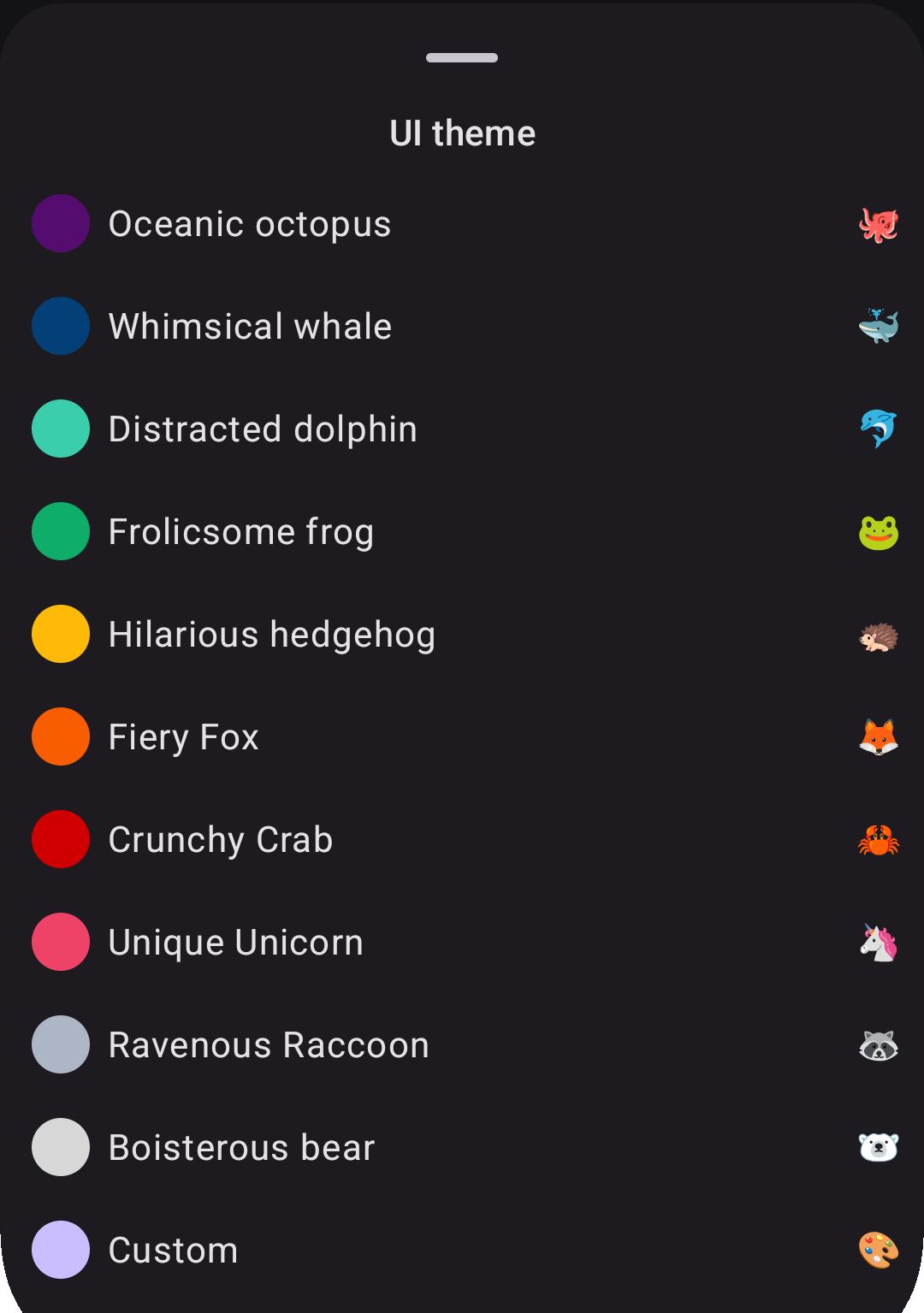
Localization and customization are first-class citizens at Procyon, as already discussed. An feature in which they come together is the choice of the color theme to apply to the app.

In Compose Multiplatform, we have an amazing library to generate color palettes with different styles (more or less playful, vibrant, etc.) base on a seed color, called MaterialKolor.

In order to select the base color to generate the palette, I wanted to be able to let user insert a custom value, but also to make it possible to choose from a preset.

Instead of just displaying the colors and maybe the hex code in the preview, I decided to name themes based on an animal and to create noun-adjective alliterating pair, where both words started with the same syllable onset (or at least written with the same letter).

screenshot of theme selector
A screenshot of the theme selector bottom sheet in the app.

When translating this into languages other than English, I tried to retain the play on words and specified instructions for it on Weblate for collaborators.

When these instructions were respected, the result was indeed quite funny:

Italian

<string name="theme_color_blue">Balena ballerina</string>
<string name="theme_color_gray">Procione pasticcione</string>
<string name="theme_color_green">Rana rilassata</string>
<string name="theme_color_light_blue">Delfino distratto</string>
<string name="theme_color_orange">Volpe virtuosa</string>
<string name="theme_color_pink">Unicorno unico</string>
<string name="theme_color_purple">Piovra portentosa</string>
<string name="theme_color_red">Granchio galante</string>
<string name="theme_color_white">Orso originale</string>
<string name="theme_color_yellow">Riccio rampante</string>

Spanish

<string name="theme_color_blue">Ballena bailarina</string>
<string name="theme_color_gray">Mapache maloliente</string>
<string name="theme_color_green">Rana relajada</string>
<string name="theme_color_light_blue">Delfín distraído</string>
<string name="theme_color_orange">Zorro zancudo</string>
<string name="theme_color_pink">Unicornio único</string>
<string name="theme_color_purple">Pulpo portentoso</string>
<string name="theme_color_red">Cangrejo crujiente</string>
<string name="theme_color_white">Panda peludo</string>
<string name="theme_color_yellow">Erizo errante</string>

German

<string name="settings_theme_color_blue">Witziger Wal</string>
<string name="theme_color_gray">Wildgewordener Waschbär</string>
<string name="theme_color_green">Fröhlicher Frosch</string>
<string name="theme_color_light_blue">Desorientierter Delfin</string>
<string name="theme_color_orange">Feuriger Fuchs</string>
<string name="theme_color_pink">Einzigartiges Einhorn</string>
<string name="theme_color_purple">Ozeanischer Oktopus</string>
<string name="theme_color_red">Knusprige Krabbe</string>
<string name="theme_color_white">Brabbelnder Bär</string>
<string name="theme_color_yellow">Irrsinniger Igel</string>

French

<string name="theme_color_blue">Baleine balourde</string>
<string name="theme_color_gray">Raton-laveur rapide</string>
<string name="theme_color_green">Grenouille gaffeuse</string>
<string name="theme_color_light_blue">Dauphin distrait</string>
<string name="theme_color_orange">Renard raisonnable</string>
<string name="theme_color_pink">Licorne lunatique</string>
<string name="theme_color_purple">Pieuvre pantouflarde</string>
<string name="theme_color_red">Crabe croquant</string>
<string name="theme_color_white">Ours ouaté</string>
<string name="theme_color_yellow">Hérisson hilarant</string>

In some other languages, though, the same effect was not retained and only occasionally the alliteration is preserved, e.g. in Finnish the red theme 🦀 is "Rapea rapu" or in Russian the purple theme 🐙 is rendered as "Океанический осьминог".

Question

Do you want to help improving the existing translations or add a new one? Join our Weblate projects (here and here)!

Global localization: Building a truly international open source app

How a humanities background shaped the technical decisions behind Raccoon's multilingual journey

Let me start with an adaptation from the Raccoon for Lemmy manifesto:

Quote

our goal is to offer an experience where everyone can "feel at home"

This simple phrase encapsulates a fundamental principle — enabling users to interact with software in their native language isn't just a nice-to-have feature, it's essential for true accessibility and inclusion.

As someone who studied both computer science and humanities, with extensive coursework in foreign languages (English and Spanish), translation, and interpreting, I've always understood that localization goes far beyond simply translating text. My master's thesis focused on internationalization and open source localization tools, so when I began developing the Raccoon apps, multilingual support wasn't an afterthought — it was baked into the foundation from day one.

Our philosophy

A crucial aspect of making users truly own their application is allowing it to adapt to them, not the other way around. This means providing the most direct interaction possible, starting with language preference. When someone opens an app and sees their native language, there's an immediate sense of belonging — the software feels like it was made for them.

This philosophy guided every technical decision I made about localization infrastructure.

Mapping our global expansion

1. Build the foundation

I started by implementing support for the languages I could personally manage: English, Spanish, and Italian. This gave me direct control over quality and helped establish our localization workflow before opening it up to community contributions.

2. Community-driven growth

The Raccoon apps were adopted almost immediately across Europe, North and South America. Following true open source principles, I welcomed contributions from native speakers who wanted to help. The first community-contributed languages were: Portuguese (both European pt and Brazilian pt_BR variants, German and Spanish (community review and improvements).

3. Expand across continents

With a solid foundation in place, I proactively created base resources for additional European languages, hoping to attract new users and contributors. This strategy worked beautifully, bringing in contributions for: Finnish, French, Irish, Norwegian, Romanian, Polish, Ukrainian.

Our reach eventually extended beyond Europe's borders with the addition of Chinese (Traditional Taiwan zh_TW, Hong Kong zh_HK, and Simplified zh_CN) and Tamil.

Each new language didn't just expand our user base — it brought new perspectives and cultural insights that improved the app for everyone. For this reason, I decided to create a dedicated «Acknowledgements» section in both apps and include all translators in the list of contributors, in order to give them visibility and recognize the importance of their work. The apps wouldn't be the same without it!

Our technical journey

Early days: third-party solutions (mid-2023)

When I launched the first Raccoon app in mid-2023, Compose Multiplatform lacked native localization support. I initially used Moko Resources, which worked well for simple cases but became unwieldy as our project grew in complexity. Having every module depend on resources created maintenance nightmares, especially with complex KSP (Kotlin Symbol Processing) configurations.

Lyricist (flexibility & tradeoffs)

As Compose Multiplatform evolved and added built-in support for resources like drawables and fonts, I migrated away from third-party dependencies, however, localization support was still missing in early versions (e.g. 1.6.0, released in February 2024).

Enter Lyricist, developed by the same team behind the Voyager navigation library I was already using. Lyricist offered excellent flexibility but came with significant challenges:

Option 1: XML processors

  • Advantage uses standard Android-style XMLs (converted to resource files);
  • Problem: Using format specifiers (%1$s, %1$d, etc.) may lead to invalid generated code;
  • Major issue: It completely broke reproducible builds, making F-Droid submissions painful.

Option 2: Plain Kotlin files

  • Advantage: Full control over string resources;
  • Problem: Not compatible with standard translation platforms like Weblate.

Collaboration challenges

Since these are community-driven projects, using professional translation platforms was essential. I still remember receiving Spanish translation reviews via email — there had to be a better way!

When I set up our Weblate projects, I was still using Lyricist, which meant I had to write Python scripts to convert between XML and Kotlin for every translation update. This manual process was error-prone and time-consuming, especially when using the Weblate-GitHub integration to open PRs with new translations, because I had to manually regenerate resources after every merge.

Native Compose Multiplatform

Finally, with version 1.6.10 (released in May 2024), Compose Multiplatform added native support for reading string values from the composeResources directory. This was the turning point — I could now use Android-style XML resources that seamlessly integrated with Weblate, eliminating conversion scripts entirely.

Lessons learned

Community is everything: native speakers don't just translate — they bring cultural context that makes your app truly feel local. It is important to acknowledge their work and give them visibility!

Tool selection matters: the right technical choices can make the difference between a maintainable internationalization system and a maintenance nightmare.

Start with strong foundations and design for extension: investing time in proper localization infrastructure early pays dividends as your project scales. I is important to write future-proof code and keep flexibility in mind because the ecosystem keeps evolving, and new solution may be worth embracing.

Platform integration is key: using tools that integrate well with translation platforms like Weblate dramatically reduces friction for contributors and allows them to focus on what really matters.

What's next

The localization journey continues. The foundation I've built makes adding new languages straightforward, and our community-driven approach ensures quality while fostering a sense of shared ownership.

If you're building a multilingual app, remember: localization isn't just about translating strings — it's about creating an experience where every user feels the software was made specifically for them. That's when you know you've truly succeeded in making your app feel like home.

Example

Want to contribute to Raccoon's localization efforts? Check out: