Skip to content

libs

Rekindling the spark: moving Raccoon to Metro

"For now" was doing a lot of heavy lifting

The last article ended with the words "you can consider this the end, for now, of my concerns about DI."

To be honest, when I wrote that sentence, I was far from happy with the state of things. That was precisely why I cautiously tacked on that parenthetical "for now".

The cracks in KCP

Between mid-July and early August, I had, in chronological order:

  • Migrated Raccoon from Kodein back to Koin out of genuine concern for the future of KOSI and the libraries they maintain;
  • Written a convention plugin to factor out common DI configuration across subprojects (adapting 50+ modules in the previous step made me want to make future work easier on myself);
  • Evolved from the "classic DSL" style to the Koin Compiler Plugin (KCP) with annotations, aiming to reduce manual wiring to a minimum and gain compile-time validation.

This was a substantial amount of work — with not a single visible benefit for end-users — and it forced me to freeze all new feature development and enter "maintenance mode," sticking strictly to bug fixes, dependency updates, and code cleanup.

What made it worse was that I wasn't even 100% satisfied with the end result. These were the issues that nagged at me most:

  • Kotlin 2.4.10 incompatibility: KCP wasn't fully compatible with the most recent version of Kotlin, emitting warnings for every module on every build;
  • iOS false positives: compile-time validation triggered false positives on iOS that broke iOS builds entirely, forcing me to disable it (and configuring that conditionally based on build target inside a Gradle convention plugin was anything but straightforward);
  • False negatives and runtime crashes: I realized validation was also yielding false negatives, meaning I could have a perfectly compiling project that still crashed at runtime due to migration oversights, e.g. marking a parameter with @InjectedParam (in either a factory function or a constructor) and then forgetting to pass it at the call site.

Rekindling the spark: Why Metro?

In 2026, there had to be something better in the KMP ecosystem. That's when a tiny voice in my head whispered: "Have you considered switching to Metro?"

I've been doing Android development for longer than I'm comfortable admitting (though my silver hair and beard betray me). I'm quite well-versed in Dagger/Hilt on native Android, and I'd been following the Metro project with keen interest—mixed with equal parts hope and apprehension.

I had spent months reading Zac Sweers' documentation, articles, and posts on the kotlinlang.org Slack, listening to all his talks. I'd been dreaming that one day I could convert Raccoon, while simultaneously worrying about how long and painful such a migration might be.

Last weekend, I started a playground project to test out the framework, evaluate its setup complexity and reproduce the specific edge cases I knew Raccoon presented. Then the work week hit, and it was a tough one. I had to churn through a series of difficult and remarkably unrewarding tasks.

After a couple of days of grinding, I decided I needed to compensate by building something that rekindled that "little spark": the feeling every developer gets when they finish a piece of work and are genuinely satisfied with the outcome.

So, one evening, I took the plunge and started the Metro migration.

Rolling up my sleeves: the migration plan

The following section isn't meant to be a general tutorial on how to use Metro: the project already has excellent documentation, especially if you're already familiar with Dagger/Hilt, kotlin-inject, or Anvil.

Instead, this is a chronicle of my personal approach to migrating Raccoon's specific codebase.

Given its multi-module architecture, I mapped out a six-step plan:

  1. Adapt the build logic and plugin setup;
  2. Define the root graph and entry points;
  3. Migrate core infrastructure;
  4. Migrate the business logic;
  5. Migrate all feature modules;
  6. Final cleanup.

Step 1: Build logic and plugin setup

This step involved creating a Gradle convention plugin to factor out the common DI configuration across all subprojects. The convention plugin applies the dev.zacsweers.metro plugin (version 1.4.3) and provides an extension option to also add the dev.zacsweers.metro:metrox-viewmodel-compose dependency when needed.1

Step 2: Defining the root graph and entry points

Next came defining the RootGraph interface in the :shared subproject, exposing essential accessors like UiDeps (crucial for UI-related dependencies) and AuthManager (required for the OAuth2 login flow):

interface RootGraph : ViewModelGraph {
    val authManager: AuthManager
    val uiDeps: UiDeps
}

Note that this interface is not annotated with @DependencyGraph, because the actual concrete graphs are platform-specific:

// in :androidApp
@DependencyGraph(scope = AppScope::class)
interface AndroidRootGraph :
    RootGraph,
    MetroAppComponentProviders,
    // exposes deps to the PushService subclass
    PushNotificationComponent,
    // exposes deps for the pull notification Worker
    PullNotificationComponent {

    @Provides
    fun provideContext(): Context = MainApplication.instance
}

// in :desktopApp
@DependencyGraph(scope = AppScope::class)
interface DesktopRootGraph : RootGraph

// in the iosMain source set in :shared
@DependencyGraph(scope = AppScope::class)
interface IosRootGraph : RootGraph

The main @Composable entry point of the application was adapted to accept RootGraph as a parameter.

On the platform sides:

  • Android: MainApplication was updated to invoke the createGraph factory inside onCreate(), while MainActivity was updated to retrieve the root graph reference from the Application instance, use it for the OAuth2 login flow, and pass it down into the Composable tree.
  • JVM (desktop): The main() function was updated to call the createGraph factory and pass the resulting graph down into Composition.
  • iOS: MainViewController was updated to lazily call the createGraph factory (passing it into Composition), and iOSApp was adjusted to access AuthManager via MainViewControllerKt.iosRootGraph for OAuth2 authentication.

Step 3: Migrating core infrastructure

In this phase, all subprojects under the :core group were migrated, focusing primarily on remote API services, local persistence, and native utilities. While I won't detail every single class, a couple of key highlights illustrate the flavor of the migration.

Remote API services relied heavily on assisted injection. The centralized factory, which previously relied on Koin's dynamic runtime parameter resolution based on class types, was refactored to use explicit pattern matching over types.

Before:

@Factory
internal class DefaultAppService(@InjectedParam args: ServiceCreationArgs) : AppService {
    /* ... */
}

@Single
internal class DefaultServiceFactory : ServiceFactory, KoinComponent {
    override fun <T : Any> create(clazz: KClass<T>, args: ServiceCreationArgs): T =
        getKoin().get(clazz = clazz, qualifier = null, parameters = { parametersOf(args) })
}

After:

@AssistedInject
class DefaultAppService(@Assisted args: ServiceCreationArgs) : AppService {
    /* ... */
}

@AssistedFactory
fun interface AppServiceFactory {
    fun create(@Assisted args: ServiceCreationArgs): DefaultAppService
}

@ContributesBinding(AppScope::class)
@Inject
class DefaultServiceFactory(
    private val appServiceFactory: AppServiceFactory,
    /* ... other factories... */
) : ServiceFactory {

    override fun <T : Any> create(clazz: KClass<T>, args: ServiceCreationArgs): T {
        val service = when (clazz) {
            AppService::class -> appServiceFactory.create(args)
            /* ... remaining `when` branches with other service types... */
            else -> throw IllegalArgumentException("Unknown service class: ${clazz.simpleName}")
        }
        return clazz.cast(service)
    }
}

I intentionally refrained from migrating @Single to @SingleIn(AppScope::class) here because doing so would be redundant: ServiceFactory is injected only once in the entire project inside ServiceProvider (which itself is a singleton). Furthermore, even if it were injected elsewhere, leaving it unscoped offers distinct advantages:

  • It is a lightweight, stateless object, so instantiation overhead is negligible;
  • It holds no internal state, eliminating concurrency or interference risks;
  • Unscoped instances can be garbage collected as soon as they go out of scope, rather than lingering permanently in memory.

Tip

As a general rule during this migration, leaving dependencies unscoped was always the preferred default whenever possible.

Here is the exact decision heuristic I used to decide whether to scope a dependency or keep it unscoped:

Is the class a ViewModel?
  ├── YES ──> ✅ Use @Inject + @ContributesIntoMap(AppScope::class) with @ViewModelKey
  └── NO ──> Does it hold in-memory state or flows shared across components?
              ├── YES ──> ✅ USE @Inject + @SingleIn(AppScope::class)
              └── NO ──> Is it heavy or expensive to construct?
                          ├── YES ──> ✅ USE @Inject + @SingleIn(AppScope::class)
                          └── NO ──> ❌ DON'T scope ✅ USE unscoped (just @Inject)

Step 4: Migrating the business logic

This step involved migrating all subprojects in the :domain group, which went smoothly without major surprises. The key detail was preserving the singleton scope (@SingleIn(AppScope::class)) for swipe navigation state while keeping newly provided pagination instances unscoped.

In Raccoon, the domain layer also handles push and pull background notifications on Android. As mentioned in Step 2, the dependencies needed inside our background Worker were previously retrieved via Koin and are now exposed through PullNotificationComponent.

Before:

@KoinWorker
internal class CheckNotificationWorker(
    context: Context,
    parameters: WorkerParameters,
    // injected by the framework
    private val inboxManager: InboxManager,
    private val strings: Strings,
) : CoroutineWorker(context, parameters) {
    /* ... */
}

After:

internal class CheckNotificationWorker(
    context: Context,
    parameters: WorkerParameters
) : CoroutineWorker(context, parameters) {

    private val component: PullNotificationComponent
        get() =
            (applicationContext as? MetroApplication)?.appComponentProviders as? PullNotificationComponent
                ?: error("PullNotificationComponent not found")

    private val inboxManager: InboxManager by lazy { component.inboxManager }

    private val strings: Strings by lazy { component.strings }

    /* ... */
}

Step 5: Migrating all feature modules

This group of modules houses UI and presentation logic. For the UI layer, the UiDeps accessor (providing access to UI helpers like NavigationCoordinator, MainRouter, DrawerCoordinator, ClipboardHelper, etc.) introduced in Step 2 finally came into action.

In the old setup, many of these dependencies were fetched directly inside navigation containers using koinInject(). That pattern is typical of service locators, but in anticipation of the Metro migration, I had already minimized those calls. Now, after retrieving UiDeps from RootGraph, it is passed down through child composables via a CompositionLocal.2

As for presentation logic, ViewModels are the star of the show, and the metrox-viewmodel-compose artifact made migrating them surprisingly straightforward.

Many ViewModels take assisted constructor parameters (e.g., navigation arguments). We already saw how @AssistedInject works in Step 3; the only new requirement here was subclassing ViewModelAssistedFactory and annotating it with @ViewModelAssistedFactoryKey:

@AssistedInject
class LoginViewModel(
    @Assisted args: LoginViewModelArgs,
    /* ... all non-assisted injected params... */
) : ViewModel() {
    /* ... */

    companion object {
        val KEY_ARGS = CreationExtras.Key<LoginViewModelArgs>()
    }
}

@Serializable
data class LoginViewModelArgs(val type: LoginType)

@AssistedFactory
@ViewModelAssistedFactoryKey(LoginViewModel::class)
@ContributesIntoMap(AppScope::class)
interface LoginViewModelFactory : ViewModelAssistedFactory {
    override fun create(extras: CreationExtras): LoginViewModel =
        create(extras[KEY_ARGS] ?: error("ViewModel args not found"))

    fun create(@Assisted args: LoginViewModelArgs): LoginViewModel
}

At the call site, assistedMetroViewModel() serves as a near drop-in replacement for koinViewModel(), with arguments passed through CreationExtras:

val model = assistedMetroViewModel<LoginViewModel>(
    extras = CreationExtras {
        this[KEY_ARGS] = LoginViewModelArgs(loginType.toLoginType())
    },
)

The non-assisted case, on the other hand, is even simpler:3

@ContributesIntoMap(AppScope::class)
@ViewModelKey
@Inject
@OptIn(FlowPreview::class)
class TimelineViewModel(
    /* ... injected params... */
) : ViewModel() {
    /* ... */
}

Where at the composable call site, it boils down to:

val model = metroViewModel<TimelineViewModel>()

Step 6: Final cleanup

This was by far the most satisfying part: stripping out all Koin references, cleaning up the version catalog, and deleting the DI setup helper object where all Koin @Modules were previously registered by hand.

The battle scars: Top technical blockers

Unsurprisingly, when migrating a medium-sized project with 50+ modules and 150+ injected dependencies, not everything worked perfectly on the first attempt. Here is a breakdown of the mistakes I made along the way—along with their symptoms, root causes, and fixes.

1. Multi-module Gradle dependency scope

  • Symptom: Compile-time error ([Metro/MissingBinding]) or, worse, runtime IllegalArgumentException when building :androidApp.
  • Cause: :shared included feature modules using implementation(projects.feature.timeline). In Gradle, implementation isolates transitive dependencies. Metro's @DependencyGraph processor running in :androidApp couldn't discover @ContributesBinding/@ContributesIntoMap in feature modules because they were missing from :androidApp's compilation classpath.
  • Solution: Replace implementation with api in shared/build.gradle.kts for all feature and domain modules.

2. Visibility modifiers and cross-module bindings

  • Symptom: Compile-time error ([Metro/MissingBinding]).
  • Cause: Classes annotated with @ContributesBinding(AppScope::class) were declared as internal. Metro generates internal bindings that the root graph in platform-specific modules ( :androidApp or :desktopApp) cannot access across Gradle module boundaries.
  • Solution: Remove the internal visibility modifier from @ContributesBinding-annotated classes.

3. ViewModel multi-bindings with multiple supertypes

  • Symptom: Compile error: @ContributesIntoMap-annotated class doesn't declare an explicit binding type but has multiple supertypes.
  • Cause: ViewModels that extended ViewModel() and also implemented MVI contract interfaces had multiple supertypes, creating ambiguity for Metro's implicit supertype resolution.
  • Solution: Explicitly pass the binding parameter and use @ViewModelKey inside the generic type argument e.g. binding<@ViewModelKey ViewModel>() (leaving the interred class key).

4. Swift / KMP Framework export boundaries

Last but not least, a KotlinNativeTarget configuration issue!

  • Symptom: Swift compilation error: cannot find 'X' in scope or type 'MainViewControllerKt' has no member X.
  • Cause: Swift only exposes types from packages explicitly listed in the framework's export declaration. Top-level functions in non-exported files or Kotlin objects outside exported packages are omitted from the generated Swift header.
  • Solution: Ensure the KMP framework is configured with the correct export(...) directives and that :shared exposes its transitive dependencies via api ( see Blocker 1).

  1. The dev.zacsweers.metro:metrox-android dependency was added manually to the :androidApp module. ↩

  2. This was also a great opportunity to refactor our CompositionLocal providers and streamline the "startup ceremony" required for UI components (making UI tests and Compose previews much cleaner). ↩

  3. In my case, it was slightly more involved because in my MVI setup all ViewModels also implement another interface, and the UI refers to them through that interface type. See Blocker 3 for a more detailed explanation. ↩

Koin is back, b*tches!

If you remember, last summer I wrote a technical article about DI and why our Raccoon apps, which had always used Koin from the beginning in 2023, were both migrated to Kodein at the end of 2024.

TL;DR

There was an issue with the 2.0.0-Beta version of Koin Annotation which broke reproducible builds, which blocked releases on F-Droid. I reported the issue but it remained unanswered and unnoticed for months.

An unwanted Christmas present

A year and a half later, I still do not have good memories of that migration. I completed it around the last week of December, and it was a bitter Christmas present. It just felt "wrong" in many ways.

In the first place, Kodein was not on the same level of completeness, and I had to manually write some missing connectors, e.g. for lifecycle-viewmodel integration. Secondly, I had to switch from a powerful annotation set to define bindings to manual wiring, just as with Koin's classic DSL.

So I was left with all the advantages and disadvantages of a classic DSL-based service locator (which apply both to Kodein and to Koin with the classic DSL):

Feature
Multiplatform support ✅
Flexibility (definition and call site) ✅
Conciseness ❌
Compile-time validation ❌
Performance ❌

Yes, it is true that this works seamlessly across all supported platforms (even if, as usual, the iOS build was more complicated). It is also easy to integrate and flexible (perhaps excessively so, considering it's possible to retrieve a dependency at whatever level of the architecture). On the downside, manual wiring via DSL implies boilerplate, there is no compile time safety so missing bindings result in runtime crashes and, last but not least, there's some overhead since resolution only happens at runtime.

I could accept this as a temporary tradeoff in order to have reproducible builds back, but I was keeping an eye on the Koin library evolution, waiting for the right moment to come back. And, as of 2026, that moment seems to have finally arrived.

"it is with great pleasure to inform you" frog meme

But, this time, it's done the "right way".

Why a change was needed

Technical considerations

As anticipated, there were some compromises. I had to accept maintaining a fair amount of boilerplate (scattered along 50+ module definitions per project), because no matter how well-thought DSLs are, you still have to manually wire components, i.e.:

  • Scoping: define the lifetime of each component and scope it correctly;
  • Binding: provide implementors using the qualifiers provided by the framework (typically a combination of type and names/tags);
  • Assisted injection: deal with the cases when some constructor parameters are dynamically passed at runtime, while some others are provided by the framework itself.

I also had to give up on safety, i.e. not get compile time errors if the DI setup is incorrect, e.g.:

  • Missing bindings: some dependency is used somewhere, but it is defined nowhere;
  • Conflicting bindings: there are multiple dependency definitions with the same qualifiers, leading to resolution ambiguity;
  • Cycles: the DI graph needs to be acyclic, it is not possible to have direct or indirect recursion, i.e. it is not possible to require in order to instantiate a component anything requiring the component itself (potentially across multiple indirection levels)

Finally, there were some performance tradeoffs I had to accept: using the service locator pattern implies that dependencies can only be resolved at runtime, with some inevitable overhead.

While these issues affect both Kodein and Koin, the latter has been maturing year after year and is going towards a different direction, whereas the former has been stalling. Which leads towards a second set of reasons why I was considering a change.

Political considerations

There were increasingly worrying signals about how the KOSI project is maintained, detailed in the public Manifesto.

  • Development Bottleneck: core maintainers operate as a commercial agency and explicitly shifted focus, reducing their open-source bandwidth;
  • Ecosystem Stagnation: Secondary projects have been frozen rather than community-delegated.1
  • Strict Governance: the organization acts as a closed ecosystem to protect the corporate brand. Community pull requests are accepted only in isolation, and the project does not onboard independent co-maintainers (applications are denied in spite of workforce being needed to implement feature requests).
  • Architectural Stalling: The project maintains an intentional distance from modern compilation features, such as compile-time verification.

Salomon Brys, one of the two core maintainers, publicly stated:

we believe that compile-time verification is way to [sic] restrictive and leads to a lot of complications when we want to provide flexibility

This sets them apart from the current industry trend towards increased compile-time safety.

The migration steps

In our Code of Conduct, the last bit says "Never give up". Even when this implies taking difficult decisions. Every technical challenge is an opportunity for improvement, experimenting and having fun.

Sometimes development, like life, moves in spirals rather than in a straight line and in order to advance further a phase when it seems like you are going backwards may be required.

Tip

In order to better understand the following, remember that DI is like a two-side coin (koin?):

  • Definition Site: where each component is scoped and bound;
  • Call Site: where a component is required and accessed in client code.

The first step was migrating back from Kodein to the initial "classic DSL" Koin, where each use case had almost a one-to-one equivalent2 at least at the definition site.

Secondly, I worked on cleaning up all the cruft, i.e. removing the "glue code" I had to write to make up for what Kodein was lacking (Compose integration, ViewModel integration etc.), which mostly was on the call site.

In the third place I migrated from the "classic DSL" to the new Compiler Plugin (KCP) DSL at the definition site, which already added compile-time validation and performance: all dependencies were determined and validated at compile time.

As a fourth step, again at the definition site, I migrated to annotations, in order to remove all boilerplate and leverage component scanning and automatic wiring (e.g. when a class implements only an interface the binding is automatically done).

Final outcome

The result has the best of both worlds: the flexibility of a service locator, the safety of a full-fledged DI framework.

Feature
Multiplatform support ✅
Flexibility ✅
Conciseness ✅
Compile-time validation ✅
Performance ✅

Moreover, Koin has established itself as the leading framework for DI on KMP. It has extensive documentation and tooling, and it is backed by an active group of users and maintainers and has grown over time, showing maturity and openness towards community feedback.

Lessons learned

I tend to be open-minded towards tools and I chose to use libraries like Koin and Kodein no matter how much they were frowned upon by my colleagues as professional Android developers (accustomed to Dagger/Hilt safety and power). However, I remember having thought my coworkers were probably right when the reproducibility problem hit.

I remember how angry I was when one single library was acting as a road blocker and preventing updates from being distributed on app stores, and I swore I would never go back to Koin in my life.

But eventually I appreciated the commitment of Arnaud and his team; I listened to him in person at KotlinConf some year ago, which was really impressive. I was really grateful for their listening to community feedback, abandoning the old KSP-based approach in favor of the new KCP.

Changing one's mind is a sign of intelligence and maturity, and I was genuinely happy to change my mind with this respect.

You can consider this the end, for now, of my concerns about DI in Raccoon.3


  1. For example, the official Kodein-DB repository has been explicitly labeled as a "Project paused" with the caveat that it would not be maintained in its current form. ↩

  2. Except that Kodein has three ways of defining bindings: singleton (single instance), provider (new instance each time, no arguments) and factory (new instance each time with assisted arguments); whereas Koin has only two: single and factory (with or without arguments). ↩

  3. As told in the previous article, Metro looks great, but I am still evaluating it, considering both technical features and the way is maintained. ↩

On mobile, and increasingly on desktop, every app needs a solid navigation system. It isn't just a UI pattern (like master-detail) or managing back gestures; it's the very skeleton of the user experience and a fundamental block in the user's mental model. When taking certain actions, users expect to transition from one fullscreen page to another; when taking others, they expect a modal (dialog or bottom sheet) to appear, and so on.

Why Navigation is Complex

Unfortunately, Navigation is rarely straightforward. In declarative UI paradigms like Compose, components render a state that needs to be retained across recompositions. Depending on the platform, this state must also survive configuration changes and process death.

As I discussed in a previous article, state holders have lifecycles bound to a view's visibility. When a view enters the viewport, the holder is born; when it's gone, it's destroyed to free up memory.

Sometimes, parameters need to be passed back and forth between navigation entries: input data for an item accessed from a list, or output data from a user selection. Other times, "shared data" must be retained across several entries, such as in wizards or user journeys spanning multiple screens.

All of this has deep implications for DI, memory management, and app architecture.

Choosing a Path

When I started with CMP in 2023, JetBrains hadn't yet released an official navigation solution. The community filled this void with several alternatives:

In my early experiments, I tested Precompose and Decompose on desktop but ultimately chose Voyager for mobile. Its practicality was its biggest selling point: the "Holy Trinity" of Screen, ScreenModel, and Navigator made everything feel easy and compact.

The Voyager Reality Check

To be honest: something felt off right from the start: the model was quite intrusive. In Compose, all UI elements (including fullscreen pages) are functions, but in Voyager, screens were objects. Over time, as complexity piled up, cracks began to show.

The Serialization Trap

I discovered the hard way that Screens aren't regular objects that can hold any instance variables. On Android, for example, all their members must be either primitives or types that can be stored in a Bundle.

To handle multiplatform state restoration, you have to define an expect interface,1 actualized by a tagging interface on non-JVM platforms and by a typealias of java.io.Serializable (details here).

This was quite fragile and I remember it breaking during Gradle/AGP upgrades.

I eventually opted to fall back on primitives (like IDs) for passing data between screens and added a custom cache layer just to store items before a transition.

Even before tackling adaptive layouts, I had to deal with nested navigation (main stack + bottom bar + drawer). I ended up encapsulating the logic into adapters and helpers (like NavigationCoordinator and NavigationAdapter, plus a MainRouter to manage modularization by feature).

Then there were deep links. Voyager's own documentation admits that it doesn't provide a built-in solution for handling deep link URIs.

Switch to Navigation Compose

In 2024, JetBrains ported Navigation Compose to Multiplatform, starting with version 1.6.10. By the end of that year, version 1.7.0 also introduced type-safe navigation.

Therefore, in mid-2025, I took the opportunity to migrate the whole project. It wasn't easy, it took roughly one week per project,2 but moving to a standard solution felt like finally having solid ground under my feet.

Ironically, the adapters I created to encapsulate Voyager's workarounds proved useful. They decoupled the client project from the navigation library itself, so the migration mostly involved changing those internal classes: instead of wrapping a Navigator instance, they wrapped around a NavController.

But the story didn't end there. By late 2025, I planned to add desktop support and improve layouts for tablets and foldables. This meant dealing with Adaptive Layouts: representing master-detail as two separate screens on small devices but as a two-pane single screen on larger ones (using ListDetailPaneScaffold).

In Navigation Compose, I ended up with two different navigation graphs: dedicated two-pane destinations for large screens and separate destinations for mobile.

Enter Navigation 3

Meanwhile, Google released Navigation 3. Its biggest advantage was giving the client app full ownership of the backstack. It also introduced SceneStrategy, which decoupled navigation entries from their layout strategy. This meant master and detail destination definitions could remain independent of how they were presented.

Navigation 3 entered CMP in version 1.10.0 at the start of 2026. Roughly a year after moving to Navigation Compose, I decided to re-migrate everything to Navigation 3.

For those interested, here is my migration checklist:

  • ensure all destinations comply with the NavKey interface and setting up SavedStateConfiguration for multiplatform state restoration;
  • replace old constructs (NavHost, NavController, NavGraph) with the new ones (NavDisplay, NavBackStack, NavEntryDecorator, SceneStrategy);
  • remove ListDetailPaneScaffold usages and cleaning up the dual graph definitions;
  • tests, tests and more tests (both automated and manual ones).

This time, my adapters turned against me. The recommended approach for Navigation 3 is to use a NavigationState holder and a Navigator class (see the migration guide), whereas I was relying on NavigationCoordinator and NavigationAdapter.

Eventually I chose to keep my existing surface API but updated the internal implementation, which was also a great excuse to polish some "encrustations of time" like an old throttling mechanism which was not needed any more.

Lessons Learned

If I could go back to 2023, here is what I'd tell myself:

  1. Standardization > Easiness: A compact library might save time today but cost months tomorrow.
  2. Mind compromises: Don't pick a library that treats deep links as an afterthought, choices can backfire.
  3. Build Adaptive from Day One: Even if you're only on mobile now, you'll want those extra pixels later.
  4. Be prepared to change: As already stated in other articles in this blog, changes are inevitable, so embrace them as improvement opportunities.

  1. Expect/actual classes and interfaces are in Beta. You can opt in with the compiler flag -Xexpect-actual-classes. ↩

  2. Specifically, migrating both the Mastodon/Friendica client and the Lemmy client. ↩

Bringing Push Notifications to Raccoon

The Beginning: a Missing Feature

One of the most common complaints during Raccoon's first year of development, and a major reason why some early adopters jumped ship, was the lack of support for push notifications.

It's a fair critique, but what many users didn't realize is that push notifications aren't just a simple, client-side switch you flip. As the name suggests, notifications must be "pushed" to devices by an external service the moment an event occurs.

To understand why this was such a hurdle for Raccoon, we first need to look at how traditional push notifications work.

Anatomy of Push Notifications

The standard architecture for push notifications is a three-way dance involving the client device, the backend instance, and a third-party messaging relay acting as the "man in the middle".

Here is how they interact:

  • Client Application: the app registers with a third-party messaging service—usually tied directly to the mobile operating system, like APNS for iOS or FCM for Android. The device obtains a unique "push token" for that specific app installation and sends it to the backend via an authenticated endpoint.

  • Application server: the backend stores these tokens and links them to the correct user account. Whenever an event triggers a notification (based on the user's preferences), the backend makes a server-to-server call to the messaging relay.

  • Messaging Relay: this service takes the backend's request and dispatches the message to the device on a "best-effort" basis (handling edge cases like offline devices, app badges, priority levels, custom sounds, etc.).

In short: the client app handles tokens and incoming messages, the application server manages user preferences and triggers, and the messaging service handles the complex, platform-specific delivery.

The Open Source Dilemma

While this architecture works flawlessly for centralized corporate apps, the rules change entirely when you build for open-source networks and the Fediverse.

Raccoon has been strongly committed to zero reliance on closed-source, proprietary third-party libraries, otherwise I would not even be able to distribute the app through F-Droid. That immediately rules out standard integrations with FCM and APNS.

Then, I discovered UnifiedPush.

Decoupling the "Man in the Middle"

UnifiedPush is based on a slightly different paradigm. Instead of a single, proprietary monolith, it splits the middleman into two separate components:

  • Push Server: it receives events directly from the application server through the WebPush open protocol;1
  • Distributor: an app installed on the device which delivers those notifications to individual apps through the UP protocol.

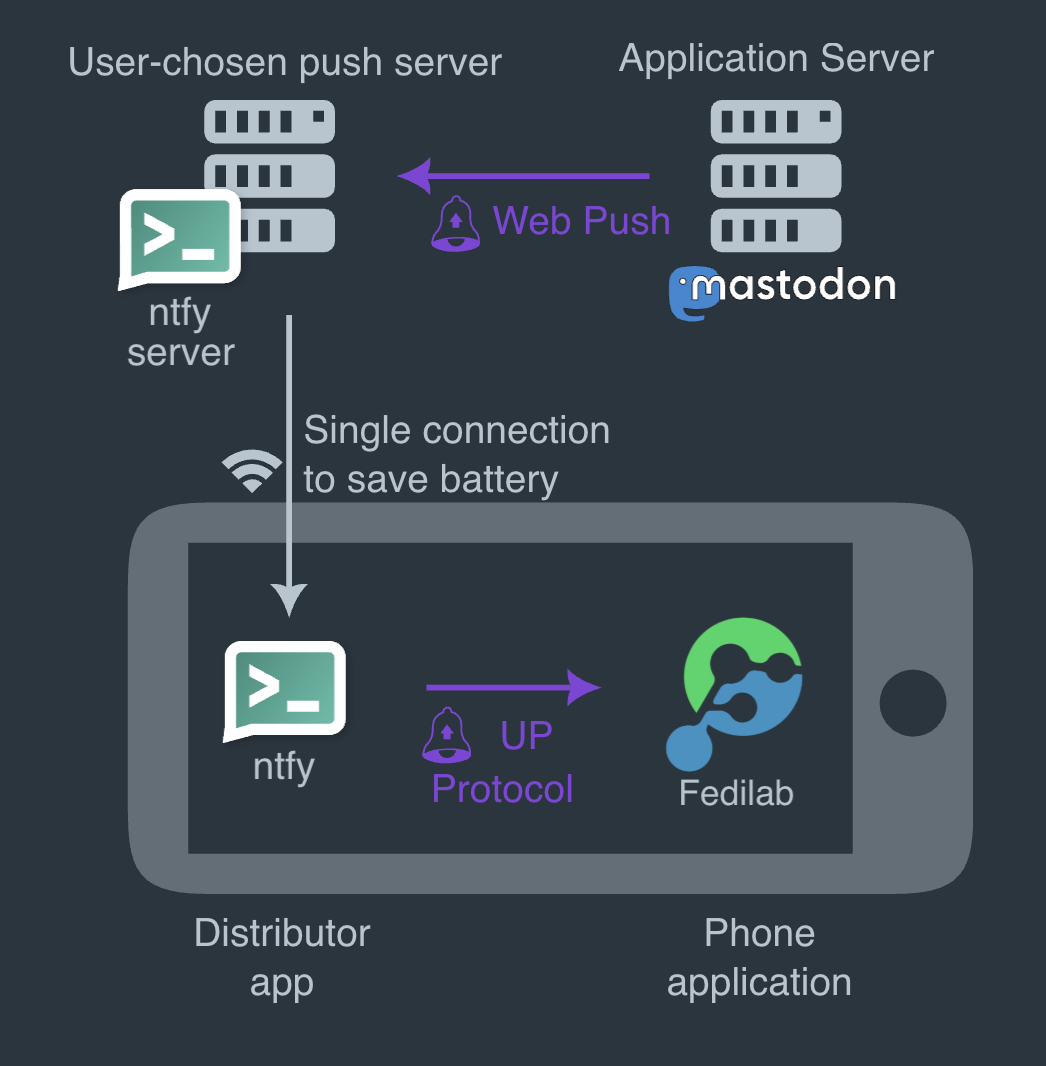
So, together with the application server and the client app, there are totally four components involved:

diagram illustrating UnifiedPush
Diagram of the interactions between components with UnifiedPush.

In this scenario, the client app registers in onto the distributor. The latter contacts the push server to create an endpoint. Once obtained, the endpoint is delivered back to the client app, which transmits it to the application server which stores the endpoint data associated to the user.

When a notification needs to be sent, the application server sends a message to the endpoint it has stored, which points to the push server. The push server processes the message and the distributor, which is subscribed for messages on the push server, proxies the notifications to the client app.

Decoupling the push server and the distributor allows for more flexibility: you are free to use whatever technology best suits you. E.g. on the server side you can choose a self-hosted server like ntfy.sh or NextPush which integrates with NextCloud, SunUp, etc. whereas on the client-side you can use the their counterparts of ntfy and SunUp on Android or dedicated apps (e.g. KUnifiedPush on Linux).

The Breakthrough: Friendica Notifications

Implementing this on Android turned out to be a game-changer. Thanks to the UnifiedPush Android SDK, Raccoon can seamlessly configure distributors, detect when new ones are installed, and let the user choose their preferred routing.

Recommendation

If you are setting this up on Android, I highly recommend using Sunup as your distributor. It is incredibly easy to set up and completely frictionless to use.

The result?

Finally, fully working, privacy-respecting push notifications! With this major milestone ticked off the list, there's officially one excuse less to prefer other Fediverse clients. 😂 🦝

References


  1. If the target platform's server is not directly compatible, Push Gateways are available too. ↩

Better documentation with Zensical

If you have visited Raccoon's user manual recently, you might have noticed a major shift. The layout is cleaner, navigation is intuitive, there's a native search box, and you can finally toggle between light and dark themes.

But why the sudden change?

Beyond GitHub Pages

It all started when I began exploring hosting alternatives like Codeberg. As more open-source projects move toward independent platforms, I wanted to see how Raccoon's documentation would fare outside the GitHub ecosystem.

While GitHub Pages is highly integrated, Codeberg favors a "DIY approach." This forced me to re-evaluate my site generator. Jekyll served us well, but it felt aged. I needed something modern, fast, and specifically built for software documentation.

Search for the right tool

I briefly considered Hugo, Jekyll's successor: it's incredibly powerful, but it felt like overkill for just documentation. Then I found out about Material for MkDocs. It was an "ah-ha" moment: beautiful defaults, easy configuration, and a professional look right out of the box.

However, a warning in the build logs gave me a pause:

Warning from the Material for MkDocs team

MkDocs 2.0, the underlying framework of Material for MkDocs, will introduce backward-incompatible changes, including:

  • All plugins will stop working – the plugin system has been removed
  • All theme overrides will break – the theming system has been rewritten

Following the link in the error message I found this article, explaining that MkDocs 1.x is essentially unmaintained and 2.x is heading in a direction incompatible with the philosophy of Material for MkDocs.

Enter Zensical

That's when I discovered Zensical.

Zensical isn't just another theme; it's the successor to Material for MkDocs, built to solve the fragmentation and maintenance issues of the MkDocs ecosystem. It takes everything I loved about Material — the aesthetics, the ease of use, the rich feature set — and builds it on a more stable, forward-looking foundation.

The migration was fairly easy, thanks to sane defaults and exhaustive documentation. Some of the standout features include:

  • Custom palettes & Dark Mode: effortless switching between light and dark themes;
  • Native search: fast, client-side search that just works;
  • Organization: powerful categorization with tags and multi-language support.

But what truly shines are the Markdown extensions. They allow for a rich documentation experience with features like admonitions, collapsible details, syntax highlighting, code tabs, MathJax formulas, and even emojis.

If you are managing a software project and want documentation that looks as good as your code, Zensical is the way to go.

Question

What about you? Have you found a documentation tool that changed the way you share your work?

Why I decided to migrate away from the Ktorfit library

Why maintaining an open source app is hard…

Maintaining open source projects is not for the faint of heart. Beyond technical competence it requires commitment and dedication, being able to organize and plan time carefully not only to deal with actual implementations but also for triaging user requests/reports, managing public relationships, reviewing external contributions, organizing internal workforce, etc.

It can be daunting, especially for projects maintained by few people (or just one person) in their spare time, considering we all have our regular jobs, families, hobbies, etc. Working on an application other people use in their day by day can be a great responsibility because final users depend on what you do or won't do.

… and a KMP lib is harder

Maintaining an open source library is even harder, because you are providing the building blocks on which third party apps rely, so the exposure to end-users scales up exponentially, responsibilities are much greater and so is the amount of stress maintainers are subjected to.

Kotlin Multiplatform is highly dynamic and ever-evolving ecosystem, where maintaining a library is almost a nightmare: not only the underlying platforms behind each target evolve continuously and independently ‒ JVM, native (macOS / iOS / WatchOS / TvOS / Linux / Android / MinGW) Wasm, JavaScript ‒ but also each new release of the Kotlin compiler can break things, considering JetBrains hasn't stabilized yet the APIs for compiler plugins, so each new version is potentially breaking compatibility.

Beyond the K2 compiler, the same is valid for KSP (Kotlin symbol processor) which has a release cycle close (but not 100% aligned) with the one of the compiler, with every new version potentially requiring adjustments.

Development previews and Release Candidates for both the compiler and the symbol processors are made available for the community before a new stable release becomes public, in order to give both app developers and library maintainers the time to test and adapt; nonetheless it should not be taken for granted that an open source project (especially if maintained by a small group of volunteers) do so, considering there may be other internal priorities when the new version of an external build tool is released.

Our experience

Initial dilemma and a promised solution

With this in mind, let us consider what happened during the last weeks in our apps. Both the Raccoon apps are using Ktor for networking, due to its excellent flexibility and multiplatform support.

But I was used to Retrofit to write endpoint contracts and abstract away how network calls are performed. Using annotations to define service specifications and rely on code generation to create an implementation which internally calls an HTTP client is convenient and can save writing a considerable amount of boilerplate.

Unfortunately, Retrofit is not available on KMP, so there are two alternatives:

  1. use just the Ktor client, which has a nice DSL to configure the base HTTP client as well as each individual request, plus it offers support for authentication, content negotiation (with several serialization options), logging, etc.
  2. use a library like Ktorfit, which is very similar to Retrofit and offers a familiar set of annotations plus all the advantages of code generation.

I wanted to experiment, so in 2023 chose solution 2, and for the Lemmy app there were no issues using Ktorfit in the beginning.

End of the honeymoon

When in 2024 I started working on the Friendica/Mastodon app, some headaches arrived because in some Mastodon APIs for pagination you need to access both the body and the headers of responses. Doing so requires method signatures to change in service definition (and you have to add an additional converter). Having to deal with Response<T> instead of T as a return type started to feel like the boilerplate I wanted to avoid, but I could use it just where it was needed, so overall it was fine.

When KSP 2 reached the stable stage and became the default in April 2025, both apps broke because implicit inference of dependencies between Gradle tasks (and both the Android and iOS compile tasks depended on kspCommonMainKotlinMetadata) changed. But, again, I adapted my setup after spending some time figuring out how to deal with this issue (not documented), and I still thought the benefits from using Ktorfit outnumbered the disadvantages.

Final breakup

The breakup arrived at the end of June 2025, when Kotlin 2.2.0 and KSP 2.2.0-2.0.2 were released. The library broke again, it was not possible to update the Kotlin Multiplatform plugin, which made it risky to upgrade the Gradle distribution and the Android Gradle Plugin (see here for more compatibility details). As if it wasn't enough, I had recently adopted ViewModels from AndroidX lifecycle library, and an incompatibility between the version of the library available for KMP and the AGP version I was stuck on made the Android lint crash ( see here), so my CI pipelines were broken and I had to skip a beta release.

Someone had already filed an issue to Ktorfit maintainers, but the days passed and the fix, even if a contributor had submitted a solution already, was not being merged. People started asking for updates (which is understandable considering the amount of issues I found myself in too) and I took part in the discussion wondering whether this KSP release was the gravestone for the library and switching to plain Ktor (i.e. solution 1) would allow me to escape the impasse. If there were no plans to release a new version in the short term, which is understandable too because the team could have other priorities, it could be a viable option.

And here the hell started. A well known personality in the Compose and Kotlin world, who was not even a direct contributor of the project, replied to me

Quote

Quit complaining, and constantly asking for updates. If you want to write all of the service definitions yourself, then go ahead!

and then, when someone intervened to try and make the tones settle down a little bit, replied angrily

Quote

Are you paying for support? Are you paying for maintenance? I very much doubt it, therefore you have zero right to expect anything.

And yes, at that point enough was enough. I started working on this and this to completely remove Ktorfit from all Procyon projects. The result was quite neat:

  • with dependency injection, you still decouple the service clients and the service implementations;
  • Ktor has a nice DSL to configure request (both centrally and individually).

Considering the unwelcoming community around it, I don't think I'll revert the decision, use Ktorfit again in other projects, submit new report or collaborate with them in any way in the future.

Lessons learned

What lessons did I learn from all this? First of all, as already discussed multiple times here, that choosing wisely your libraries can really make the difference. And by "wisely" I do not only mean that they implement the features they are made for, but also that they are well-maintained, updated regularly and with a positive and supportive community around them. Codes of conduct for open source projects are there for a reason, we can do better than proprietary alternatives, we believe that community in itself is a value and our words / actions reflect this principle.

Secondly, I had to review my opinion on "very important people" in software development. One can have a high degree, a great career, be an active and renowned member of the open source movement and still behave rudely to others, scare away contributors, dismiss arrogantly bug reports, etc.

I still think highly of the person who argued with me: from a technical point of view he is on a level I will probably never reach. But we are humans, we have feelings, we already live in a harsh world and we should try to be kind to each other, especially with those who are not our enemies.

I think replying in that way to someone, without knowing anything of what they are going through IRL and without trying to understand the reasons of their behaviour, shows you have little empathy and — quoting what I've been told when I said I would switch away — «puts you in a bad light».

Koin VS Kodein: a developer's journey through multiplatform DI hell

Dependency injection (or DI) has been the backbone of Android development for years, bringing flexibility, easier refactoring, and proper lifecycle management through decoupling and abstraction. But when you venture into Kotlin Multiplatform (KMP) territory, the comfortable world of Dagger and Hilt suddenly becomes unavailable.

This is the story of my two-year journey building Raccoon for Lemmy and Raccoon for Friendica, and how I learned the hard way that not all DI solutions are created equal.

The multiplatform DI dilemma

Why Dagger & Hilt don't work

The gold standards of Android DI face fundamental barriers in KMP:

  • Java dependency: both rely heavily on generated Java code, making them incompatible with native platforms like iOS;
  • KAPT legacy: until late 2023 (versions < 2.49), Dagger was tightly coupled with KAPT (Kotlin Annotation Processing Tool), while KMP uses KSP (Kotlin Symbol Processor).

Enter the alternatives

With traditional solutions off the table, the KMP community turned to alternatives. Koin emerged as a popular choice, with its lead developer Arnaud Giuliani making bold claims about multiplatform compatibility since 2021.

But here's the thing: Koin isn't actually a proper DI framework — it's a service locator. This distinction matters more than you might think. As a matter of fact, a lot of experienced Android developers do not consider Koin worth to be used large-scaled industry-level projects (as a rule of thumb, the greater the seniority the more "toy tools" are frowned upon). But why trusting blindly other people's prejudices, when you can try things directly?

Round 1: Koin (no annotations)

The setup

When I started Raccoon for Lemmy in 2023, Koin seemed like the logical choice:

  • Strong multiplatform support claims;
  • Integration with Voyager navigation library;
  • Simplified ViewModel injection and lifecycle management.

I went with the manual module definition approach, fully aware of the risks that NoBeanDefFoundException was just around the corner if I misconfigured the DI or forgot to define a binding.

A reality check

The good:

  • Project completed successfully;
  • Apps published on Google Play and F-Droid;
  • Complex interface-to-implementation binding in platform-specific source sets worked.

Concerning the last point, I was also able to handle complex scenarios where you have an interface in the commonMain source set and you want to bind it to different implementations in platform-specific source sets.

The idea was to simply have the native module as an expect val and several actual modules with native bindings (see example below).

The bad:

  • No compile-time validation: NoBeanDefFoundException lurking around every corner;
  • A lot of boilerplate code to define modules manually.

The lack of compile-time safety became increasingly problematic as the project grew. Unlike Dagger, where DI errors prevent compilation, Koin happily lets you ship broken apps if you forget a binding or including some module (it happened, for example here).

Round 2: Koin-Annotations

The promise

When starting Raccoon for Friendica, I decided to challenge myself with Koin-Annotations, lured by promises of:

  • Compile-time validation;
  • Reduced boilerplate;
  • Industry-ready reliability.

An implementation nightmare

KSP configuration hell

Setting up KSP in a multi-module KMP project was not so easy:

  • Documentation was sparse (mid-2024)
  • Trial and error for days
  • Multiple modules made everything trickier, but I eventually created a Gradle convention plugin to properly configure all subprojects.
Platform-specific bindings

The elegant solution for platform-specific implementations became a little more convoluted:

Before (manual):

// in commonMain source set
interface SomeInterface {
    fun someFunction()
}

expect val nativeModule: Module

// in platform-specific source sets
class SomeImplementation : SomeInterface {
    override fun someFunction() = Unit
}

actual val nativeModule = module {
    single<SomeInterface> {
        SomeImplementation()
    }
}

After (with annotations):

// in commonMain source set
interface SomeInterface {
    fun someFunction()
}

@Single
expect class SomeImplementation : SomeInterface {
    override fun someFunction()
}

@Module
expect class SomeModule

// in platform-specific source sets
@Single
actual class SomeImplementation : SomeInterface {
    override fun someFunction() = Unit
}

@Module
@ComponentScan
actual class SomeModule

This required the experimental -Xexpected-actual-classes compiler argument and significantly more boilerplate (notice the repeated @Single scopes, the empty method body in the expect class, etc.).

Nonetheless, I rolled up my sleeves and embarked in the journey:

  • ~200 DI bindings per app
  • Multiple Gradle subprojects
  • Several weeks of intensive work (in my spare time)

The F-Droid catastrophe

Just when I thought the migration was successful, disaster struck. The Lemmy app, which had been successfully building on F-Droid, suddenly failed their reproducible build requirements.

The root cause

Koin-Annotations generates metadata classes with time-based hashes that change on every compilation. This breaks reproducible builds — a critical requirement for F-Droid's security policies.

The maintainer response

I opened an issue explaining the problem. The response was disappointing:

  • No acknowledgment of the issue;
  • Similar issues remain unaddressed after 6+ months;
  • Arrogant dismissal (to the other developer reporting the same issue I encountered): lead maintainer doesn't understand why this is an issue (see here).

For an open-source project where F-Droid represented my main user base, this was unacceptable.

Round 3: Kodein to the rescue

Why Kodein?

Frustrated with Koin's maintainership and technical issues, I looked for alternatives. Kodein caught my attention:

  • "Painless dependency injection" tagline (painkillers were exactly what I needed);
  • Integration with Voyager navigation;
  • No pretentious marketing claims: it was honest about what it is and isn't.

The migration experience

What I expected

Another painful multi-week migration process.

What I got
  • Clear, comprehensive documentation
  • Practical examples
  • Straightforward integration
  • Excellent Compose multiplatform support
Technical considerations

The only "tricky" part was Android Context binding (Koin had dedicated constructs for this):

// in commonMain source set
fun initDi(additionalBuilder: DI.Builder.() -> Unit = {}) {
    RootDI.di =
        DI {
            additionalBuilder()
            // rest of module imports and/or definitions
        }
}

// in androidMain source set
class MainApplication : Application() {
    override fun onCreate() {
        super.onCreate()
        initDi {
            bind<Context> { provider { applicationContext } }
        }
    }
}

whereas in the iOSApp.swift:

@main
struct iOSApp: App {
    init() {
        DiHelperKt.doInitDi { _ in }
    }
}

The results

  • Seamless cross-platform portability
  • No build reproducibility issues
  • Cleaner architecture (thanks to accumulated experience)
  • Reliable, predictable behavior

Key lessons learned

Tool selection matters

For cross-functional infrastructure (DI, navigation, logging), choose tools based on:

  • Maintenance quality: how are issues handled?
  • Community engagement: are contributions properly managed?
  • Documentation: is it clear and comprehensive?
  • Stability vs. innovation balance: new features shouldn't compromise reliability

Design for flexibility

  • Keep DI structure modular and replaceable
  • Abstract away framework-specific details
  • Design interfaces that don't leak implementation concerns
  • Changes are inevitable — embrace them as improvement opportunities

Stay open to innovation

The KMP DI landscape continues evolving. Keep an eye on emerging solutions like:

  • Metro: a promising new KMP DI tool
  • Future Dagger/Hilt KMP support
  • Other community-driven alternatives

The final veredict: a comparison

Aspect Koin (Manual) Koin-Annotations Kodein
Compile-time Safety ❌ ✅ ❌
Setup Complexity ⭐⭐ ⭐⭐⭐⭐⭐ ⭐⭐
Documentation ⭐⭐⭐ ⭐⭐ ⭐⭐⭐⭐⭐
Maintenance ⭐⭐ ⭐ ⭐⭐⭐⭐
F-Droid Compatible ✅ ❌ ✅
Learning Curve ⭐⭐ ⭐⭐⭐⭐ ⭐⭐

Final thoughts

Sometimes the best solution isn't the most popular or heavily marketed one. Kodein's honest, straightforward approach to dependency injection proved more valuable than Koin's flashy promises and problematic execution.

The journey taught me that in software development, as in life, reliability trumps hype every time. When building production applications that need to work across multiple platforms and distribution channels, choose tools that do what they say they will do — nothing more, nothing less.

For your next KMP project, consider giving Kodein a try. Your future self (and your F-Droid users) will thank you.

Question

Have you had similar experiences with DI libraries in KMP? Reach out to your thoughts and war stories!