Skip to content

Our blog

Welcome to the official blog of the Procyon Project! Here we share updates about our Kotlin Multiplatform apps, development challenges, and thoughts on the Fediverse.

Labor Limae: When "Mostly Working" isn't Enough

In his Ars Poetica, Horace uses the term labor limae to define the process by which artists refine their work before publication as if progressively smoothing down sharp edges using a file.

Without any pretension to compare myself to the great Latin poet, I kind of resonate with the filing work he describes, as I recently found several rough edges to be polished in my code, even though I invested a lot of effort to modernize the project and keep it in a healthy state (see last month's article).

Questionable Architecture

For example, I was recently scanning the codebase to find occurrences of position-based destructuring to migrate to new name-based syntax. While doing so, I found a snippet to handle translations duplicated several times, instead of creating a dedicated use case and invoke it.

In this category, it is worth mentioning the undisciplined use of Compose's composition local mechanism accumulated over the years. For each of the custom ones, I even had to add an exclusion rule for Spotless in build configuration. And even for library ones, their usage was sometimes weird, e.g. LocalDensity (to set custom font scale) was provided in three different places with the same exact source.

Another example was that post actions (the ability to reply, share, bookmark, etc.) were exposed through a repository which was accessed directly from the UI layer. A more solid solution would have been to save permissions in the UI model and populate them in the presentation or, even better, pagination logic. The funny thing was that I had already handled custom emojis in the "correct" way, so apart from a suboptimal architectural choice this was also an inconsistency.

Code Inconsistencies

Speaking of inconsistencies, there were reducer functions in ViewModels, where sometimes intent was handled in place, sometimes it was delegated to a private handler method whose naming did not follow a consistent pattern. Moreover, some of the handlers were suspend functions, while others encapsulated asynchronicity inside the function body.

Another inconsistency I found was in assisted injection: sometimes assisted factories were considered an implementation detail and extended a parent interface, sometimes they were exposed directly to call sites. Considering the flexibility provided by the former pattern, I chose to consistently adopt it everywhere: consider the assisted factory an implementation detail and bind it to the public parent interface for clients.

Poor Naming Choices

In computer science there are just two difficult things: cache invalidation, naming things… and off-by-1 errors (sic)!

Raccoon is no exception: there were some confusing legacy naming choices. Suffice it to say that "paged lists" were called "lists with page cursor" and "posts" were called "timeline entries".

The reason why I chose to do so was, in the early days, to not adopt any backend-driven terminology (e.g. Mastodon defines them as "statuses", Friendica calls them "items", etc.). However, my initial choice was verbose and ultimately did not age well: it was too vague to convey any meaning and too verbose.

Overcomplication

In all cases where assisted injection was used were only allowed a single assisted param, using a wrapper data class where multiple values were needed. This was a legacy of Voyager's Koin integration, which somehow survived across the years, even if navigation was migrated first to Compose Navigation and then to Navigation 3; while dependency injection switched to Koin + KSP annotations, Kodein, Kotlin + compiler plugin and finally to Metro. There was no longer any need to wrap values inside a data class and have a single assisted param.

Concerning navigation, I had another "WTF moment" when I realized that my abstractions1 were beautifully architected with interface-implementation and DI annotations, but the concrete class was manually instantiated where needed. And for a good reason, injection would have never worked since there were constructor parameters which couldn't be pulled off Metro's graph as there were no bindings for them (the correct approach was to pass them via assisted injection).

Lack of optimization

Knowing that obfuscation, minification and resource shrinking, if not properly configured, could lead to breakages in release builds, I left those optimizations disabled at the beginning of the development stage. I thought "I'll enable them when I start publishing release builds", then time passed, I started distributing to hundreds of users, and the options remained disabled.

It was not until Google Play warned me that the app could be delisted for not turning on advanced protection that I found the time to turn them on, test and debug, and ship the optimized bundle. I didn't even realize that the APK size, for distribution outside Google Play, had increased since the adoption of Metro, which could be an issue for both third-party store maintainers and users who had to download larger archives.

Considering app size, how about redundant resources? I found I had two variants of the "play" arrow for videos, one with and one without an outlined circle. They are simple vector images, so do not add that much to the final bundle size but, again, isn't it better to have just one?

UX & a11y Pitfalls

Finally, there was a whole list of small interventions for things that got on my nerves every time I used the app.

The search screen was opened with the keyboard opened by design. Ok, but it remained opened when scrolling the lazy list, which felt weird and kept the focus away from the search results. Moreover, worse still, when navigating to another screen (e.g. post detail) and going back to the search, the keyboard reopened. This, again, felt weird and made the search feature feel clunky.

Then, the image detail screen. I designed the feature to handle multiple elements (with a horizontal pager) and multiple media types (images and videos). This was cool, but the image viewer also had a pan-to-zoom behavior, which conflicted with the page scroll gestures. The solution I came up with two years ago, when my only goal was to complete the MVP, was to lock the zoom initially, and change the zoom level with a double tap. Again, this felt unnatural, but it wasn't until last week that I designed a better gesture hierarchy, passing scroll events to the pager unless zoomed in beyond 1x.

Still concerning images, Compose Multiplatform added shared element transitions from version 1.7.0 in October 2024. We're in October 2026 and there was still no use of it in Raccoon, because there was always something more important to do. Well, users deserve better! Version 1.1.7 adds shared element transitions when opening single images from post lists, post detail and user detail.

This was also an occasion to spot all the cases where Modifier.clickable was added to UI components with an empty lambda, which resulted in extraneous ripple effects and accessibility tools incorrectly identifying non-interactive elements as clickable.

And, finally, plain old bugs. For example, the reblog count was incorrect after adding or removing a boost, the navigation drawer could lock in the closed state and never reopen, the list-detail navigation was behaving incorrectly in some paths, predictive back did not always animate correctly on mobile.

Wrapping up

It's easy to let legacy code pile up when things work in "most cases". But true project health isn't always about shipping new features: it's also about the mindset to go back, smooth down rough edges and reconsider previous choices if the experience suggests so.

Refactoring, eliminating bugs and inconsistencies, and tightening up gestures and a11y isn't just a technical exercise. It translates into a faster, smoother, and more user-friendly experience for everyone.

Version 1.1.8 is the result of this "filing" work: lighter binaries, better navigation transitions, intuitive media interactions and a cleaner foundation ready for whatever comes next.

Tip

Labor limae is never really finished, but every pass brings us closer to the polished experience Raccoon users deserve.


  1. Which were used to encapsulate Voyager's Navigator first, then Compose Navigation's NavController and finally Navigation 3's NavBackStack. ↩

The Devil in the Details: Polishing Raccoon's UX

As you may remember from previous articles (here and here), the way Raccoon displays group accounts is a bit special.

Forum Mode: simple by design

Instead of opening them in Classic mode like regular accounts (with four sections: Posts, Posts & Replies, Pinned, Media), groups are displayed in Forum mode with a single section.

This layout1 has the purpose of giving prominence to the "aggregator-like" feature of Friendica, and the screen structure is intentionally simple.

The screen title displays the group name, while the main content is a refreshable list of top-level posts, each of which is the root topic of a discussion thread. Full stop.

Spotting the missing bit

In my main Friendica instance, I have a group account which I use to communicate news and receive feedback. I check it out from time to time to see whether there are bug reports or feature requests.

I don't know how it could have happened… probably because I've always had more important aspects to focus on, but it was not until very recently that I realized Forum mode was missing a crucial bit.

There are basically two ways a user can interact with a group:

  1. Participating in the discussion by either:
    • creating a new thread, which translates to creating a new top-level post mentioning the group;2
    • adding a reply to an existing thread;
  2. Joining the group, which translates to following the account.

In Raccoon, the first kind of interaction had been implemented, documented and optimized. But what about the second one?

No button, no dedicated item in the top app bar actions menu, nothing. Absolutely nothing.

The only way to actually join the group was (ironically) to switch back to Classic mode and use the relationship button which is shown for regular accounts.

Small details, big impact

In order to solve this quite important usability flaw, I chose to implement a header card, very similar to the one used for regular users, except that it is vertically more compact3 to keep the focus on the discussion.

It is weird that I am only realizing this after almost two years, of project development.

However, since groups are a minority of accounts in the current Fediverse, this oversight could go unnoticed.

The telltale sign was a user comment asking to make Classic mode the default, which got me wondering why: what could make a user miss the classic view?

This is part of a continuous effort to make the UI more functional and appealing. I've also recently restyled the app info dialog to have a "fresher" layout (more concise texts, custom logos, etc.).

I am also trying to make interactions with groups easier, literally "a touch of a finger away" for everyone, because it is one of the most powerful and interesting features of the Fediverse.


  1. Which can be disabled in Settings by turning off "Open groups in forum mode by default". ↩

  2. With either an @-style public mention (Mastodon & Friendica) or a !-style private mention (Friendica-only). ↩

  3. The possibility to enable/disable notifications was placed in the top app bar action menu. ↩

Community contributions: sharing is caring

In English, there is this popular phrase "sharing is caring". For introverts, though, this often remains something very difficult to apply in real life. For example, one may hesitate to offer their work out of fear of being judged. Or, on the opposite side, one may find it difficult to accept collaboration from others, wondering what they might expect in return.

Working on apps like Raccoon-s (the Mastodon/Friendica client and the Lemmy one) was an opportunity to put myself to test and see how I would cope with those situations.

In today's article we'll see what kinds of contributors the projects attracted and how each one of them not only shaped the apps themselves but also turned me, as the main developer, into a richer person.

So let's start!

Different types of contributors

To begin, my work exposed me to public criticism. Trust me, a lot of criticism. Especially on Lemmy, where users are known for not being excessively polite or diplomatic.

I must confess that I've not always reacted well to it; e.g. when I closed and reopened the repository under a different organization (see What happened to Raccoon for Lemmy?).

Nonetheless, when this happened, I was surprised to see that there were also people who genuinely appreciated the project, some of them even volunteered to take ownership of it in case I decided to discontinue it.

1. Developers

That leads to the first type of collaboration I got from people online. That moment of crisis, when I was facing being harshly criticized for how a library I used rendered Markdown in August 2024, was also the moment when I met N7-X.

He helped me immensely, both with Markdown rendering and in general with some design decisions I am still applying today. I was impressed to see that someone (in another continent, with a totally different background) wanted to collaborate with me to make the app better, expecting nothing in return.

"Being impressed" is not even the right word, it was heartwarming. And I must admit it helped me get through that difficult moment and find the energy not only to continue working on the project, but also to start new ones.

2. Translators

Then there are translators. Before studying Computer Science and working as a software engineer, I was in the professional translation industry.

Question

Did you notice all apps had Italian and Spanish support from day zero?

This is why I've always been attentive to offer support for localization and to choose the right tools to make localization easier for me as a maintainer and for translators.

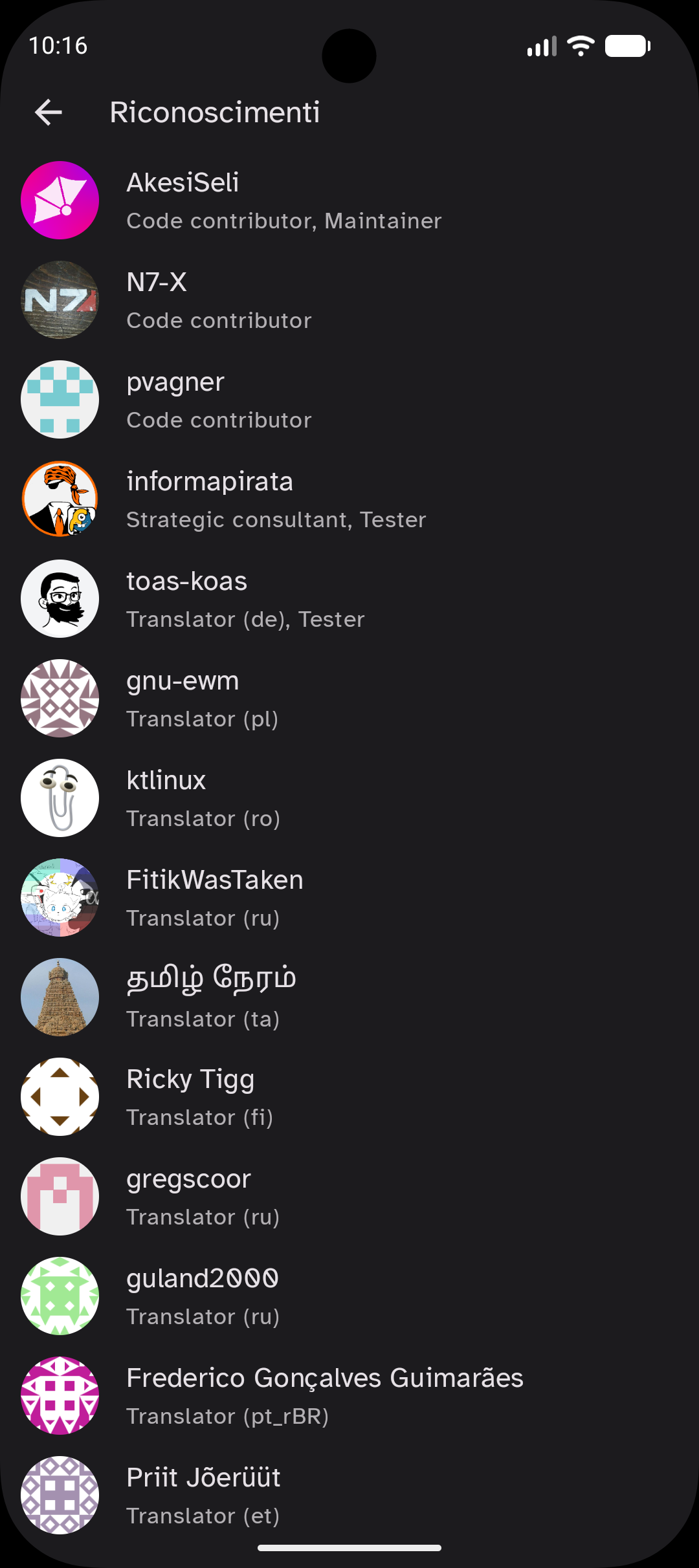
Since I understand the struggles of localization, all translators are given credits in the acknowledgements screen.

acknowledgements screen
A screenshot of the "Acknowledgements" screen.

Tip

Those who submitted translations in the Weblate project also reached out to me to provide feedback, talk about the future of the project, discover who was behind it, etc.

Receiving new translations or proofreads for existing ones was, again, a motivation boost and it was surprising to see how people nearby (e.g., German or Romanian) and from far away (e.g., Tamil or Brazilian Portuguese) wanted to help expand the user base.

3. Accessibility experts

When working on apps / websites professionally, there are legal requirements about accessibility which must be met by all services (see earlier article about advanced a11y), so it should be taken as a given.

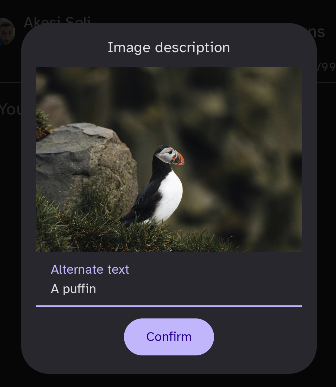
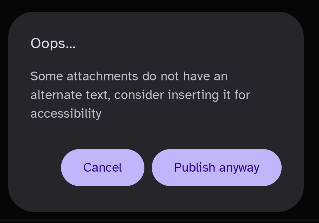
In an open-source "pet project", though, accessibility can be much more discretionary. For Raccoon, I remember making it the default behavior to open a dialog for alternative text and issuing a warning when a post is about to be published with missing alt text.

alt text dialog
Dialog to insert the alt text each time an image is attached.
missing alt text warning
Warning shown when some image attachments are missing the alt text.

Then, I was relying on Compose Multiplatform for the heavy lifting of integrating with accessibility tools, provided that the guidelines and best practices are being followed.

Until one day a lot of unexpected help came from pvagner, who helped me understand some of the issues people using screen readers faced with the original timeline layout, fix them and avoid making the same mistakes again.

One of the purposes of the Fediverse is to create inclusive and diverse communities, and I guess this is also one of the reasons why we work on creating ecosystems for it.

Knowing that in some way I laid my brick to help build that was a sign that the direction is the right one and was a motivation booster for me personally.

4. Strategic advisors

The fourth kind of collaborators I met during my journey was what I would classify as "strategic advisors". For example, while working on the Lemmy client, I met the administrators of feddit.it which is the largest Italian instance.

One of them was the one who first talked to me about the unique features of Friendica and inspired me to create a new client for it.

This person also suggested emphasizing aspects such as rich text formatting and discussion groups, which became one of the most distinctive features of the app compared to similar ones in the open source ecosystem.

Engaging with this kind of input has always been a little challenging because it forced me to question the scope of my work over and over again, adjust the strategy to constantly meet new targets.

But, on the other side, I truly believe that what originates from a constructive discussion is greater than the sum of the components involved. Moreover, having this kind of advisory helped me to prioritize user requests and bug reports (see the next paragraph).

5. Feedback and bug reporters

Finally, there are the most common contributions an open-source project receives: feature requests and bug reports.

Having to deal with these helped me to develop both social and planning skills, which are crucial even in my professional job.

Wrapping up

Working on open source projects can be daunting for introverts, but looking back, it was one of the best decisions I made.

You have no idea how good it feels to create, little by little, something useful (hopefully) for myself and for others.

Plus, this was the occasion to open up to other people, share thoughts, and collaborate to create something together in a period where individualism seems to dominate relationships.

In a word, I would say this felt like "healing" a little bit from the scars of life.

Note

Want to know more about the project? Or, maybe, feel like contributing yourself? Have a look at our GitHub page!

From side project to Procyon: a look behind

As we are approaching the last quarter of the year, it is normal for me to look back at all that has been done in the last months, evaluate the current state of the project and plan for the future.

Live fast, and eat trash (a.k.a. reuse code)

The Raccoon client for Mastodon and Friendica was started during the summer of 2024, as a spin-off of the Lemmy client, whose development had started approximately a year before. The initial core was assembled in a short time, taking heavy inspiration from the already established app, trying to reuse as much as possible of the existing code.

The strategy was, more or less: take the existing architecture, switch the APIs to be compatible with Mastodon/Friendica instances, rewrite the content rendering engine (since Lemmy posts were Markdown-based while Mastodon posts are HTML-based), distribute it fast and see how it is received by the public.

There were minimal variations in the tech stack, e.g. using Room Multiplatform instead of SQLDelight for local persistence, using Sentry for crash reporting (instead of saving traces on device and rely on manual reports), using Mokkery in commonTest instead of MockK on androidHostTest.

KMP in its infancy: the technical debt

As a result, large portions of technical debt inherited from an era when KMP was immature were still sitting there:

  • localization used Lyricist (instead of the CMP resource system);
  • DI using Koin with classic DSL (despite annotations being available);
  • Voyager navigation (despite Compose Navigation being ported to multiplatform);
  • endpoint calls used Ktorfit (breaking at every KSP update);
  • setting encryption still used deprecated EncryptedSharedPreferences on Android;
  • build configuration was scattered in individual scripts across subprojects, with subsequent duplication and potentially subtle inconsistencies.

Paying it back: modernizing the stack

Starting from the end of 2024 and for most of 2025, besides reaching feature parity with existing clients and fixing bugs, I always allocated a great amount of time to evolve the project and pay off that debt.

At the beginning of 2026, the situation was the following:

  • resources and localization had been ported to the built-in CMP system, but icons still relied on Google's Material Icons set, which has been deprecated in the meantime;
  • DI was ported to Koin with KSP annotations, breaking reproducible builds, so Kodein was introduced as a temporary replacement until a more modern solution became available;
  • the navigation system was ported to Compose Navigation with regular AndroidX ViewModels;
  • network calls were implemented with plain Ktor, no need for Ktorfit adapters;
  • a custom layer for preference encryption on Android was introduced;
  • build logic was centralized in a set of convention plugins, consistently applied throughout all subprojects for configuration.

Breaking changes and the road to 1.0

In the meantime, Gradle 9 and AGP 9.x were released, making the project's very structure and most of the build logic obsolete.

Therefore, a series of tough decisions had to be made in order to keep the project "healthy" and release a stable 1.0.0 version:

  • revamp the project's website and documentation to get a more modern and functional look (using Zensical);
  • update Gradle and AGP, aligning with the now recommended project structure;
  • add the JVM target and introduce desktop (with .deb package published at every stable release);
  • introduce support for tablets and large screens using adaptive layouts;
  • replace Material Icons with Material Symbols.

And that was exactly what I prioritized for version 1.0.0, which was released on June 8th, 2026.

Beyond 1.0: surfing the KMP bleeding edge

After the first stable release, I started working on the areas which still needed improvement, such as:

  • Navigation 3 with the concept of Scene and SceneStrategy offers a much more elegant solution to the problem of adapting navigation and screen layout to the available screen size;
  • a new player entered the DI scene on KMP: Metro, which finally promises to solve all the issues of previous solutions: conciseness, compile-time safety, power and flexibility;
  • a new Preview annotation to be used in common code was introduced, making setup easier and cleaner.

Those were essentially the areas where I have been working in the last months, alongside a lot of code cleanup and keeping an "aggressive" update strategy for Kotlin versions (adopting new features as they emerged, e.g. explicit backing fields or the unused return type checker).

New features were added as well, in the meantime, such as:

  • support for quote posts on Mastodon;
  • content translation with LibreTranslate;
  • implementing cross-instance exploration;
  • adding themes for the reply bar in forum view;
  • improve search and suggestion functionality with the transition to /v2 endpoints.

What now? A look ahead

What can be expected for the immediate future, then? First of all, I finally feel that I have a solid foundation to build upon, thanks to the modernization effort I've engaged in.

For sure, on the feature side, support will be added for new Mastodon 4.6 features, such as user collections.

On the UX side, I'd like to leverage some new features of CMP (e.g. Grid) for better attachment rendering (instead of the existing carousels).

Finally, tech-wise, I am looking forward to the moment when rich errors are introduced in the language.

In the meantime, I still have to adopt other language features already in preview, like name-based destructuring. Or, since androidx.lifecycle:lifecycle-*:2.11.0 (and its multiplatform port) introduced Scoped ViewModels, this will be the occasion to isolate responsibilities and trim some VM which had grown too large.

Rekindling the spark: moving Raccoon to Metro

"For now" was doing a lot of heavy lifting

The last article ended with the words "you can consider this the end, for now, of my concerns about DI."

To be honest, when I wrote that sentence, I was far from happy with the state of things. That was precisely why I cautiously tacked on that parenthetical "for now".

The cracks in KCP

Between mid-July and early August, I had, in chronological order:

  • Migrated Raccoon from Kodein back to Koin out of genuine concern for the future of KOSI and the libraries they maintain;
  • Written a convention plugin to factor out common DI configuration across subprojects (adapting 50+ modules in the previous step made me want to make future work easier on myself);
  • Evolved from the "classic DSL" style to the Koin Compiler Plugin (KCP) with annotations, aiming to reduce manual wiring to a minimum and gain compile-time validation.

This was a substantial amount of work — with not a single visible benefit for end-users — and it forced me to freeze all new feature development and enter "maintenance mode," sticking strictly to bug fixes, dependency updates, and code cleanup.

What made it worse was that I wasn't even 100% satisfied with the end result. These were the issues that nagged at me most:

  • Kotlin 2.4.10 incompatibility: KCP wasn't fully compatible with the most recent version of Kotlin, emitting warnings for every module on every build;
  • iOS false positives: compile-time validation triggered false positives on iOS that broke iOS builds entirely, forcing me to disable it (and configuring that conditionally based on build target inside a Gradle convention plugin was anything but straightforward);
  • False negatives and runtime crashes: I realized validation was also yielding false negatives, meaning I could have a perfectly compiling project that still crashed at runtime due to migration oversights, e.g. marking a parameter with @InjectedParam (in either a factory function or a constructor) and then forgetting to pass it at the call site.

Rekindling the spark: Why Metro?

In 2026, there had to be something better in the KMP ecosystem. That's when a tiny voice in my head whispered: "Have you considered switching to Metro?"

I've been doing Android development for longer than I'm comfortable admitting (though my silver hair and beard betray me). I'm quite well-versed in Dagger/Hilt on native Android, and I'd been following the Metro project with keen interest—mixed with equal parts hope and apprehension.

I had spent months reading Zac Sweers' documentation, articles, and posts on the kotlinlang.org Slack, listening to all his talks. I'd been dreaming that one day I could convert Raccoon, while simultaneously worrying about how long and painful such a migration might be.

Last weekend, I started a playground project to test out the framework, evaluate its setup complexity and reproduce the specific edge cases I knew Raccoon presented. Then the work week hit, and it was a tough one. I had to churn through a series of difficult and remarkably unrewarding tasks.

After a couple of days of grinding, I decided I needed to compensate by building something that rekindled that "little spark": the feeling every developer gets when they finish a piece of work and are genuinely satisfied with the outcome.

So, one evening, I took the plunge and started the Metro migration.

Rolling up my sleeves: the migration plan

The following section isn't meant to be a general tutorial on how to use Metro: the project already has excellent documentation, especially if you're already familiar with Dagger/Hilt, kotlin-inject, or Anvil.

Instead, this is a chronicle of my personal approach to migrating Raccoon's specific codebase.

Given its multi-module architecture, I mapped out a six-step plan:

  1. Adapt the build logic and plugin setup;
  2. Define the root graph and entry points;
  3. Migrate core infrastructure;
  4. Migrate the business logic;
  5. Migrate all feature modules;
  6. Final cleanup.

Step 1: Build logic and plugin setup

This step involved creating a Gradle convention plugin to factor out the common DI configuration across all subprojects. The convention plugin applies the dev.zacsweers.metro plugin (version 1.4.3) and provides an extension option to also add the dev.zacsweers.metro:metrox-viewmodel-compose dependency when needed.1

Step 2: Defining the root graph and entry points

Next came defining the RootGraph interface in the :shared subproject, exposing essential accessors like UiDeps (crucial for UI-related dependencies) and AuthManager (required for the OAuth2 login flow):

interface RootGraph : ViewModelGraph {
    val authManager: AuthManager
    val uiDeps: UiDeps
}

Note that this interface is not annotated with @DependencyGraph, because the actual concrete graphs are platform-specific:

// in :androidApp
@DependencyGraph(scope = AppScope::class)
interface AndroidRootGraph :
    RootGraph,
    MetroAppComponentProviders,
    // exposes deps to the PushService subclass
    PushNotificationComponent,
    // exposes deps for the pull notification Worker
    PullNotificationComponent {

    @Provides
    fun provideContext(): Context = MainApplication.instance
}

// in :desktopApp
@DependencyGraph(scope = AppScope::class)
interface DesktopRootGraph : RootGraph

// in the iosMain source set in :shared
@DependencyGraph(scope = AppScope::class)
interface IosRootGraph : RootGraph

The main @Composable entry point of the application was adapted to accept RootGraph as a parameter.

On the platform sides:

  • Android: MainApplication was updated to invoke the createGraph factory inside onCreate(), while MainActivity was updated to retrieve the root graph reference from the Application instance, use it for the OAuth2 login flow, and pass it down into the Composable tree.
  • JVM (desktop): The main() function was updated to call the createGraph factory and pass the resulting graph down into Composition.
  • iOS: MainViewController was updated to lazily call the createGraph factory (passing it into Composition), and iOSApp was adjusted to access AuthManager via MainViewControllerKt.iosRootGraph for OAuth2 authentication.

Step 3: Migrating core infrastructure

In this phase, all subprojects under the :core group were migrated, focusing primarily on remote API services, local persistence, and native utilities. While I won't detail every single class, a couple of key highlights illustrate the flavor of the migration.

Remote API services relied heavily on assisted injection. The centralized factory, which previously relied on Koin's dynamic runtime parameter resolution based on class types, was refactored to use explicit pattern matching over types.

Before:

@Factory
internal class DefaultAppService(@InjectedParam args: ServiceCreationArgs) : AppService {
    /* ... */
}

@Single
internal class DefaultServiceFactory : ServiceFactory, KoinComponent {
    override fun <T : Any> create(clazz: KClass<T>, args: ServiceCreationArgs): T =
        getKoin().get(clazz = clazz, qualifier = null, parameters = { parametersOf(args) })
}

After:

@AssistedInject
class DefaultAppService(@Assisted args: ServiceCreationArgs) : AppService {
    /* ... */
}

@AssistedFactory
fun interface AppServiceFactory {
    fun create(@Assisted args: ServiceCreationArgs): DefaultAppService
}

@ContributesBinding(AppScope::class)
@Inject
class DefaultServiceFactory(
    private val appServiceFactory: AppServiceFactory,
    /* ... other factories... */
) : ServiceFactory {

    override fun <T : Any> create(clazz: KClass<T>, args: ServiceCreationArgs): T {
        val service = when (clazz) {
            AppService::class -> appServiceFactory.create(args)
            /* ... remaining `when` branches with other service types... */
            else -> throw IllegalArgumentException("Unknown service class: ${clazz.simpleName}")
        }
        return clazz.cast(service)
    }
}

I intentionally refrained from migrating @Single to @SingleIn(AppScope::class) here because doing so would be redundant: ServiceFactory is injected only once in the entire project inside ServiceProvider (which itself is a singleton). Furthermore, even if it were injected elsewhere, leaving it unscoped offers distinct advantages:

  • It is a lightweight, stateless object, so instantiation overhead is negligible;
  • It holds no internal state, eliminating concurrency or interference risks;
  • Unscoped instances can be garbage collected as soon as they go out of scope, rather than lingering permanently in memory.

Tip

As a general rule during this migration, leaving dependencies unscoped was always the preferred default whenever possible.

Here is the exact decision heuristic I used to decide whether to scope a dependency or keep it unscoped:

Is the class a ViewModel?
  ├── YES ──> ✅ Use @Inject + @ContributesIntoMap(AppScope::class) with @ViewModelKey
  └── NO ──> Does it hold in-memory state or flows shared across components?
              ├── YES ──> ✅ USE @Inject + @SingleIn(AppScope::class)
              └── NO ──> Is it heavy or expensive to construct?
                          ├── YES ──> ✅ USE @Inject + @SingleIn(AppScope::class)
                          └── NO ──> ❌ DON'T scope ✅ USE unscoped (just @Inject)

Step 4: Migrating the business logic

This step involved migrating all subprojects in the :domain group, which went smoothly without major surprises. The key detail was preserving the singleton scope (@SingleIn(AppScope::class)) for swipe navigation state while keeping newly provided pagination instances unscoped.

In Raccoon, the domain layer also handles push and pull background notifications on Android. As mentioned in Step 2, the dependencies needed inside our background Worker were previously retrieved via Koin and are now exposed through PullNotificationComponent.

Before:

@KoinWorker
internal class CheckNotificationWorker(
    context: Context,
    parameters: WorkerParameters,
    // injected by the framework
    private val inboxManager: InboxManager,
    private val strings: Strings,
) : CoroutineWorker(context, parameters) {
    /* ... */
}

After:

internal class CheckNotificationWorker(
    context: Context,
    parameters: WorkerParameters
) : CoroutineWorker(context, parameters) {

    private val component: PullNotificationComponent
        get() =
            (applicationContext as? MetroApplication)?.appComponentProviders as? PullNotificationComponent
                ?: error("PullNotificationComponent not found")

    private val inboxManager: InboxManager by lazy { component.inboxManager }

    private val strings: Strings by lazy { component.strings }

    /* ... */
}

Step 5: Migrating all feature modules

This group of modules houses UI and presentation logic. For the UI layer, the UiDeps accessor (providing access to UI helpers like NavigationCoordinator, MainRouter, DrawerCoordinator, ClipboardHelper, etc.) introduced in Step 2 finally came into action.

In the old setup, many of these dependencies were fetched directly inside navigation containers using koinInject(). That pattern is typical of service locators, but in anticipation of the Metro migration, I had already minimized those calls. Now, after retrieving UiDeps from RootGraph, it is passed down through child composables via a CompositionLocal.2

As for presentation logic, ViewModels are the star of the show, and the metrox-viewmodel-compose artifact made migrating them surprisingly straightforward.

Many ViewModels take assisted constructor parameters (e.g., navigation arguments). We already saw how @AssistedInject works in Step 3; the only new requirement here was subclassing ViewModelAssistedFactory and annotating it with @ViewModelAssistedFactoryKey:

@AssistedInject
class LoginViewModel(
    @Assisted args: LoginViewModelArgs,
    /* ... all non-assisted injected params... */
) : ViewModel() {
    /* ... */

    companion object {
        val KEY_ARGS = CreationExtras.Key<LoginViewModelArgs>()
    }
}

@Serializable
data class LoginViewModelArgs(val type: LoginType)

@AssistedFactory
@ViewModelAssistedFactoryKey(LoginViewModel::class)
@ContributesIntoMap(AppScope::class)
interface LoginViewModelFactory : ViewModelAssistedFactory {
    override fun create(extras: CreationExtras): LoginViewModel =
        create(extras[KEY_ARGS] ?: error("ViewModel args not found"))

    fun create(@Assisted args: LoginViewModelArgs): LoginViewModel
}

At the call site, assistedMetroViewModel() serves as a near drop-in replacement for koinViewModel(), with arguments passed through CreationExtras:

val model = assistedMetroViewModel<LoginViewModel>(
    extras = CreationExtras {
        this[KEY_ARGS] = LoginViewModelArgs(loginType.toLoginType())
    },
)

The non-assisted case, on the other hand, is even simpler:3

@ContributesIntoMap(AppScope::class)
@ViewModelKey
@Inject
@OptIn(FlowPreview::class)
class TimelineViewModel(
    /* ... injected params... */
) : ViewModel() {
    /* ... */
}

Where at the composable call site, it boils down to:

val model = metroViewModel<TimelineViewModel>()

Step 6: Final cleanup

This was by far the most satisfying part: stripping out all Koin references, cleaning up the version catalog, and deleting the DI setup helper object where all Koin @Modules were previously registered by hand.

The battle scars: Top technical blockers

Unsurprisingly, when migrating a medium-sized project with 50+ modules and 150+ injected dependencies, not everything worked perfectly on the first attempt. Here is a breakdown of the mistakes I made along the way—along with their symptoms, root causes, and fixes.

1. Multi-module Gradle dependency scope

  • Symptom: Compile-time error ([Metro/MissingBinding]) or, worse, runtime IllegalArgumentException when building :androidApp.
  • Cause: :shared included feature modules using implementation(projects.feature.timeline). In Gradle, implementation isolates transitive dependencies. Metro's @DependencyGraph processor running in :androidApp couldn't discover @ContributesBinding/@ContributesIntoMap in feature modules because they were missing from :androidApp's compilation classpath.
  • Solution: Replace implementation with api in shared/build.gradle.kts for all feature and domain modules.

2. Visibility modifiers and cross-module bindings

  • Symptom: Compile-time error ([Metro/MissingBinding]).
  • Cause: Classes annotated with @ContributesBinding(AppScope::class) were declared as internal. Metro generates internal bindings that the root graph in platform-specific modules ( :androidApp or :desktopApp) cannot access across Gradle module boundaries.
  • Solution: Remove the internal visibility modifier from @ContributesBinding-annotated classes.

3. ViewModel multi-bindings with multiple supertypes

  • Symptom: Compile error: @ContributesIntoMap-annotated class doesn't declare an explicit binding type but has multiple supertypes.
  • Cause: ViewModels that extended ViewModel() and also implemented MVI contract interfaces had multiple supertypes, creating ambiguity for Metro's implicit supertype resolution.
  • Solution: Explicitly pass the binding parameter and use @ViewModelKey inside the generic type argument e.g. binding<@ViewModelKey ViewModel>() (leaving the interred class key).

4. Swift / KMP Framework export boundaries

Last but not least, a KotlinNativeTarget configuration issue!

  • Symptom: Swift compilation error: cannot find 'X' in scope or type 'MainViewControllerKt' has no member X.
  • Cause: Swift only exposes types from packages explicitly listed in the framework's export declaration. Top-level functions in non-exported files or Kotlin objects outside exported packages are omitted from the generated Swift header.
  • Solution: Ensure the KMP framework is configured with the correct export(...) directives and that :shared exposes its transitive dependencies via api ( see Blocker 1).

  1. The dev.zacsweers.metro:metrox-android dependency was added manually to the :androidApp module. ↩

  2. This was also a great opportunity to refactor our CompositionLocal providers and streamline the "startup ceremony" required for UI components (making UI tests and Compose previews much cleaner). ↩

  3. In my case, it was slightly more involved because in my MVI setup all ViewModels also implement another interface, and the UI refers to them through that interface type. See Blocker 3 for a more detailed explanation. ↩

Koin is back, b*tches!

If you remember, last summer I wrote a technical article about DI and why our Raccoon apps, which had always used Koin from the beginning in 2023, were both migrated to Kodein at the end of 2024.

TL;DR

There was an issue with the 2.0.0-Beta version of Koin Annotation which broke reproducible builds, which blocked releases on F-Droid. I reported the issue but it remained unanswered and unnoticed for months.

An unwanted Christmas present

A year and a half later, I still do not have good memories of that migration. I completed it around the last week of December, and it was a bitter Christmas present. It just felt "wrong" in many ways.

In the first place, Kodein was not on the same level of completeness, and I had to manually write some missing connectors, e.g. for lifecycle-viewmodel integration. Secondly, I had to switch from a powerful annotation set to define bindings to manual wiring, just as with Koin's classic DSL.

So I was left with all the advantages and disadvantages of a classic DSL-based service locator (which apply both to Kodein and to Koin with the classic DSL):

Feature
Multiplatform support âś…
Flexibility (definition and call site) âś…
Conciseness ❌
Compile-time validation ❌
Performance ❌

Yes, it is true that this works seamlessly across all supported platforms (even if, as usual, the iOS build was more complicated). It is also easy to integrate and flexible (perhaps excessively so, considering it's possible to retrieve a dependency at whatever level of the architecture). On the downside, manual wiring via DSL implies boilerplate, there is no compile time safety so missing bindings result in runtime crashes and, last but not least, there's some overhead since resolution only happens at runtime.

I could accept this as a temporary tradeoff in order to have reproducible builds back, but I was keeping an eye on the Koin library evolution, waiting for the right moment to come back. And, as of 2026, that moment seems to have finally arrived.

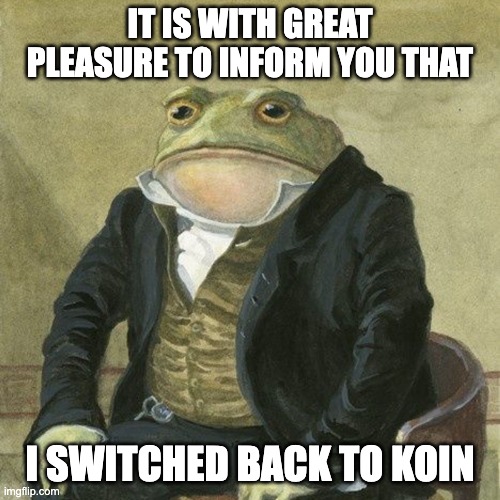
"it is with great pleasure to inform you" frog meme

But, this time, it's done the "right way".

Why a change was needed

Technical considerations

As anticipated, there were some compromises. I had to accept maintaining a fair amount of boilerplate (scattered along 50+ module definitions per project), because no matter how well-thought DSLs are, you still have to manually wire components, i.e.:

  • Scoping: define the lifetime of each component and scope it correctly;
  • Binding: provide implementors using the qualifiers provided by the framework (typically a combination of type and names/tags);
  • Assisted injection: deal with the cases when some constructor parameters are dynamically passed at runtime, while some others are provided by the framework itself.

I also had to give up on safety, i.e. not get compile time errors if the DI setup is incorrect, e.g.:

  • Missing bindings: some dependency is used somewhere, but it is defined nowhere;
  • Conflicting bindings: there are multiple dependency definitions with the same qualifiers, leading to resolution ambiguity;
  • Cycles: the DI graph needs to be acyclic, it is not possible to have direct or indirect recursion, i.e. it is not possible to require in order to instantiate a component anything requiring the component itself (potentially across multiple indirection levels)

Finally, there were some performance tradeoffs I had to accept: using the service locator pattern implies that dependencies can only be resolved at runtime, with some inevitable overhead.

While these issues affect both Kodein and Koin, the latter has been maturing year after year and is going towards a different direction, whereas the former has been stalling. Which leads towards a second set of reasons why I was considering a change.

Political considerations

There were increasingly worrying signals about how the KOSI project is maintained, detailed in the public Manifesto.

  • Development Bottleneck: core maintainers operate as a commercial agency and explicitly shifted focus, reducing their open-source bandwidth;
  • Ecosystem Stagnation: Secondary projects have been frozen rather than community-delegated.1
  • Strict Governance: the organization acts as a closed ecosystem to protect the corporate brand. Community pull requests are accepted only in isolation, and the project does not onboard independent co-maintainers (applications are denied in spite of workforce being needed to implement feature requests).
  • Architectural Stalling: The project maintains an intentional distance from modern compilation features, such as compile-time verification.

Salomon Brys, one of the two core maintainers, publicly stated:

we believe that compile-time verification is way to [sic] restrictive and leads to a lot of complications when we want to provide flexibility

This sets them apart from the current industry trend towards increased compile-time safety.

The migration steps

In our Code of Conduct, the last bit says "Never give up". Even when this implies taking difficult decisions. Every technical challenge is an opportunity for improvement, experimenting and having fun.

Sometimes development, like life, moves in spirals rather than in a straight line and in order to advance further a phase when it seems like you are going backwards may be required.

Tip

In order to better understand the following, remember that DI is like a two-side coin (koin?):

  • Definition Site: where each component is scoped and bound;
  • Call Site: where a component is required and accessed in client code.

The first step was migrating back from Kodein to the initial "classic DSL" Koin, where each use case had almost a one-to-one equivalent2 at least at the definition site.

Secondly, I worked on cleaning up all the cruft, i.e. removing the "glue code" I had to write to make up for what Kodein was lacking (Compose integration, ViewModel integration etc.), which mostly was on the call site.

In the third place I migrated from the "classic DSL" to the new Compiler Plugin (KCP) DSL at the definition site, which already added compile-time validation and performance: all dependencies were determined and validated at compile time.

As a fourth step, again at the definition site, I migrated to annotations, in order to remove all boilerplate and leverage component scanning and automatic wiring (e.g. when a class implements only an interface the binding is automatically done).

Final outcome

The result has the best of both worlds: the flexibility of a service locator, the safety of a full-fledged DI framework.

Feature
Multiplatform support âś…
Flexibility âś…
Conciseness âś…
Compile-time validation âś…
Performance âś…

Moreover, Koin has established itself as the leading framework for DI on KMP. It has extensive documentation and tooling, and it is backed by an active group of users and maintainers and has grown over time, showing maturity and openness towards community feedback.

Lessons learned

I tend to be open-minded towards tools and I chose to use libraries like Koin and Kodein no matter how much they were frowned upon by my colleagues as professional Android developers (accustomed to Dagger/Hilt safety and power). However, I remember having thought my coworkers were probably right when the reproducibility problem hit.

I remember how angry I was when one single library was acting as a road blocker and preventing updates from being distributed on app stores, and I swore I would never go back to Koin in my life.

But eventually I appreciated the commitment of Arnaud and his team; I listened to him in person at KotlinConf some year ago, which was really impressive. I was really grateful for their listening to community feedback, abandoning the old KSP-based approach in favor of the new KCP.

Changing one's mind is a sign of intelligence and maturity, and I was genuinely happy to change my mind with this respect.

You can consider this the end, for now, of my concerns about DI in Raccoon.3


  1. For example, the official Kodein-DB repository has been explicitly labeled as a "Project paused" with the caveat that it would not be maintained in its current form. ↩

  2. Except that Kodein has three ways of defining bindings: singleton (single instance), provider (new instance each time, no arguments) and factory (new instance each time with assisted arguments); whereas Koin has only two: single and factory (with or without arguments). ↩

  3. As told in the previous article, Metro looks great, but I am still evaluating it, considering both technical features and the way is maintained. ↩

The Intentional Raccoon: Why I Code the Hard Way

Do you remember the reaction my admin friend got when they published a post about Raccoon's 1.0.0 release on lemmy.world?

Lemmy users will be Lemmy users: radical, aggressive, self-referential. I tried to work "for" them in the past and create a client app, but for my IRL mental sanity I had to take several pauses over time, and now I am considering archiving that project altogether.1

Let alone the attitude, let alone that the OP was accused of being a bot for using a human expression like "finally", the concerns expressed are real and shared by more and more people.

The Reverse Turing Test

As the Internet is being flooded by AI-generated content, some people are becoming paranoid about "AI slop". It seems like they have nothing better to do than Turing-test everything to detect any non-human footprint and, if they do, they start throwing stones, crying about techno-feudalism, spread alarmism about electricity or water consumption, etc.

What made me most sad about this episode is that the person who was accusing didn't spend any time trying to understand who he was talking to and what he was talking about. So, here is my attempt to clarify who I am and what my personal position is on AI usage in OSS development, especially as side-projects are concerned.

A Choice of Freedom

I got a university degree in CS. I've been working in IT for fifteen years at several different companies. I've been experiencing on my own skin what being into the "meat grinder" feels like, long before 2022 when ChatGPT promised to solve all mankind's (and programmers') issues.

At work, I have to deal with unrealistic deadlines (not decided by me), maintain legacy code ( written by people who left the company), adhere to conventions or obey someone else's decisions ( I don't fully share).

Even when, how much and from which provider to use AI is not my decision from 9 to 6, when I sit at my desk in the office.

Side projects have always been an "escape way" to me. When I come home (in evenings and weekends) and open my IDE I have a totally different approach. I am free to experiment, scout new technologies I like, learn things I choose, set my own schedule and priorities without checking the clock, write and organize code according to my personal taste. There's more, usually I solve real problems I experience in my life in first person.

There is something deeply personal in that. It makes me feel the joy of creating something with my commitment, week after week, like growing a tree. It makes me feel a sense of achievement whenever I implement a feature request or fix a bug, which is greater the more difficult it was to get to the solution, like in a videogame (quest - reward).2

To be honest, developing "at my pace" also has a nostalgic bit to it: it reminds me of an era when developing software still had some "craftsmanship" in it, when I was younger and the future still seemed bright.

If I vibe-coded my apps, what would I get? I would give up on all creativity. The "videogame" dynamic would almost be gone. I wouldn't learn anything which enriches me as a person and as a professional.

Assembly vs. Craft

Working in my 9-to-6 job has always felt like being in an assembly line. You clock in, the machine starts grinding, you have to follow the rhythm, there's no questioning. Efficiency (reduce time to save company's money), functionality (adhere to requirements someone else decided), predictability (enforce standards and prioritize repeatability) are key.

But we all remember «Modern Times» by Chaplin, that is alienating. I am not saying that in my Raccoon apps everything is handmade, I use several third-party libraries and I didn't reinvent the wheel for networking, persistence, data (un)marshaling, UI, etc. But I still choose how all the pieces fit together, like assembling an IKEA piece of furniture.

And, I will never insist too much on it, there's value in learning something the hard way, trying things out, disassembling and reassembling elements to study the internals, is not at all a waste of time. Scientists and technicians, we need to experiment, observe and interpret our results to progress. And the struggle is a great teacher in that: remove the struggle, impoverish the learning.

And resorting to shortcuts is self-inflicted damage too. AI may be wiping out the process of writing code, especially at big scale in large companies. But the ability to understand the "why" behind each line of code is not being superseded: you need it to evaluate and review AI generated code.

Conclusion: Pro-Intentionality, not Anti-AI

The fact that Linus Torvalds recently said that AI is clearly a useful tool, that Linux is not an anti-AI project, and that anyone with issues with that should fork it and go their way, has generated a lot of debate (source here).

Yes, that is true, especially in a project like the Linux kernel where efficiency and scale are the only metrics. For industrial usage, AI makes perfectly sense from an economic point of view.

Nonetheless, the Procyon Project feels like a "workshop" to me (not an industrial "factory") and there is space for human creativity.

Like an artisan pours a little bit of themselves in each one of their works, when side projects are approached like a craft (and not a utility) something similar happens. And the "soul" emerges in little weird details, e.g. some play on words in the theme names.

LLMs aim for the "average" result based on their training data, human work aims for specificities. To me, like to many other devs I guess, there are projects which feel like a "sacred space" for manual craft.

Question

Where do you draw the line between using AI for productivity and letting it take over the "fun" part of your development process?


  1. Or, rather, merging the Lemmy client into the Mastodon / Friendica one, since it is already multi-instance. ↩

  2. The more problems I solve, the more experience I gain, which makes me a better professional in my 9-to-6 job, stay tuned for more in a future article. ↩

On mobile, and increasingly on desktop, every app needs a solid navigation system. It isn't just a UI pattern (like master-detail) or managing back gestures; it's the very skeleton of the user experience and a fundamental block in the user's mental model. When taking certain actions, users expect to transition from one fullscreen page to another; when taking others, they expect a modal (dialog or bottom sheet) to appear, and so on.

Why Navigation is Complex

Unfortunately, Navigation is rarely straightforward. In declarative UI paradigms like Compose, components render a state that needs to be retained across recompositions. Depending on the platform, this state must also survive configuration changes and process death.

As I discussed in a previous article, state holders have lifecycles bound to a view's visibility. When a view enters the viewport, the holder is born; when it's gone, it's destroyed to free up memory.

Sometimes, parameters need to be passed back and forth between navigation entries: input data for an item accessed from a list, or output data from a user selection. Other times, "shared data" must be retained across several entries, such as in wizards or user journeys spanning multiple screens.

All of this has deep implications for DI, memory management, and app architecture.

Choosing a Path

When I started with CMP in 2023, JetBrains hadn't yet released an official navigation solution. The community filled this void with several alternatives:

In my early experiments, I tested Precompose and Decompose on desktop but ultimately chose Voyager for mobile. Its practicality was its biggest selling point: the "Holy Trinity" of Screen, ScreenModel, and Navigator made everything feel easy and compact.

The Voyager Reality Check

To be honest: something felt off right from the start: the model was quite intrusive. In Compose, all UI elements (including fullscreen pages) are functions, but in Voyager, screens were objects. Over time, as complexity piled up, cracks began to show.

The Serialization Trap

I discovered the hard way that Screens aren't regular objects that can hold any instance variables. On Android, for example, all their members must be either primitives or types that can be stored in a Bundle.

To handle multiplatform state restoration, you have to define an expect interface,1 actualized by a tagging interface on non-JVM platforms and by a typealias of java.io.Serializable (details here).

This was quite fragile and I remember it breaking during Gradle/AGP upgrades.

I eventually opted to fall back on primitives (like IDs) for passing data between screens and added a custom cache layer just to store items before a transition.

Even before tackling adaptive layouts, I had to deal with nested navigation (main stack + bottom bar + drawer). I ended up encapsulating the logic into adapters and helpers (like NavigationCoordinator and NavigationAdapter, plus a MainRouter to manage modularization by feature).

Then there were deep links. Voyager's own documentation admits that it doesn't provide a built-in solution for handling deep link URIs.

Switch to Navigation Compose

In 2024, JetBrains ported Navigation Compose to Multiplatform, starting with version 1.6.10. By the end of that year, version 1.7.0 also introduced type-safe navigation.

Therefore, in mid-2025, I took the opportunity to migrate the whole project. It wasn't easy, it took roughly one week per project,2 but moving to a standard solution felt like finally having solid ground under my feet.

Ironically, the adapters I created to encapsulate Voyager's workarounds proved useful. They decoupled the client project from the navigation library itself, so the migration mostly involved changing those internal classes: instead of wrapping a Navigator instance, they wrapped around a NavController.

But the story didn't end there. By late 2025, I planned to add desktop support and improve layouts for tablets and foldables. This meant dealing with Adaptive Layouts: representing master-detail as two separate screens on small devices but as a two-pane single screen on larger ones (using ListDetailPaneScaffold).

In Navigation Compose, I ended up with two different navigation graphs: dedicated two-pane destinations for large screens and separate destinations for mobile.

Enter Navigation 3

Meanwhile, Google released Navigation 3. Its biggest advantage was giving the client app full ownership of the backstack. It also introduced SceneStrategy, which decoupled navigation entries from their layout strategy. This meant master and detail destination definitions could remain independent of how they were presented.

Navigation 3 entered CMP in version 1.10.0 at the start of 2026. Roughly a year after moving to Navigation Compose, I decided to re-migrate everything to Navigation 3.

For those interested, here is my migration checklist:

  • ensure all destinations comply with the NavKey interface and setting up SavedStateConfiguration for multiplatform state restoration;
  • replace old constructs (NavHost, NavController, NavGraph) with the new ones (NavDisplay, NavBackStack, NavEntryDecorator, SceneStrategy);
  • remove ListDetailPaneScaffold usages and cleaning up the dual graph definitions;
  • tests, tests and more tests (both automated and manual ones).

This time, my adapters turned against me. The recommended approach for Navigation 3 is to use a NavigationState holder and a Navigator class (see the migration guide), whereas I was relying on NavigationCoordinator and NavigationAdapter.

Eventually I chose to keep my existing surface API but updated the internal implementation, which was also a great excuse to polish some "encrustations of time" like an old throttling mechanism which was not needed any more.

Lessons Learned

If I could go back to 2023, here is what I'd tell myself:

  1. Standardization > Easiness: A compact library might save time today but cost months tomorrow.
  2. Mind compromises: Don't pick a library that treats deep links as an afterthought, choices can backfire.
  3. Build Adaptive from Day One: Even if you're only on mobile now, you'll want those extra pixels later.
  4. Be prepared to change: As already stated in other articles in this blog, changes are inevitable, so embrace them as improvement opportunities.

  1. Expect/actual classes and interfaces are in Beta. You can opt in with the compiler flag -Xexpect-actual-classes. ↩

  2. Specifically, migrating both the Mastodon/Friendica client and the Lemmy client. ↩

Rendering ActivityPub groups (Part 2)

In Part 1 we described what a group is and how its contents are displayed in the so-called "Forum Mode" in Raccoon. As a quick reminder, the main page contains the list of first-level posts re-shared by the group, which roughly correspond to classic forum "threads".

Each thread can be opened to access its detail screen containing the discussion. The thread detail screen has the following layout: the initial post by the OP is displayed at the top and replies appear below.

In this article we will explain how the raccoon proceeds to "dig though the trash" and go deeper and deeper in the discussion thread.

The Family Tree

In a discussion each element has exactly one parent, except for the initial post which has none and is the common ancestor of all others.

In Computer Science, this data structure is called a tree, where the initial post is the root node. This means that conversations are intrinsically hierarchical, where the context of each post is made up of:

  • its parent and ancestors up to the root node;
  • its children and descendants below it.
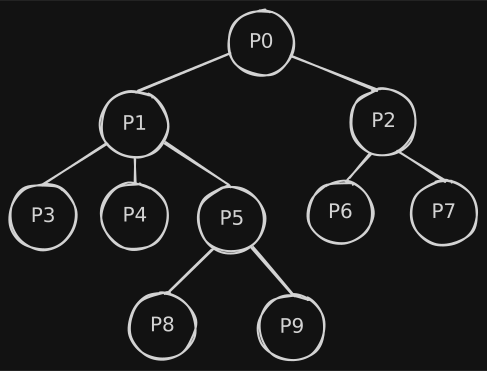
sample reply tree
Underlying representation of replies as a tree.

Making Threads Look Good

In order to follow a discussion as a reader and writer, it is important to quickly identify two types of relationships:

  • who is answering to whom, i.e. parents and children;
  • posts on the same level because they have the same parent, i.e. siblings.

In order to guide the user in identifying these, two visual elements are introduced:

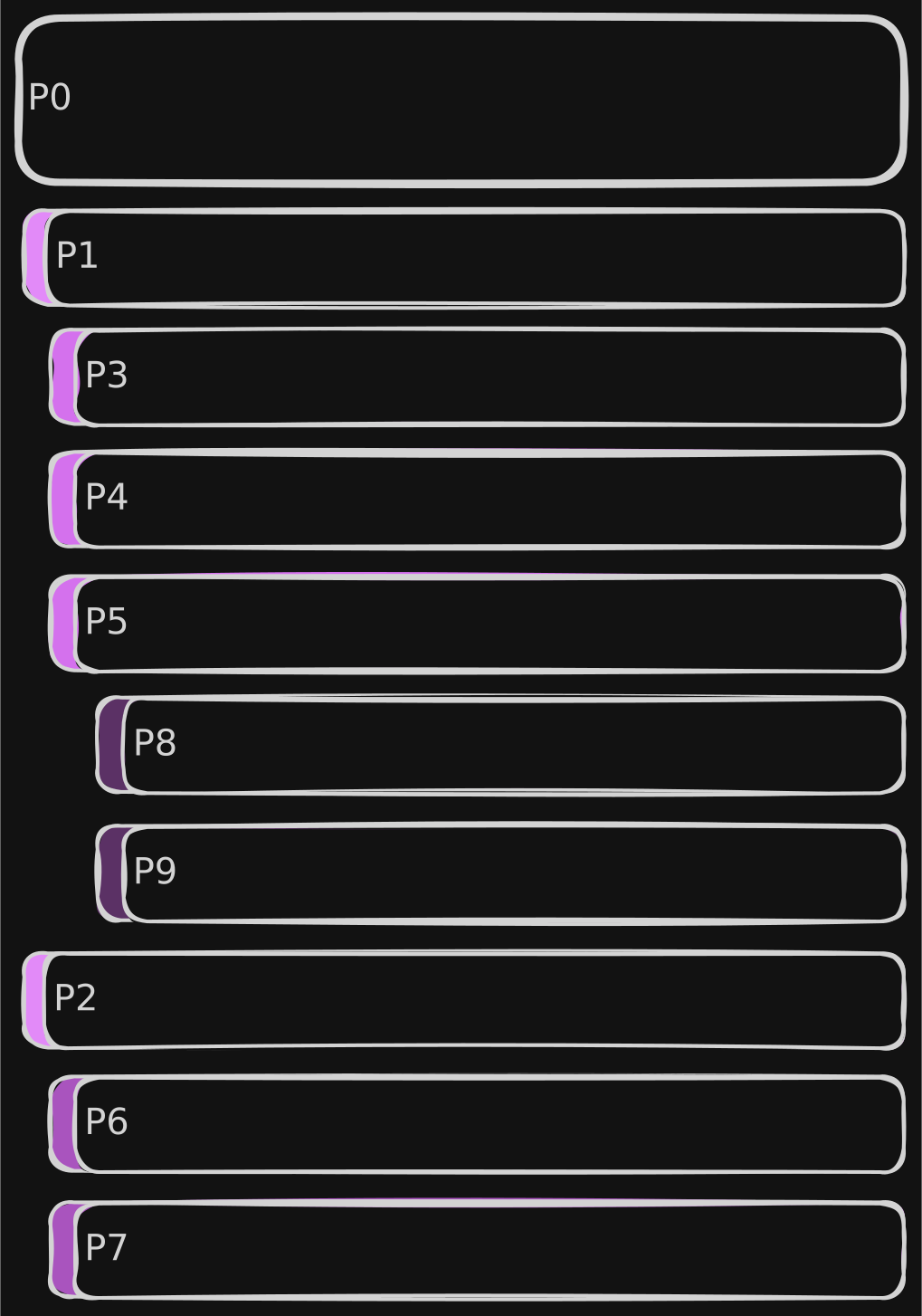
  • visual offset: posts are progressively indented according to their depth level;
  • comment bar: a colorful bar is displayed laterally with the full height of the post body, so that posts of the same level can be easily identified.1
sample reply list
Visual representation of replies as a list.

Completeness is Key

Reply trees can grow indefinitely (both in breadth and depth) and, it is very important to make sure that:

  • no unneeded extra data is downloaded: more data means more time to load as well as more bandwidth, memory and power consumption;
  • at the same time, if each data fetch is partial, not too many requests are done to the instance, to avoid overloading servers.

As anticipated in part 1, Mastodon APIs offer an endpoint to fetch the context of a post: GET v1/statuses/:id/context. On Mastodon instances, the resulting context is capped to 40 ancestors and 60 descendants with a max depth of 20 for unauthenticated requests, 4096 ancestors and 4096 descendants with unlimited depth for authenticated requests.

API Considerations

Unfortunately, on Friendica this API has historically always been problematic. Friendica is built to aggregate different networks and protocols (ActivityPub, Diaspora, RSS feeds, etc.). Probably due to the more complex DB structure, results of the context API are kwnown to be truncated, with some reply branches entirely missing.

In order to overcome this issue, the only solution was to populate the tree manually. As an example, let's imagine "P0", "P1", etc. to be the post IDs. Let's also assume that response for a GET v1/statuses/P0/context would be the following JSON, where descendants are truncated at the first level:

{
  "ancestors": [],
  "descendants": [
    {
      "id": "P1",
      "replies_count": 3,
      // ...
    },
    {
      "id": "P2",
      "replies_count": 2,
      // ...
    }
  ]
}

We know that the post has no ancestors and has two descendants, one of which with three replies. In order to reconstruct the rest of the tree, we need to: iterate over all descendants having a reply count greater than zero (non-leaves), collect their first-level descendants, then proceed downwards in all subtrees recursively until leaves are reached in every path.

In the process, it is important that we keep track the depth of each post, in order to properly indent them in the layout and for another reason we'll discuss later.

Considering that conversations can grow indefinitely, another condition should be imposed: stop fetching data when a threshold depth is reached, to avoid overloading the server with too many requests and fetching data that the reader may not even be interested to see. The depth property we have been calculating earlier may be useful with this respect.

Since the tree we manipulate is incomplete, we also need to be able to identify those "pruning points" and be able to load the remaining subtree (on-demand) at a later point. Again, the depth property we have been calculating can be used, in conjunction with the reply_count we get from the server.

Step 1: Grow the Tree

private data class Node(
    val entry: TimelineEntryModel,
    var children: List<Node> = listOf(),
)

private suspend fun populateTree(node: Node, depth: Int, max: Int) {
    if (node.entry.replyCount == 0 || depth >= max) {
        return
    }
    val descendants = repository.getContext(node.entry.id)?.descendants.orEmpty()
    val children = descendants.mapNotNull { child ->
        Node(entry = child.copy(depth = node.entry.depth + 1))
    }
    for (child in children) {
        populateTree(node = child, depth = depth + 1, max = max)
    }
    node.children = children
}

Let's break down the code:

  • lines 1-4 define a data structure to represent tree nodes;
  • line 6 contains the function signature, where in the params:
    • depth is the current level in the tree;
    • max is the threshold depth;
  • lines 7-9 contains the base cases, either the current node is a leaf or the max depth is reached;
  • line 10 fetches the post's context from the server and extract the descendants;
  • lines 11-13 retain each node's absolute depth and create the list of children;
  • lines 14-16 recursively calls the function for each child node;
  • line 17 populates the children of the current node.

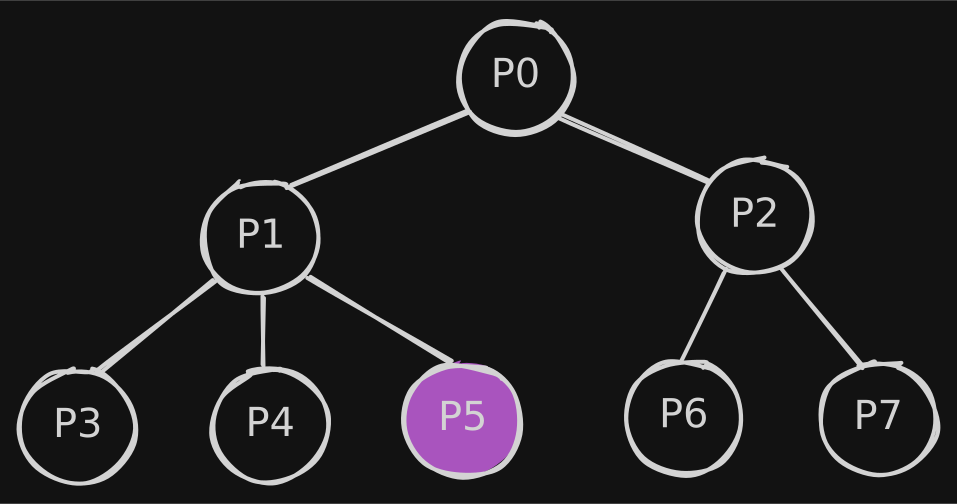
Imagine we call this function on P0 with max = 2, the result would be:

sample reply list

where in "P5" we know (by its replyCount) that are 2 descendants, but we did not fetch any of them.

Step 2: Linearize the Tree

Building the tree is only half of the puzzle, though. As we've seen earlier posts must be laid out in a list and in a very specific order.

In order to do so, we have another recursive helper:

1
2
3
4
5
6
private fun MutableList<TimelineEntryModel>.linearize(node: Node) {
    add(node.entry)
    for (child in node.children) {
        linearize(child)
    }
}

which traverses the tree depth-first adding each visited node, so that if we consider the post IDs we get ["P0", "P1", "P3", "P4", "P5", "P2", "P6", "P7"] as we wanted.

How do we know, though, that between "P5" and "P2" there is a "pruning point"?

Step 3: Knowing When to Stop

The answer is in the last helper function:

1
2
3
4
5
6
private fun List<TimelineEntryModel>.populateLoadMore() = mapIndexed { idx, entry ->
    val hasMoreReplies = entry.replyCount > 0
    val isNextCommentNotChild =
        idx == lastIndex || this[idx + 1].depth <= entry.depth
    entry.copy(loadMore = hasMoreReplies && isNextCommentNotChild)
}

where we set a loadMore flag in the entries, which is true only if these two conditions hold true at the same time:

  • the entry has at least one reply (replyCount strictly greater than zero);
  • it is the last item of the list or the next item has a depth less than or equal to the current one (i.e. it is a sibling, an uncle or great-uncle).

In those points, in the UI, a "Load more replies" button will be shown which ends up triggering the populateTree function for the subtree rooted in that node.


  1. Depending on the theme, colors also convey the depth: the deeper the level, the darker the color. ↩

Rendering ActivityPub groups (Part 1)

This is Part 1 of a two-article sequence on ActivityPub groups. This post covers ActivityStreams definitions, Mastodon API integration, and the Raccoon rendering logic.

Part 2 will follow with a deep dive into the code behind populating the reply tree in the thread detail screen.

What are Actors?

The AP protocol describes several kinds of Actors, i.e. the entities publishing content, interconnected by relationships and interacting with each other and with content.

Under the hood, for any object to be considered an Actor, it must have the following properties:

  • an inbox, where it receives messages published by others;
  • an outbox, where it publishes its own activities.

In the AS 2.0 lingo, the most common type of actor is a Person, which represents an individual human user. This is what we typically think of as a "user account": the entity that publishes posts, follows others, and interacts with content by liking or reblogging it.

Another very interesting type of actor is a Group. According to the specification, groups represent a formal or informal collective of individuals. In practice, they often act as communities or relays: activities sent to the group are distributed to all its members.

The perfect use case for groups are discussion topics: pages where all first level posts are related to a common topic and each of them can be replied to. This is basically the same structure of online forums, of Reddit's subreddits, Lemmy's communities, and so on…

How this maps to Mastodon

In terms of Mastodon APIs, Groups map to instances of the Account, where the group property is true.1 According to the official docs, this property:

Note

Description:
Indicates that the account represents a Group actor
Type:
Boolean
Version history:
3.1.0 – added

Raccoon Rendering

Forum list

In Raccoon, when opening a user profile and the corresponding account has "group": true the preferred view mode for the user detail screen is the so-called "Forum Mode".

This is very similar to a classic timeline, but with some differences:

  • in the top app bar, the title shows «Topic: [group name]» instead of just the username;
  • posts are retrieved with a GET v1/accounts/:id/statuses request, where the exclude_replies parameter set to true: by doing so, only first-level posts created or boosted by the account are shown;
  • there is a "Plus" button to create a new thread in the forum (first-level post).
forum list screenshot
A screenshot of the user detail screen in "Forum Mode".

Post creation

In the composer, when creating a new thread:

  • an indicator «Post to [group name]» is shown;
  • an @-mention is automatically added at the beginning of the message.2

Instead, when creating nested level replies, the usual reply pattern is applied:

  • an indicator «In reply to [user name]» is shown;
  • a series of @-mentions are automatically added at the beginning.

Thread detail

Conceptually, this screen is very similar to a regular post detail but with some differences:

  • the main post (first-level) is displayed always at the top, in its full layout;
  • replies appear below it and are retrieved with a GET v1/statuses/:id/context request, with a progressive indentation depending on their depth level with a color indicating the level and making it easier to identify same-level answers;
  • Swipe Navigation: you can scroll between threads in the forum with horizontal swipes;
  • there is a "Reply" button to create new second-level replies to the main post.
thread detail screenshot
A screenshot of the thread detail screen with the list of replies.

Stay tuned!

Now that we've covered the "what", it's time to talk about the "how". In the second part of this series, I'll be sharing the code that makes this all possible.

To be honest, this was one of the most complex parts of the project: fetching and organizing the reply tree.

I'll walk you through the hurdles I encountered with the current state of Mastodon APIs and the specific workarounds Raccoon uses to make the conversation flow feel natural without overloading the server instance at the same time.


  1. Support for this kind of entity has been introduced in February 2020 in #12071. ↩

  2. It was a !-mention initially, but it was changed later to increase compatibility (!-mentions are only supported by Friendica) and visibility (with !-mentions, only accounts following the group can see the message). ↩