Rendering ActivityPub groups (Part 1)
Published on June 29, 2026
This is Part 1 of a two-article sequence on ActivityPub groups. This post covers ActivityStreams definitions, Mastodon API integration, and the Raccoon rendering logic.
Part 2 will follow with a deep dive into the code behind populating the reply tree in the thread detail screen.
What are Actors?
The AP protocol describes several kinds of Actors, i.e. the entities publishing content, interconnected by relationships and interacting with each other and with content.
Under the hood, for any object to be considered an Actor, it must have the following properties:
- an
inbox, where it receives messages published by others; - an
outbox, where it publishes its own activities.
In the AS 2.0 lingo, the most common type of actor is a Person, which represents an individual human user. This is what we typically think of as a "user account": the entity that publishes posts, follows others, and interacts with content by liking or reblogging it.
Another very interesting type of actor is a Group. According to the specification, groups represent a formal or informal collective of individuals. In practice, they often act as communities or relays: activities sent to the group are distributed to all its members.
The perfect use case for groups are discussion topics: pages where all first level posts are related to a common topic and each of them can be replied to. This is basically the same structure of online forums, of Reddit's subreddits, Lemmy's communities, and so on…
How this maps to Mastodon
In terms of Mastodon APIs, Groups map to instances of the Account, where the group property is
true.1 According to the official docs, this property:
Note
- Description:
- Indicates that the account represents a
Groupactor - Type:
- Boolean
- Version history:
3.1.0– added
Raccoon Rendering
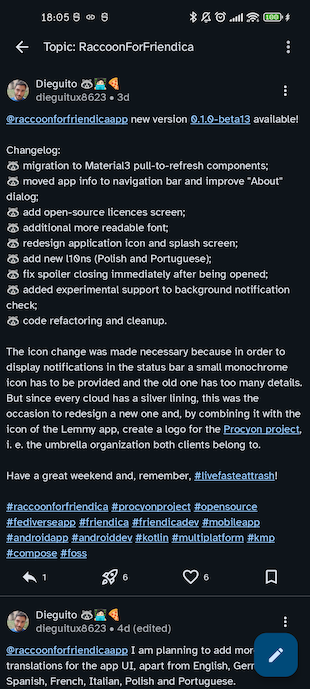
Forum list
In Raccoon, when opening a user profile and the corresponding account has "group": true
the preferred view mode for the user detail screen is the so-called "Forum Mode".
This is very similar to a classic timeline, but with some differences:
- in the top app bar, the title shows «Topic:
[group name]» instead of just the username; - posts are retrieved with a GET
v1/accounts/:id/statusesrequest, where theexclude_repliesparameter set totrue: by doing so, only first-level posts created or boosted by the account are shown; - there is a "Plus" button to create a new thread in the forum (first-level post).
Post creation
In the composer, when creating a new thread:
- an indicator «Post to
[group name]» is shown; - an @-mention is automatically added at the beginning of the message.2
Instead, when creating nested level replies, the usual reply pattern is applied:
- an indicator «In reply to
[user name]» is shown; - a series of @-mentions are automatically added at the beginning.
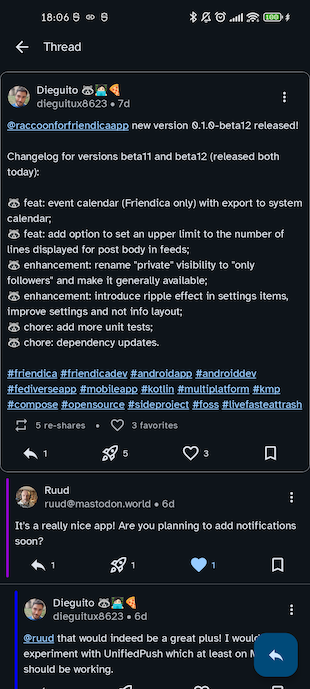
Thread detail
Conceptually, this screen is very similar to a regular post detail but with some differences:
- the main post (first-level) is displayed always at the top, in its full layout;
- replies appear below it and are retrieved with a GET
v1/statuses/:id/contextrequest, with a progressive indentation depending on their depth level with a color indicating the level and making it easier to identify same-level answers; - Swipe Navigation: you can scroll between threads in the forum with horizontal swipes;
- there is a "Reply" button to create new second-level replies to the main post.
Stay tuned!
Now that we've covered the "what", it's time to talk about the "how". In the second part of this series, I'll be sharing the code that makes this all possible.
To be honest, this was one of the most complex parts of the project: fetching and organizing the reply tree.
I'll walk you through the hurdles I encountered with the current state of Mastodon APIs and the specific workarounds Raccoon uses to make the conversation flow feel natural without overloading the server instance at the same time.