Rendering ActivityPub groups (Part 2)
Published on July 04, 2026
In Part 1 we described what a group is and how its contents are displayed in the so-called "Forum Mode" in Raccoon. As a quick reminder, the main page contains the list of first-level posts re-shared by the group, which roughly correspond to classic forum "threads".
Each thread can be opened to access its detail screen containing the discussion. The thread detail screen has the following layout: the initial post by the OP is displayed at the top and replies appear below.
In this article we will explain how the raccoon proceeds to "dig though the trash" and go deeper and deeper in the discussion thread.
The Family Tree
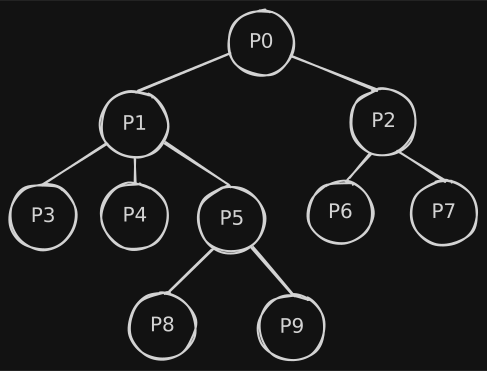
In a discussion each element has exactly one parent, except for the initial post which has none and is the common ancestor of all others.
In Computer Science, this data structure is called a tree, where the initial post is the root node. This means that conversations are intrinsically hierarchical, where the context of each post is made up of:
- its parent and ancestors up to the root node;
- its children and descendants below it.
Making Threads Look Good
In order to follow a discussion as a reader and writer, it is important to quickly identify two types of relationships:
- who is answering to whom, i.e. parents and children;
- posts on the same level because they have the same parent, i.e. siblings.
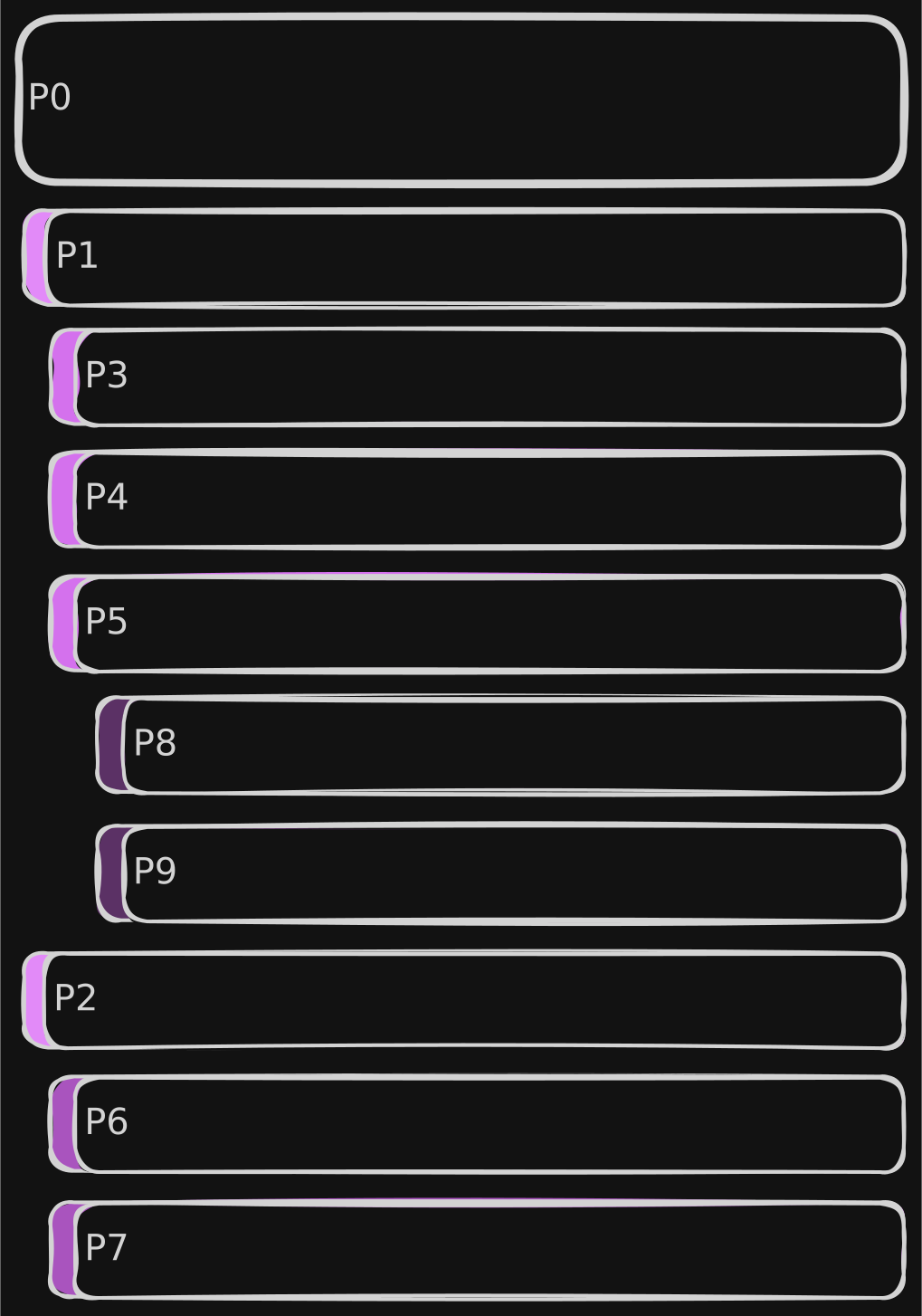
In order to guide the user in identifying these, two visual elements are introduced:
- visual offset: posts are progressively indented according to their depth level;
- comment bar: a colorful bar is displayed laterally with the full height of the post body, so that posts of the same level can be easily identified.1
Completeness is Key
Reply trees can grow indefinitely (both in breadth and depth) and, it is very important to make sure that:
- no unneeded extra data is downloaded: more data means more time to load as well as more bandwidth, memory and power consumption;
- at the same time, if each data fetch is partial, not too many requests are done to the instance, to avoid overloading servers.
As anticipated in part 1, Mastodon APIs offer an endpoint to fetch the context of a post:
GET v1/statuses/:id/context.
On Mastodon instances, the resulting context is capped to 40 ancestors and 60 descendants with a max
depth of 20 for unauthenticated requests, 4096 ancestors and 4096 descendants with unlimited depth
for authenticated requests.
API Considerations
Unfortunately, on Friendica this API has historically always been problematic. Friendica is built to aggregate different networks and protocols (ActivityPub, Diaspora, RSS feeds, etc.). Probably due to the more complex DB structure, results of the context API are kwnown to be truncated, with some reply branches entirely missing.
In order to overcome this issue, the only solution was to populate the tree manually. As an example,
let's imagine "P0", "P1", etc. to be the post IDs. Let's also assume that response for a GET
v1/statuses/P0/context would be the following JSON, where descendants are truncated at the first
level:
{
  "ancestors": [],
  "descendants": [
    {
      "id": "P1",
      "replies_count": 3,
      // ...
    },
    {
      "id": "P2",
      "replies_count": 2,
      // ...
    }
  ]
}
We know that the post has no ancestors and has two descendants, one of which with three replies. In order to reconstruct the rest of the tree, we need to: iterate over all descendants having a reply count greater than zero (non-leaves), collect their first-level descendants, then proceed downwards in all subtrees recursively until leaves are reached in every path.
In the process, it is important that we keep track the depth of each post, in order to properly indent them in the layout and for another reason we'll discuss later.
Considering that conversations can grow indefinitely, another condition should be imposed: stop fetching data when a threshold depth is reached, to avoid overloading the server with too many requests and fetching data that the reader may not even be interested to see. The depth property we have been calculating earlier may be useful with this respect.
Since the tree we manipulate is incomplete, we also need to be able to identify those "pruning points" and be able to load the remaining subtree (on-demand) at a later point. Again, the depth property we have been calculating can be used, in conjunction with the reply_count we get from the server.
Step 1: Grow the Tree
Let's break down the code:
- lines 1-4 define a data structure to represent tree nodes;
- line 6 contains the function signature, where in the params:
depthis the current level in the tree;maxis the threshold depth;
- lines 7-9 contains the base cases, either the current node is a leaf or the max depth is reached;
- line 10 fetches the post's context from the server and extract the descendants;
- lines 11-13 retain each node's absolute
depthand create the list ofchildren; - lines 14-16 recursively calls the function for each child node;
- line 17 populates the children of the current node.
Imagine we call this function on P0 with max = 2, the result would be:
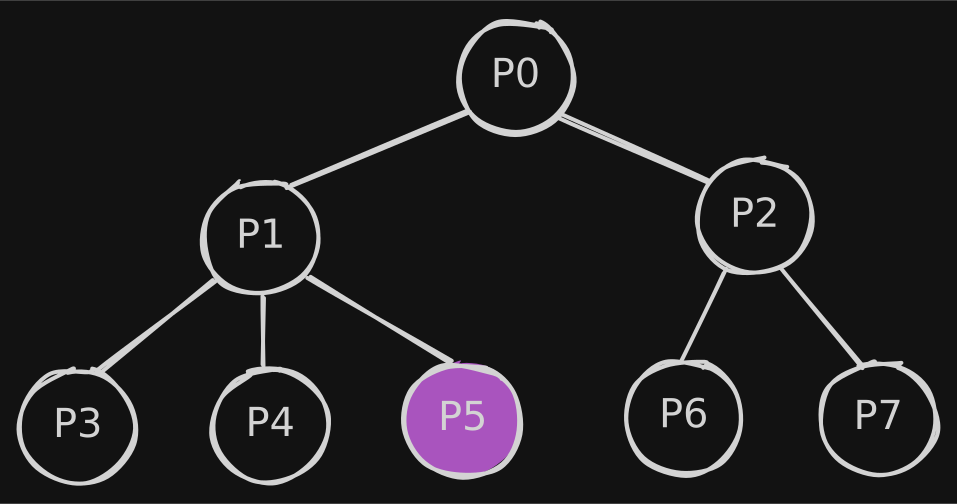
where in "P5" we know (by its replyCount) that are 2 descendants, but we did not fetch any of
them.
Step 2: Linearize the Tree
Building the tree is only half of the puzzle, though. As we've seen earlier posts must be laid out in a list and in a very specific order.
In order to do so, we have another recursive helper:
which traverses the tree depth-first adding each visited node, so that if we consider the post IDs
we get ["P0", "P1", "P3", "P4", "P5", "P2", "P6", "P7"] as we wanted.
How do we know, though, that between "P5" and "P2" there is a "pruning point"?
Step 3: Knowing When to Stop
The answer is in the last helper function:
where we set a loadMore flag in the entries, which is true only if these two conditions hold true
at the same time:
- the entry has at least one reply (
replyCountstrictly greater than zero); - it is the last item of the list or the next item has a
depthless than or equal to the current one (i.e. it is a sibling, an uncle or great-uncle).
In those points, in the UI, a "Load more replies" button will be shown which ends up triggering the
populateTree function for the subtree rooted in that node.
-
Depending on the theme, colors also convey the depth: the deeper the level, the darker the color. ↩