Skip to content

friendica

Bringing Push Notifications to Raccoon

The Beginning: a Missing Feature

One of the most common complaints during Raccoon's first year of development, and a major reason why some early adopters jumped ship, was the lack of support for push notifications.

It's a fair critique, but what many users didn't realize is that push notifications aren't just a simple, client-side switch you flip. As the name suggests, notifications must be "pushed" to devices by an external service the moment an event occurs.

To understand why this was such a hurdle for Raccoon, we first need to look at how traditional push notifications work.

Anatomy of Push Notifications

The standard architecture for push notifications is a three-way dance involving the client device, the backend instance, and a third-party messaging relay acting as the "man in the middle".

Here is how they interact:

  • Client Application: the app registers with a third-party messaging service—usually tied directly to the mobile operating system, like APNS for iOS or FCM for Android. The device obtains a unique "push token" for that specific app installation and sends it to the backend via an authenticated endpoint.

  • Application server: the backend stores these tokens and links them to the correct user account. Whenever an event triggers a notification (based on the user's preferences), the backend makes a server-to-server call to the messaging relay.

  • Messaging Relay: this service takes the backend's request and dispatches the message to the device on a "best-effort" basis (handling edge cases like offline devices, app badges, priority levels, custom sounds, etc.).

In short: the client app handles tokens and incoming messages, the application server manages user preferences and triggers, and the messaging service handles the complex, platform-specific delivery.

The Open Source Dilemma

While this architecture works flawlessly for centralized corporate apps, the rules change entirely when you build for open-source networks and the Fediverse.

Raccoon has been strongly committed to zero reliance on closed-source, proprietary third-party libraries, otherwise I would not even be able to distribute the app through F-Droid. That immediately rules out standard integrations with FCM and APNS.

Then, I discovered UnifiedPush.

Decoupling the "Man in the Middle"

UnifiedPush is based on a slightly different paradigm. Instead of a single, proprietary monolith, it splits the middleman into two separate components:

  • Push Server: it receives events directly from the application server through the WebPush open protocol;1
  • Distributor: an app installed on the device which delivers those notifications to individual apps through the UP protocol.

So, together with the application server and the client app, there are totally four components involved:
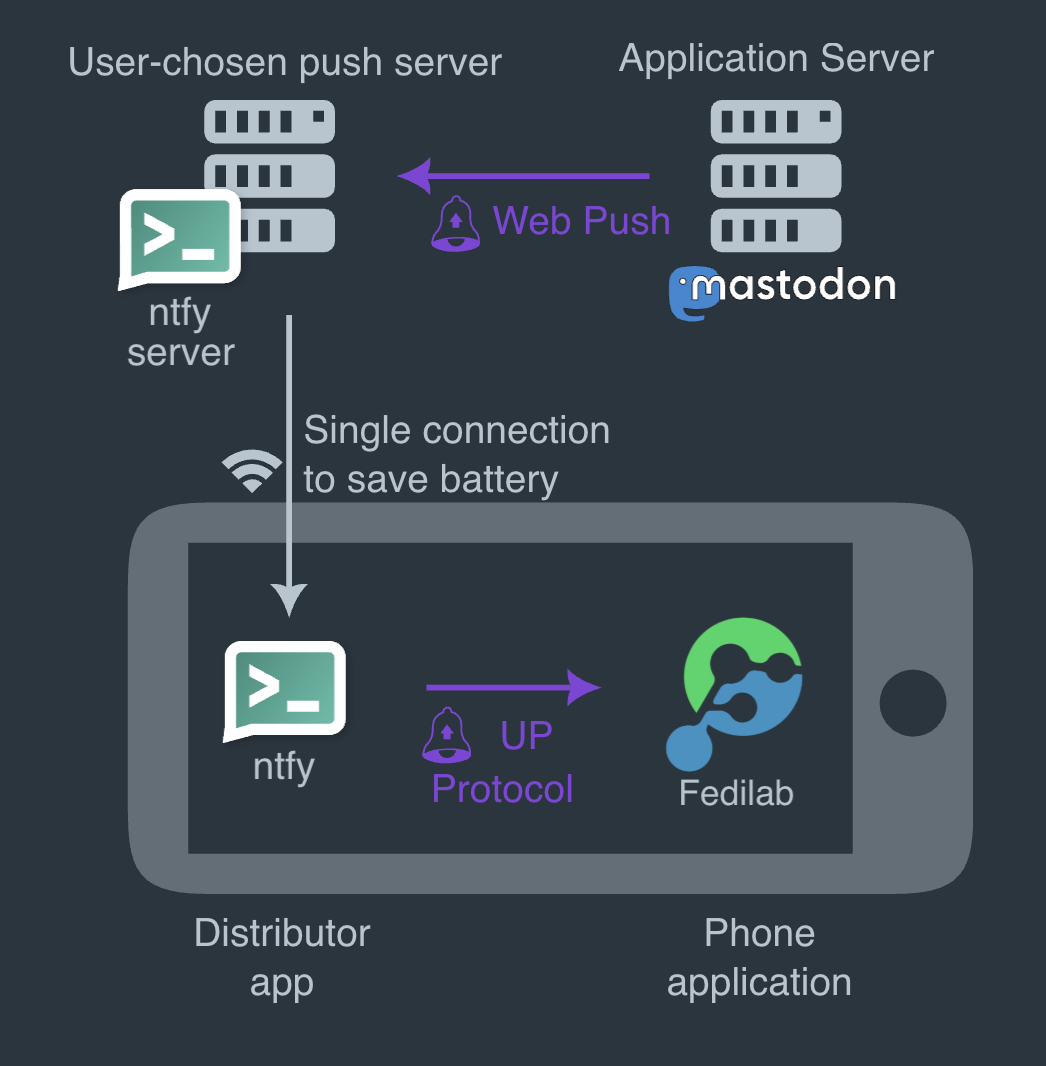
diagram illustrating UnifiedPush
Diagram of the interactions between components with UnifiedPush.

In this scenario, the client app registers in onto the distributor. The latter contacts the push server to create an endpoint. Once obtained, the endpoint is delivered back to the client app, which transmits it to the application server which stores the endpoint data associated to the user.

When a notification needs to be sent, the application server sends a message to the endpoint it has stored, which points to the push server. The push server processes the message and the distributor, which is subscribed for messages on the push server, proxies the notifications to the client app.

Decoupling the push server and the distributor allows for more flexibility: you are free to use whatever technology best suits you. E.g. on the server side you can choose a self-hosted server like ntfy.sh or NextPush which integrates with NextCloud, SunUp, etc. whereas on the client-side you can use the their counterparts of ntfy and SunUp on Android or dedicated apps (e.g. KUnifiedPush on Linux).

The Breakthrough: Friendica Notifications

Implementing this on Android turned out to be a game-changer. Thanks to the UnifiedPush Android SDK, Raccoon can seamlessly configure distributors, detect when new ones are installed, and let the user choose their preferred routing.

Recommendation

If you are setting this up on Android, I highly recommend using Sunup as your distributor. It is incredibly easy to set up and completely frictionless to use.

The result?

Finally, fully working, privacy-respecting push notifications! With this major milestone ticked off the list, there's officially one excuse less to prefer other Fediverse clients. 😂 🦝

References


  1. If the target platform's server is not directly compatible, Push Gateways are available too. ↩

Friendica: the Swiss Army knife of the Fediverse

While most fediverse platforms force you to choose between microblogging, photo sharing, or link aggregation, one platform refuses to make you pick just one.

Friendica is a social environment integrated in the Fediverse, just like Mastodon or Pixelfed ‒ but it is also compatible with Bluesky, Tumblr, WordPress, GNU Social, Diaspora, RSS and several more tools and platforms.

Universal federation hub

Unlike other platform, which primarily focus on single types of contents (e.g statuses or photo sharing), Friendica serves as a universal translator across multiple protocols, acting like a hub which brings "together all of the Fediverse into one experience" (according to hankg).

The Facebook the Fediverse

Friendica uses a post/replies idiom with a Facebook-like UX, rather than the Twitter-like status streams found in Mastodon. This creates a more traditional social networking experience with threaded conversations and a focus on community interaction.

Just like Facebook, Friendica features the concept of groups (which are treated as ActivityPub actors), i.e. a special kind of profiles which act as an aggregator for posts related to the same topic, similar to Lemmy's communities.

Other features which Friendica shares with Facebook are:

  • the possibility to organize uploaded media into a gallery with different albums (and images inside each album);
  • an integrated event calendar (with birthdays and custom events);
  • direct messages between users;
  • the ability to quote (cross-post) other people's posts, not just boosting them but embedding them into a new one;
  • the possibility to organize contacts in circles (which can not only be used like user-defined timelines to read posts but also as a target scope to publish posts to).

Enhanced content

Friendica offers robust content capabilities including unlimited post length (within server limits), extensive media support for photos (even embedded), audios, videos, and file attachments, plus geotagging options.

Moreover, posts can have, besides the main content, also a title and a spoiler, and their body supports rich formatting with different text styles (italic, bold, strikethrough, monospaced, quoted, itemized, etc.)

With this respect, Friendica positions itself as a Swiss Army knife ‒ less specialized than Mastodon (microblogging) or Pixelfed (photo sharing), but more versatile in connecting different communities and content types under one roof.

External integrations

Friendica can import arbitrary websites and blogs into your social stream via RSS/Atom feeds, making it act as both a social network and content aggregator. This feature is unique among major fediverse platforms.

It also features an email connector which allows to you add conventional email contacts to your social networking stream, making it possible to bidirectionally interact via email with the configured contacts just as if they were participating in the social stream.

The mobile challenge

This feature richness creates both Friendica's greatest strength and its biggest challenge when implementing clients. As a matter of fact, the web interface is great to access all of these features on desktop but on a mobile device there are different constraints for usability and readability, so having an app to use the most important functions of the platform would be a great plus.

Ideally, an app for Friendica should have at least the following features:

  • timeline view with ability to switch feed type (public, local, subscriptions, user-made lists);
  • post detail, i.e. opening a conversation in its context and see the replies, number of re-shares and people who added it to favorites;
  • user detail with ability to see posts, post and replies, pinned posts and media, subscribe for notifications from a user, follow/send a request or unfollow them, see following/followers;
  • support for ActivityPub groups, with the ability to open threads in "forum mode";
  • see trending posts, hashtags, links and following recommendations;
  • follow/unfollow an hashtag and view all the posts containing a given hashtag;
  • post actions (re-share, favorite, bookmark) and – for own ones – edit, delete or pin to profile;
  • global search hashtags, post and users containing some specific terms;
  • customize the application appearance with color themes, font face and size, etc;
  • login via OAuth2;
  • view and edit one's own profile data;
  • view incoming notifications and filter the list;
  • manage one's own follow requests and accept/reject each one of them;
  • view the list of one's own favorites, bookmarks and followed hashtags;
  • create a post/reply with formatted text, image attachments (and alt text), spoiler and title;
  • schedule a post (and change its schedule date) or save it to drafts;
  • report posts/users to administrators for content moderation;
  • mute/unmute, block/unblock users and manage the list of muted/blocked users;
  • manage one's own circles (i.e. user-defined lists);
  • multi-account with easy ability to switch between accounts;
  • send direct messages to other users and see conversations;
  • manage one's own photo gallery;
  • view one's own event calendar.

Tip

This is the point where Raccoon for Friendica comes in, trying to provide a mobile solution functional and aesthetically convenient at the same time.